38
BL E SCREENU
LA
CH SET T I NG
GUAGEN
UN VERSAL PLUSI
PE S RNOAL P F.ER
BL E SCREENU
LA
CH SET T I NG
GUAGEN
UN VERSAL PLUSI
PE S RNOALP F.ER
UN VI ERSA L P LUS
VCR
OFF
:
:
DVD
OFF
:
:
UN VI ERSA L P LUS
VCR
CH3
:
:
DVD
OFF
:
:
→
CH
CH
VOL
—
VOL
+
CH
CH
VOL
—
VOL
+
CH
CH
PERSONAL PREFERENCE
MENU MUTE
CATV TV
DVD VCR
VOL
—
CH
CH
VOL
+
ABCD
SL EP T IMERE
VIDEO ADJUST
ELECTAUD I O S
SET UP
CAPT I ONCLOSED
CONTROLPARENT
ENERGY SAVE
VOL
—
VOL
+
→
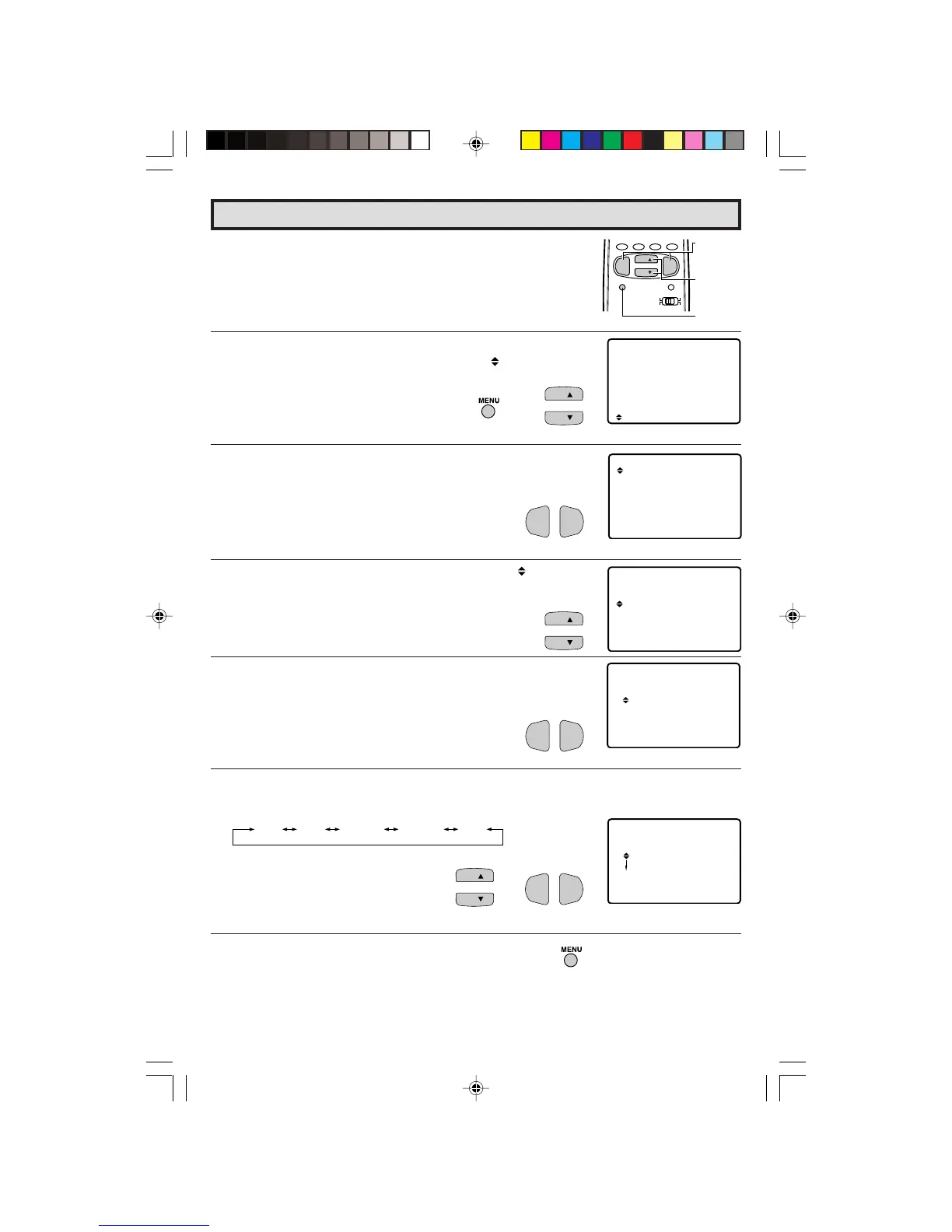
Set Up (Continued)
L UNIVERSAL PLUS FUNCTION
VCR or DVD input mode will be selected automatically by pressing
the VCR or DVD PLAY buttons on the UNIVERSAL REMOTE
CONTROL.
1 Press
MENU
to access the MAIN MENU screen.
2 Press
CH UP
(
8
) or
DOWN
(
9
) to move the “ ” mark to “SET
UP”.
3 Press
VOL (+)
or
(–)
to access SET UP mode.
4 Press
CH UP
(
8
) or
DOWN
(
9
) to move the “ ” mark to
“UNIVERSAL PLUS”.
5 Press
VOL (+)
or
(–)
to access UNIVERSAL PLUS to select VCR
or DVD mode.
6 Press
CH UP
(
8
) or
DOWN
(
9
)
to select the VCR or DVD, and
press
VOL (+)
or
(–)
to select “CH3, CH4”, “INPUT 1”, “INPUT 2”
or “OFF”.
CH3 CH4 INPUT 1 INPUT 2 OFF
Set model to the input in which your
VCR or DVD is connected to. If done
through RF, select either channel 3 or
4 to match the setting of the VCR or
DVD.
7 Press
MENU
to exit.
(SET UP mode)
(MAIN MENU screen)
VOLUME
(+)/(–)
CHANNEL
UP (8)/
DOWN (9)
MENU
(UNIVERSAL PLUS select mode)
37-38 27R-S100.p65e 3/4/01, 11:38 AM38


 To Next Page