E-9
ENGLISH
Mount main bracket unit A to the LCD television
Use the following procedures to install the Model 52 inch LCD color TV (LC-52GX1W,
LC-52GX2W).
The illustrations are for explanation purposes and may different from the actual product.
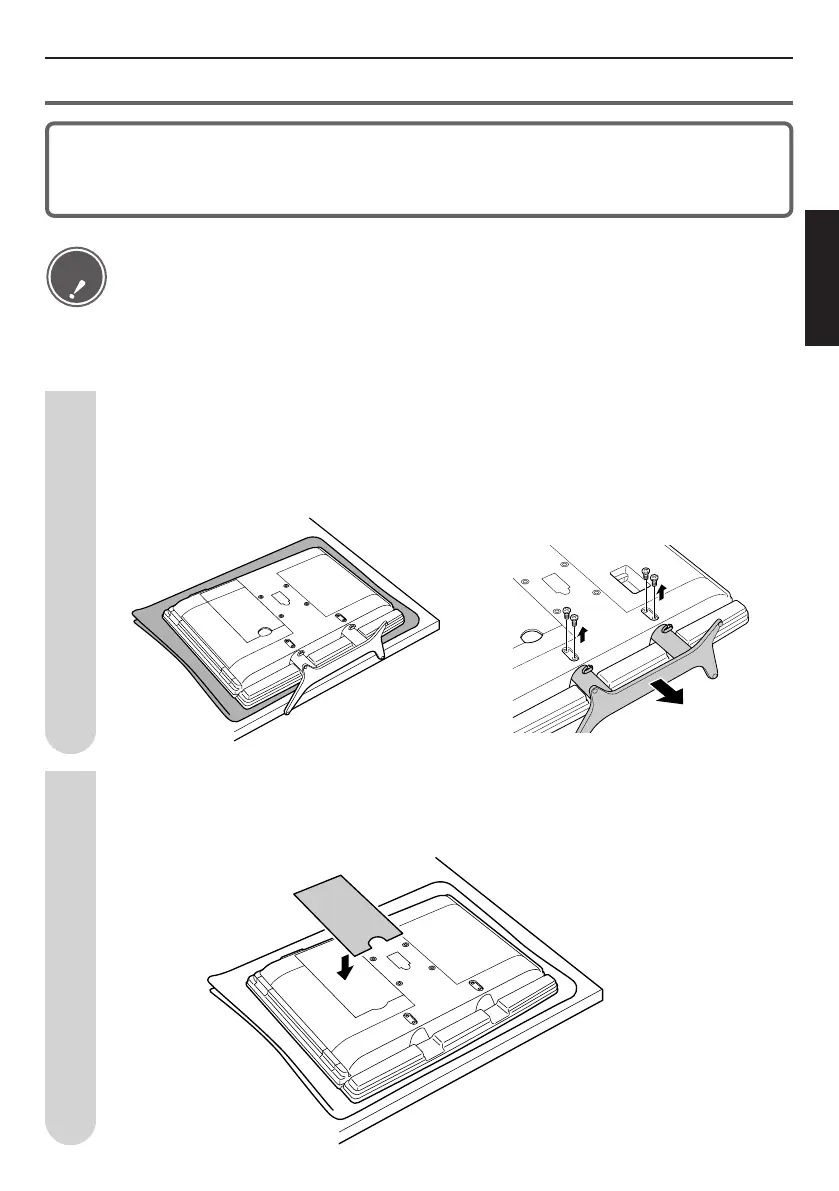
Remove the table stand.
Remove the screws (4 screws) fastening the table stand, and then remove the table stand.
(Remove after pulling in the direction shown by the arrow.)
Save the removed stand fastening screws (4 screws).
Perform the cable work.
Remove the terminal cover, wire the cables, and then replace the cover.
1
2
• When installing the wall-mount bracket to the LCD color TV, place the LCD color TV face
down on a soft cloth or cushion.
• The stand can also be removed from Model 52 when it is in the standing position, but the
explanation is given for the laying position for which it is easier to install the wall mount bracket.
• When lifting up the television, do not hold it by the speakers. Doing so could damage them.
Caution


 To Next Page