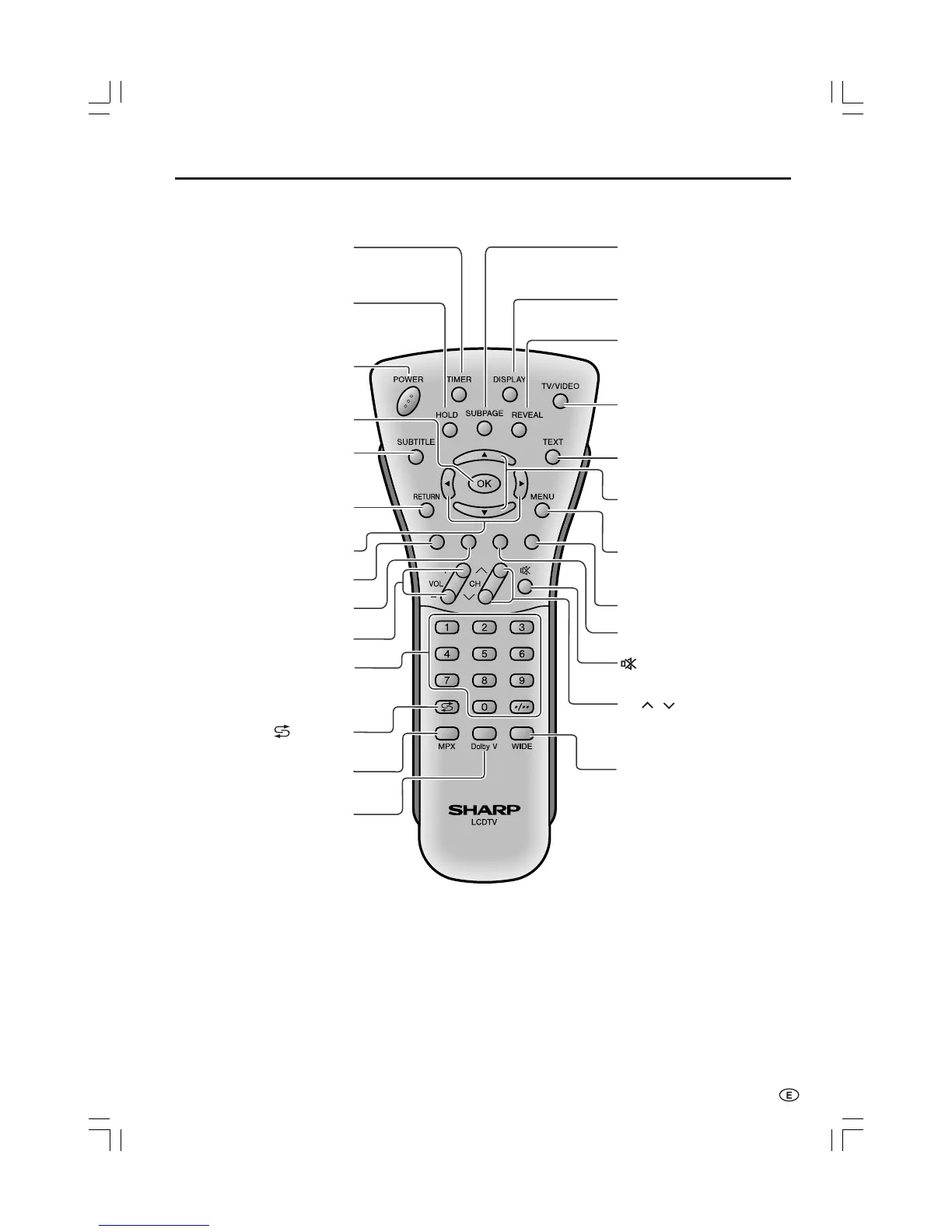
SUBTITLE
Displays the Teletext
Subtitle directly.
(P. 27)
OK
(P. 14)
HOLD
Temporarily holds the
current Teletext page.
(P. 27)
TIMER
Displays the Timer functions
Menu screen. (P. 23)
(Mute)
Switches the sound on and off.
(P. 11)
Yellow
(P. 26)
Cyan
(P. 26)
Channel Select
TV input mode: Selects the channel.
(P. 11)
Teletext mode: 0-9/Selects the page.
(P. 26)
MENU
Displays the TV menu or returns
to normal screen.
(P. 14)
VOL (+)/(
-
)
(P. 11)
(Flashback)
Returns to the previous
channel. (P. 11)
Red, Picture Menu
(P. 16, 26)
Right/Left Selection
(P. 14)
RETURN
Returns to the previous screen.
TEXT
Displays the Teletext mode
screen. (P. 26)
Upwards/Downwards
Selection, Zoom display
function (Teletext mode)
(P. 14, 27)
POWER
(P. 10)
MPX
Switches to the audio
mode. (P. 24)
REVEAL
Displays hidden information
such as solutions to riddles
and puzzles. (P. 27)
TV/VIDEO
Switches the input source between
COMPONENT, AV1, AV2, AV3
and TV mode. (P. 10)
SUBPAGE
Displays the Teletext
Subpage directly.
(P. 27)
DISPLAY
Turns on the status display when
the menu is not displayed. (P. 23)
WIDE
Changes the wide image mode.
(P. 22)
Dolby V
Selects Virtual Dolby
Surround settings.
(P. 19)
Green, Sound Menu
(P. 19, 26)
CH ( )/( )
TV input mode: Selects the channel.
(P. 11)
Teletext mode: Selects the page.
(P. 26)













 To Next Page