13
Preset (Continued)
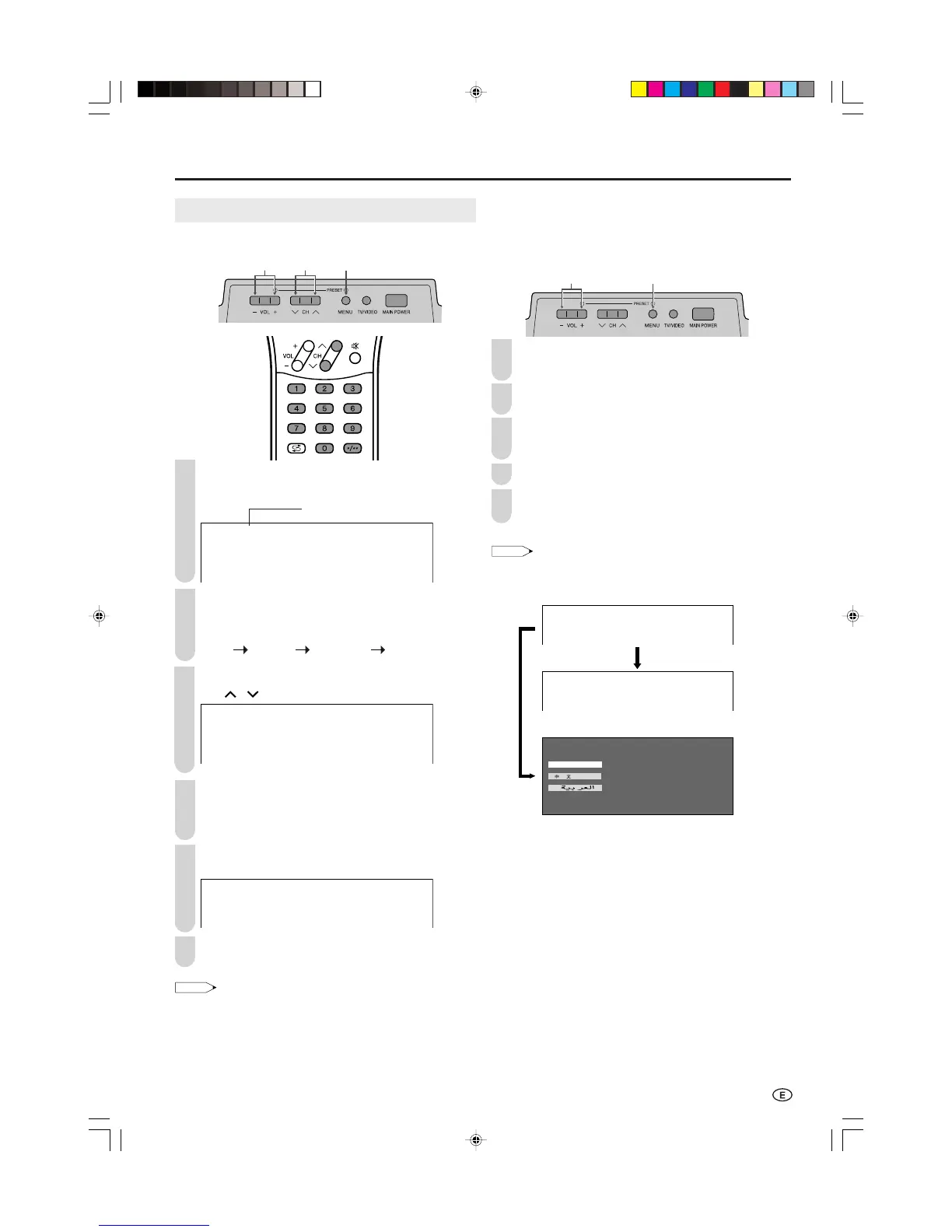
■ Setting a channel to a desired TV station
Upper control panel
Press MENU (PRESET-1) on the upper part of the
LCD TV set for more than 2 seconds to display the
AUTO mode screen.
Press MENU (PRESET-1) to display the MANUAL
mode screen.
• Press MENU (PRESET-1) again to change the
MANUAL mode as shown below.
Select the channel position using Channel Select or
CH (
)/( ).
MANUAL
(
B/G
)
VHF 1
48.25MHZ
Press VOL (–)/(+) to locate the channel you want to
preset to the position. Search is initiated and when a
TV signal is received during the search, the search
stops.
Repeat steps 3 and 4 above, to preset the channel
positions for other broadcasts, etc.
MANUAL
(
B/G
)
UHF 5
623.25MHZ
Press MENU (PRESET-1) twice to return to the
normal screen.
• System may not have been set correctly, if noise can be heard or
if there is no sound. In such a case, adjust “SOUND SYSTEM”.
(See page 14.)
Presetting the Channels (MANUAL)
■ In a weak reception area or under bad reception
conditions
Upper control panel
Press MENU (PRESET-1) on the upper part of the
LCD TV set for more than 2 seconds to display the
AUTO mode screen.
Press MENU (PRESET-1) to display the MANUAL
mode screen.
While the MANUAL mode screen is displayed, press
MENU (PRESET-1) for more than 2 seconds.
The channel position number remains in green.
Adjust for good reception using VOL (–)/(+).
After finishing the adjustment, press MENU
(PRESET-1) to continue channel presetting.
• While the MANUAL mode screen is displayed, press MENU
(PRESET-1).
(The LANGUAGE mode screen will appear.)
MANUAL
(
B/G
)
VHF 1
48.25MHZ
FINE
UHF 5
623.25MHZ
ENGLISH
Press MENU for more than
2 seconds.
AUTO MANUAL LANGUAGE NORMAL SCREEN
2
LC-22GA3MX_E_P12-15.p65 2004.9.9, 5:48 PM13










 To Next Page