Other Viewing Options
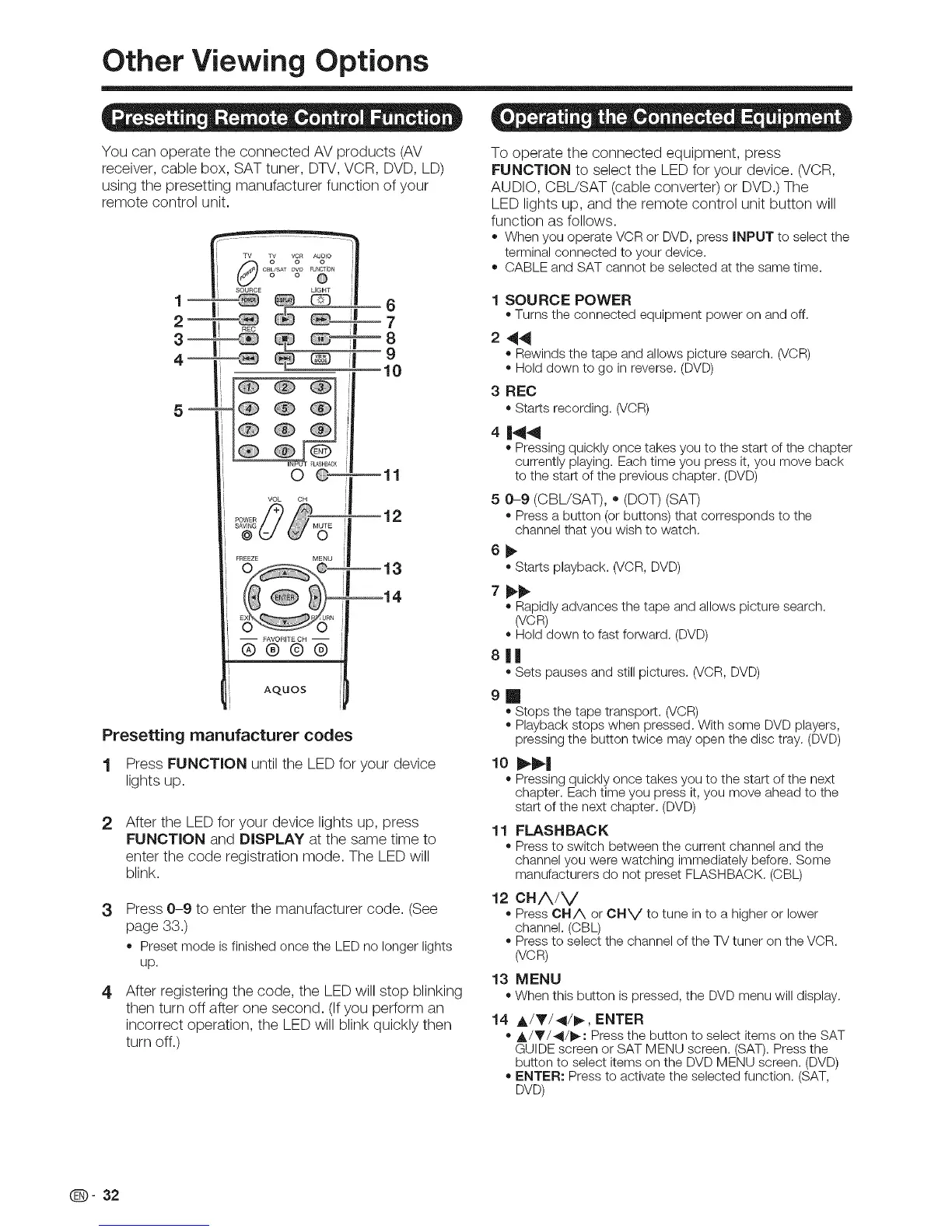
You can operate the connected AV products (AV
receiver, cable box, SAT tuner, DTV, VCR, DVD, LD)
using the presetting manufacturer function of your
remote control unit.
O O-- mll
VOL OH
FREEZE MENU
o_ --13
14
EX ,URN
-- FAVORIIECH --
®®@®
AQUOS
Presetting manufacturer codes
1 Press FUNCTION until the LED for your device
lights up.
2 After the LED for your device lights up, press
FUNCTION and DISPLAY at the same time to
enter the code registration mode. The LED will
blink.
3
4
Press 0-9 to enter the manufacturer code. (See
page 33.)
o Preset mode is finished once the LED no longer lights
up.
After registering the code, the LED will stop blinking
then turn off after one second. (Ifyou perform an
incorrect operation, the LED will blink quickly then
turn off.)
To operate the connected equipment, press
FUNCTION to select the LED for your device. (VCR,
AUDIO, CBL/SAT (cable converter) or DVD.) The
LED lights up, and the remote control unit button will
function as follows.
= Whenyou operate VCRor DVD,press INPUT to selectthe
terminal connectedto your device.
o CABLEand SATcannot beselected at the same time.
1 SOURCE POWER
• Turns the connected equipment poweron and off.
2 44
= Rewinds the tape and allows picture search. (VCR)
• Hold down to go in reverse. (DVD)
3 REC
=Starts recording. (VCR)
4
144
o Pressing quickly once takes you to the start of the chapter
currently playing. Each time you press it, you move back
to the start of the previous chapter. (DVD)
5 0-9 (CBL/SAT), ,, (DOT) (SAT)
o Press a button (or buttons) that corresponds to the
channel that you wish to watch.
oStarts playback. (VOR, DVD)
o Rapidly advances the tape and allows picture search.
(VCR)
• Hold down to fast forward. (DVD)
8|1
,,Sets pauses and still pictures. (VCR, DVD)
9
m
=Stops the tape transport. (VCR)
= Playback stops when pressed. With some DVD players,
pressing the button twice may open the disc tray. (DVD)
= Pressing quickly once takes you to the start of the next
chapter. Each time you press it, you move ahead to the
start of the next chapter. (DVD)
11 FLASHBACK
o Press to switch between the current channel and the
channel you were watching immediately before. Some
manufacturers do not preset FLASHBACK. (CBL)
12 CHA/V
= Press CHA or CHV to tune in to a higher or lower
channel. (OBL)
= Press to select the channel of the TV tuner on the VCR.
(VOR)
13 MENU
=Whenthis button is pressed, the DVDmenuwill display.
14 A/T/41/_, ENTER
o A/Y/_II/_: Press the button to select items on the SAT
GUIDE screen or SAT MENU screen. (SAT). Press the
button to select items on the DVD MENU screen. (DVD)
= ENTER: Press to activate the selected function. (SAT,
DVD)
@- 32




 To Next Page