5-13
5
■■
■■
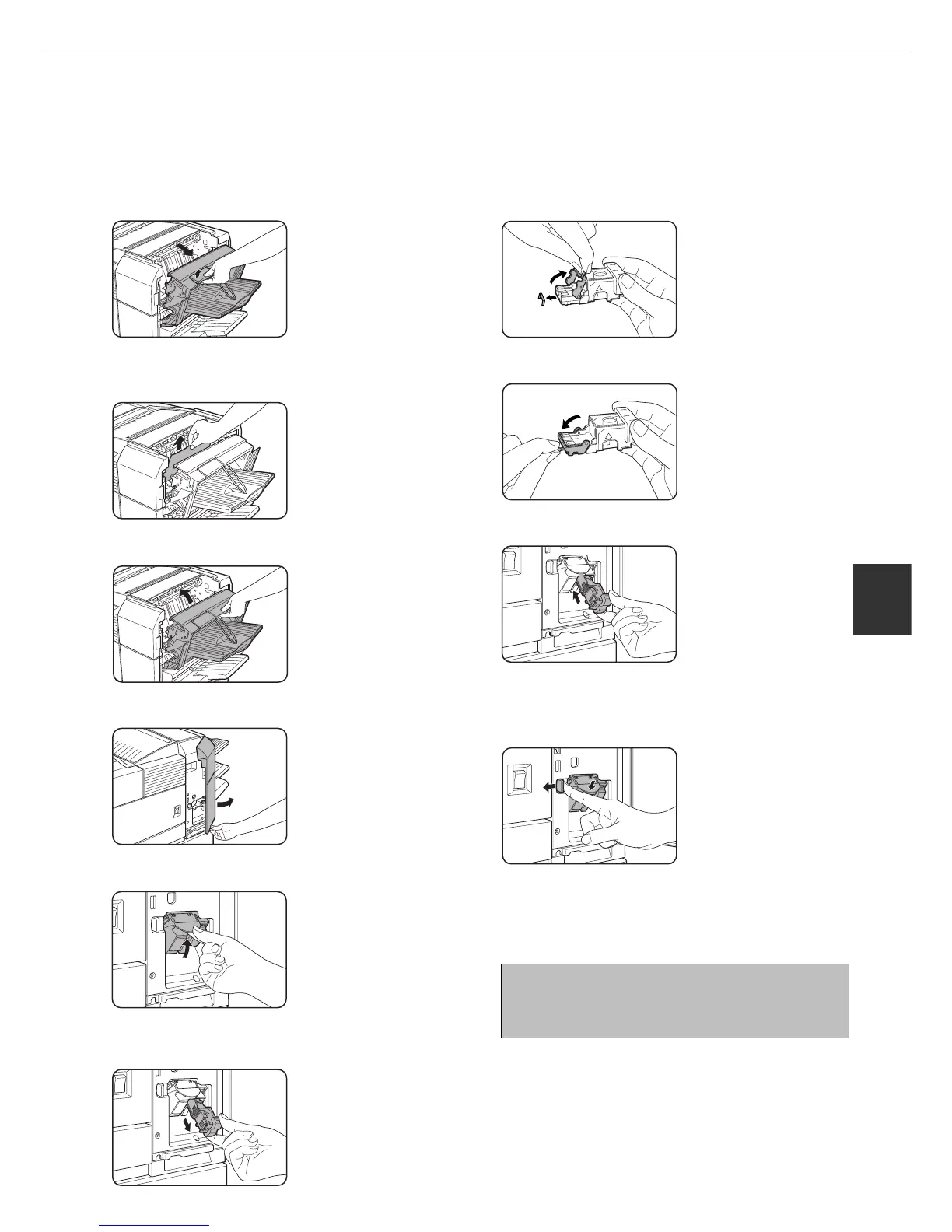
■ Checking the staple unit
If the message “CHECK THE STAPLER UNIT” or “CHECK STAPLER POSITION OR STAPLE JAM” appears, follow the
procedure below.
FINISHER
7
Raise the lever at the end of the staple box.
Remove the top staple if
it is bent. If bent staples
remain, a staple jam will
occur again.
8
Return the lever to its original position.
9
Reinstall the staple box.
Push the staple box in
until it clicks into place.
10
While pushing the staple unit release lever
to the left, rotate the staple unit to face
down.
11
Close the front cover.
NOTE
Make a test print or copy in the staple sort mode
to ensure that stapling is performed properly.
1
Open the finisher compiler.
Release the latch to open
the finisher compiler.
2
Remove the misfed paper from the stapler
compiler.
Be careful not to tear the
misfed paper during
removal.
3
Close the finisher compiler.
4
Open the finisher front cover.
5
Turn the staple unit to face up.
6
Pull the release lever for the staple box and
remove the box.



 To Next Page