5-16
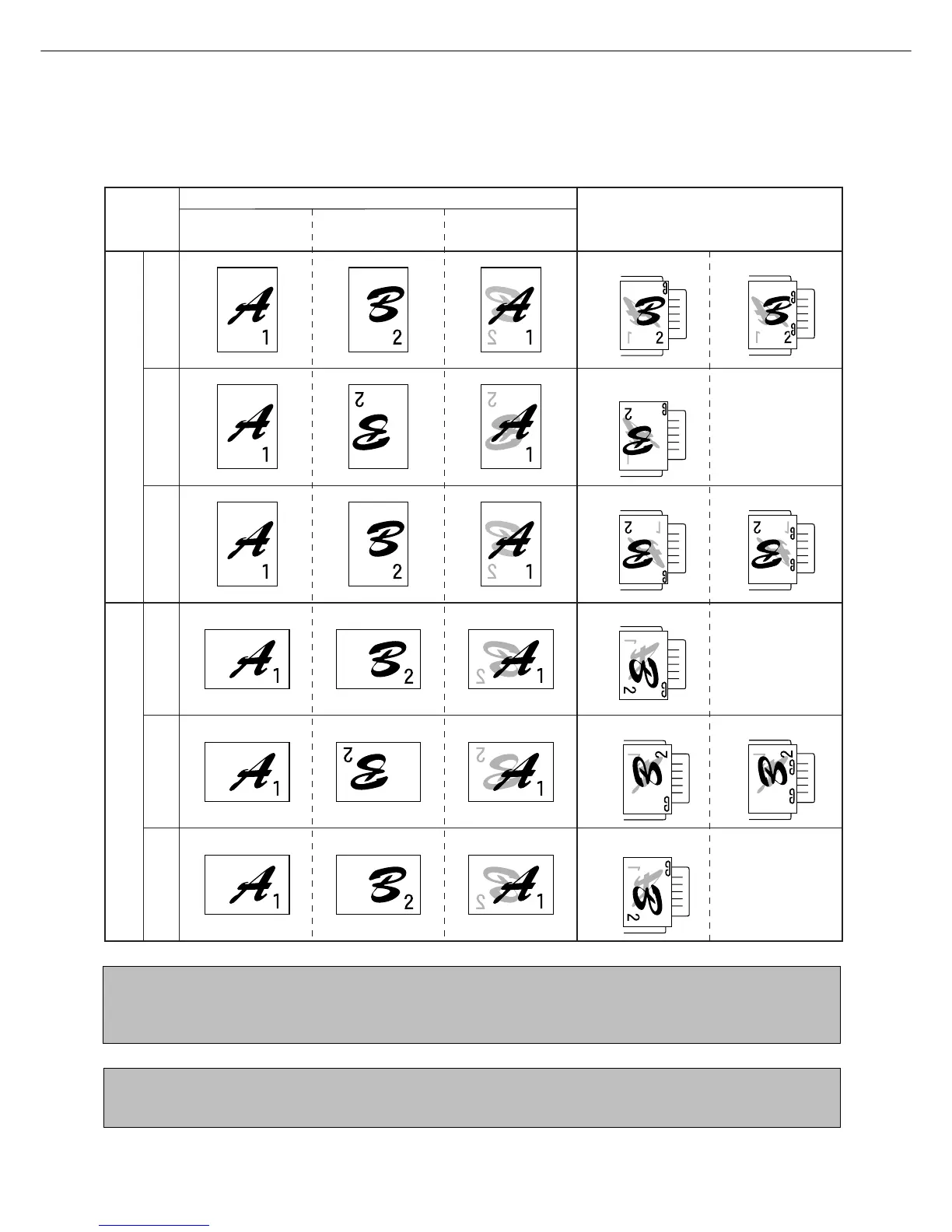
Stapling position quick reference guide for duplex output
The orientation of the copy paper, original, scanned original data, and binding position selection are all interrelated. The
table below shows these relationships.
NOTES
●
Stapling can only be done when the offset tray has been selected.
●
If mixed paper sizes are selected for stapling jobs, stapling will be automatically canceled.
NOTE
Transparency film, labels , envelopes and postcards cannot be stapled.
Orientation of original or original data
Output result
Page 1 Page 2
Page 1 & Page 2
Duplexed
Portrait orientation printing
Left binding Top binding Right binding Left binding Top binding Right binding
One-position stapling Two-position stapling
One-position stapling Two-position stapling
One-position stapling
Landscape orientation printing
Two-position staplingOne-position stapling
One-position stapling
One-position stapling
Two-position
stapling with left
binding cannot be
made.
Two-position
stapling with right
binding cannot be
made.
Two-position
stapling with top
binding cannot be
made.
FINISHER



 To Next Page