26
TWO-SIDED COPYING USING THE
BYPASS TRAY
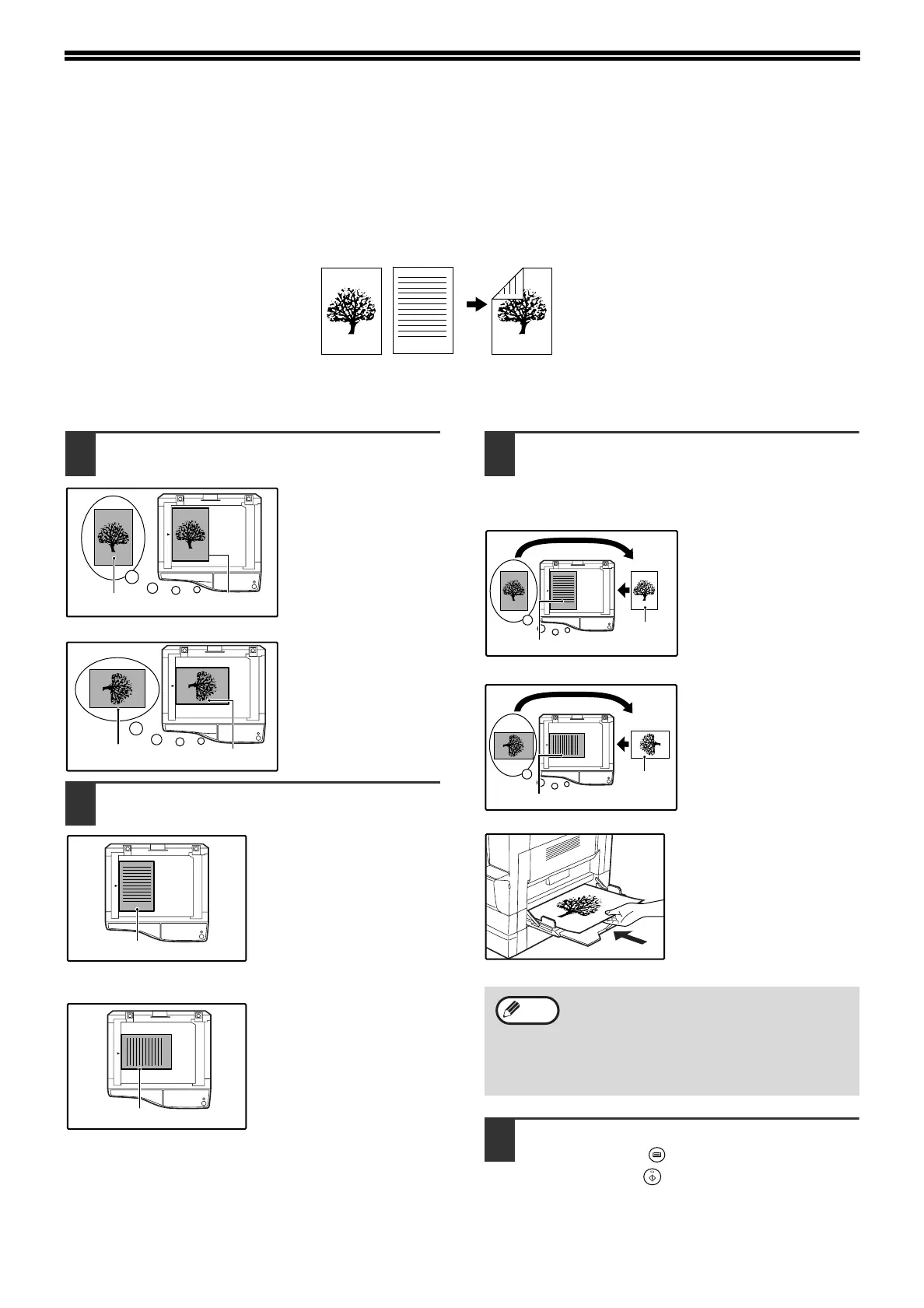
To perform manual two-sided copying, follow these steps.
Example:
Copying originals A and B onto each side of one sheet of paper
1
Copy original A.
2
Place original B as shown below.
Vertically-oriented
original:
If the original is oriented
vertically, place it in the
same orientation as
original A.
Horizontally-oriented
original:
If the original is oriented
horizontally, place it with
the top and bottom and
left and right sides
reversed with respect to
the placement of original
A.
3
Turn the copy of original A over, and
without changing the position of the
edge closest to you, insert it in the
bypass tray.
Insert the paper all the
way in.
4
Select the bypass tray with the [TRAY
SELECT] key ( ), and then press the
[START] key ( ).
The copy is delivered to the paper output tray.
12
1
Original A
Original B
Copy
1
1
• Copies made on the back side of paper
should always be made one sheet at a time
using the bypass tray.
• Straighten curled or wavy paper before
using it. Curled paper may cause misfeeds,
creases, or a poor-quality image.



 To Next Page