43
5
ENABLING TONER SAVE MODE
Toner save mode can be enabled to reduce toner consumption by about 10%.
1
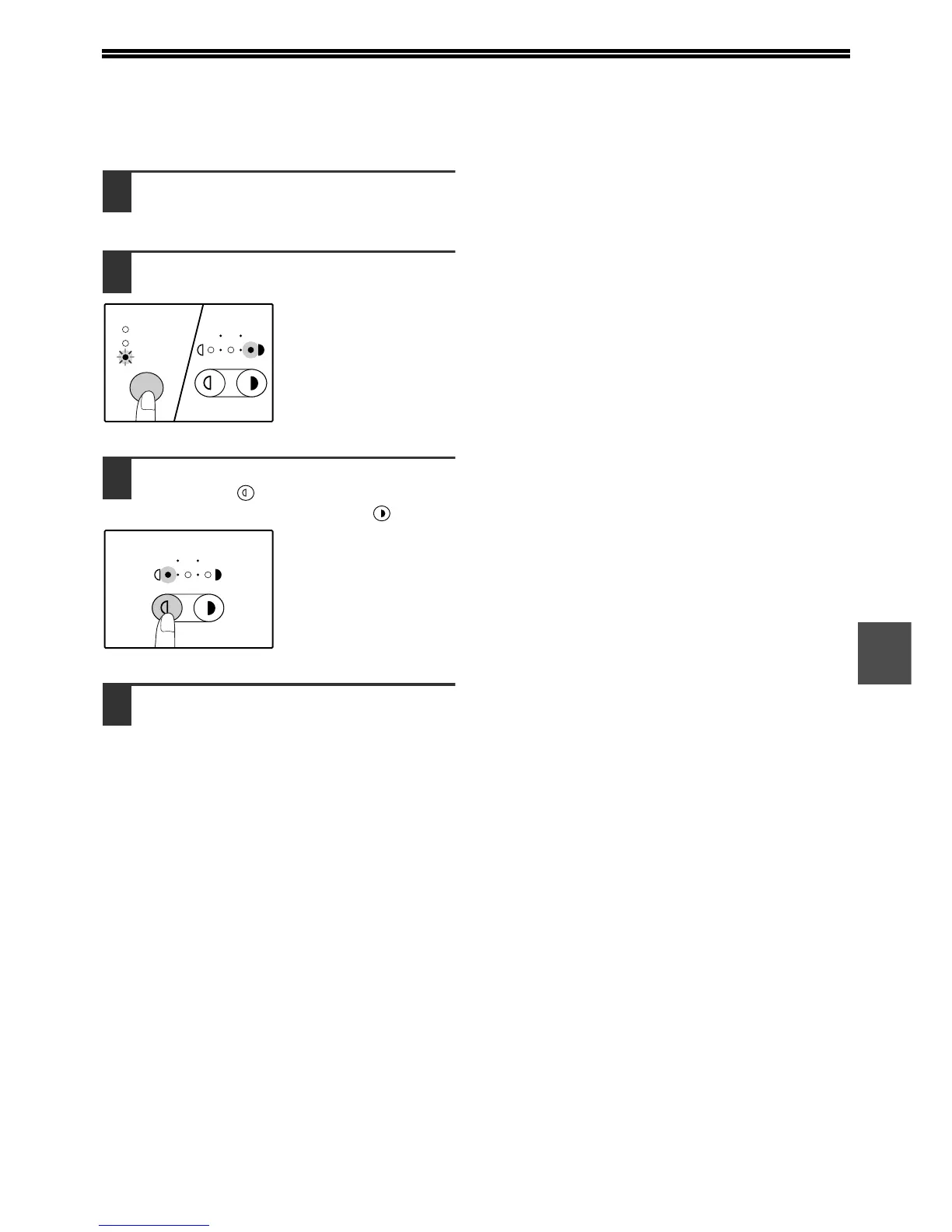
Press the [AUTO/TEXT/PHOTO] key to
select "TEXT".
2
Hold down the [AUTO/TEXT/PHOTO]
key until the PHOTO indicator blinks.
The exposure level
indicators show the
current setting.
3
To enable toner save mode, press the
[Light] key ( ). To disable toner save
mode, press the [Dark] key ( ).
When enabling toner
save mode, make sure
the "1" light blinks.
When disabling toner
save mode, make sure
the "5" light blinks.
4
Press the [AUTO/TEXT/PHOTO] key to
complete the setting.
The PHOTO indicator stops blinking and lights
steadily.










 To Next Page