AR-M350 SIMULATIONS 10-32
* This adjustment is performed only when the width detection volume
is replaced.
Normally use SIM 40-7 for input.
<List of set values>
<List of display values>
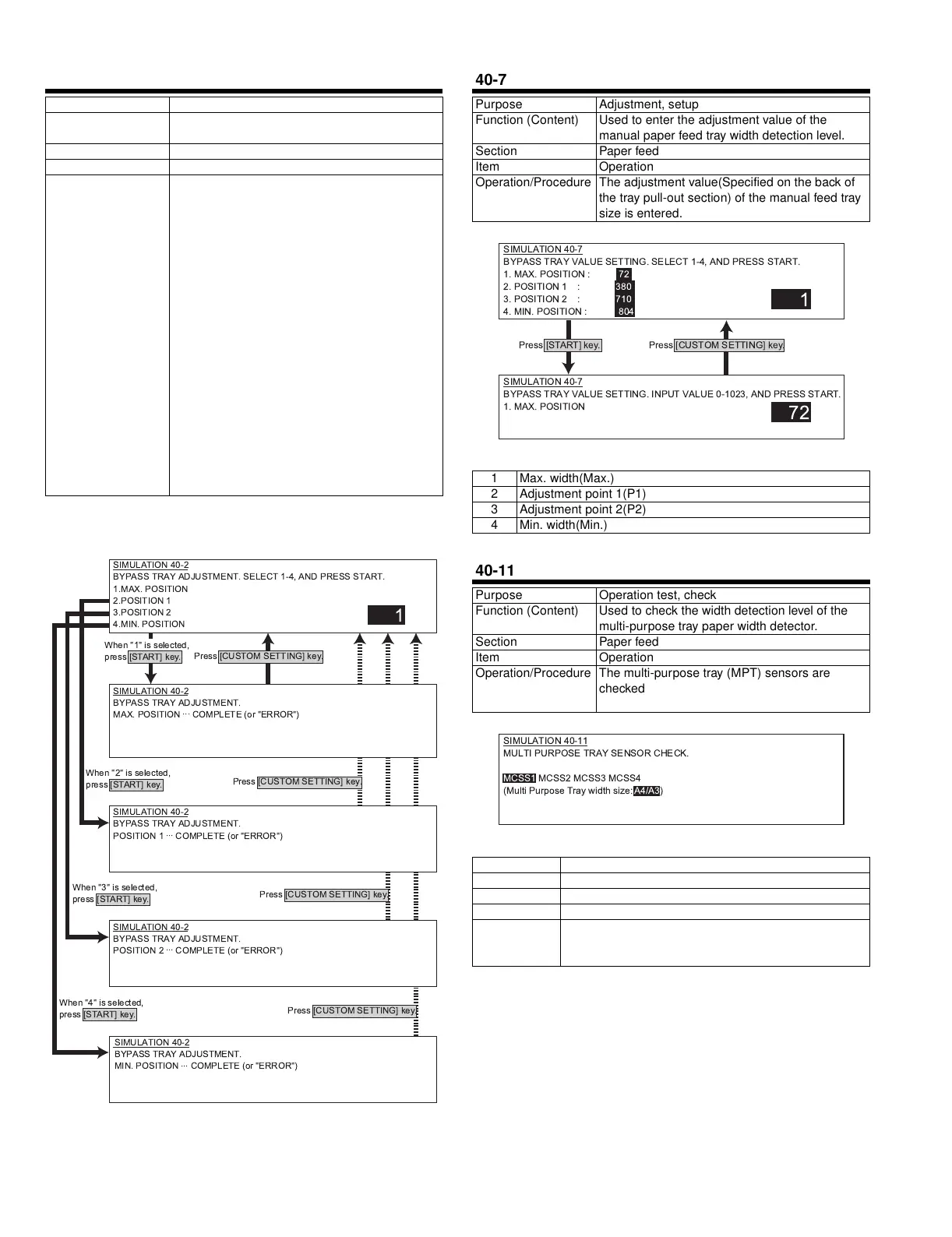
40-2
Purpose Adjustment, setup
Function (Content) Used to adjust the detection level of the manual
paper feed tray paper width volume.
Section Paper feed
Item Operation
Operation/Procedure The manual feed tray size is adjusted.
1) Extend the guide to the MAX. position. Select
1 and press START. When COMPLETE is
displayed, press CUSTOM SETTING to
return to the initial screen.
2) Move the guide to A4R position. Select 2 and
press START. When COMPLETE is
displayed, press CUSTOME SETTING to
return to the initial screen.
3) Move the guide to A5R position. Select 3 and
press START. When COMPLETE is
displayed, press CUSTOME SETTING to
return to the initial screen.
4) Move the guide to MIN. position in the initial
screen. Select 4 and press START. When
COMPLETE is displayed, the adjustment is
completed.
If ERROR is displayed in procedures 1) - 4),
repeat the adjustment again."
SIMULATION 40-2
BYPASS TRAY ADJUSTMENT. SELECT 1-4, AND PRESS START.
1.MAX. POSITION
2.POSITION 1
3.POSITION 2
4.MIN. POSITION
1
SIMULATION 40-2
BYPASS TRAY ADJUSTMENT.
MAX. POSITION
...
COMPLETE (or "ERROR")
SIMULATION 40-2
BYPASS TRAY ADJUSTMENT.
POSITION 1
...
COMPLETE (or "ERROR")
SIMULATION 40-2
BYPASS TRAY ADJUSTMENT.
POSITION 2
...
COMPLETE (or "ERROR")
SIMULATION 40-2
BYPASS TRAY ADJUSTMENT.
MIN. POSITION
...
COMPLETE (or "ERROR")
Press [CUSTOM SETTING] key.
Press [CUSTOM SETTING] key.
Press [CUSTOM SETTING] key.
Press [CUSTOM SETTING] key.
When "1" is selected,
press [START] key.
When "2" is selected,
press [START] key.
When "3" is selected,
press [START] key.
When "4" is selected,
press [START] key.
40-7
Purpose Adjustment, setup
Function (Content) Used to enter the adjustment value of the
manual paper feed tray width detection level.
Section Paper feed
Item Operation
Operation/Procedure The adjustment value(Specified on the back of
the tray pull-out section) of the manual feed tray
size is entered.
1 Max. width(Max.)
2 Adjustment point 1(P1)
3 Adjustment point 2(P2)
4 Min. width(Min.)
40-11
Purpose Operation test, check
Function (Content) Used to check the width detection level of the
multi-purpose tray paper width detector.
Section Paper feed
Item Operation
Operation/Procedure The multi-purpose tray (MPT) sensors are
checked. The sensor name is highlighted when it
is highlighted.
MCSS1 Multi-purpose tray size detection 1
MCSS2 Multi-purpose tray size detection 2
MCSS3 Multi-purpose tray size detection 3
MCSS4 Multi-purpose tray size detection 4
Multi Purpose
Tray width size
(The detected size of MPT width is displayed.)
A4/A3, 11x, B5/B4, 8.5x, A4R, B5R, A5R, 5.5x, 7.25x,
EXTRA
1
SIMULATION 40-7
BYPASS TRAY VALUE SETTING. INPUT VALUE 0-1023, AND PRESS START.
1. MAX. POSITION
72
SIMULATION 40-7
BYPASS TRAY VALUE SETTING. SELECT 1-4, AND PRESS START.
1. MAX. POSITION : 72
2. POSITION 1 : 380
3. POSITION 2 : 710
4. MIN. POSITION : 804
Press [START] key.
Press [CUSTOM SETTING] key.
SIMULATION 40-11
MULTI PURPOSE TRAY SENSOR CHECK.
MCSS1 MCSS2 MCSS3 MCSS4
(Multi Purpose Tray width size: A4/A3)
' !" #$%&



 To Next Page