SENDING A FAX
2-7
2
FAXING A TWO-SIDED ORIGINAL
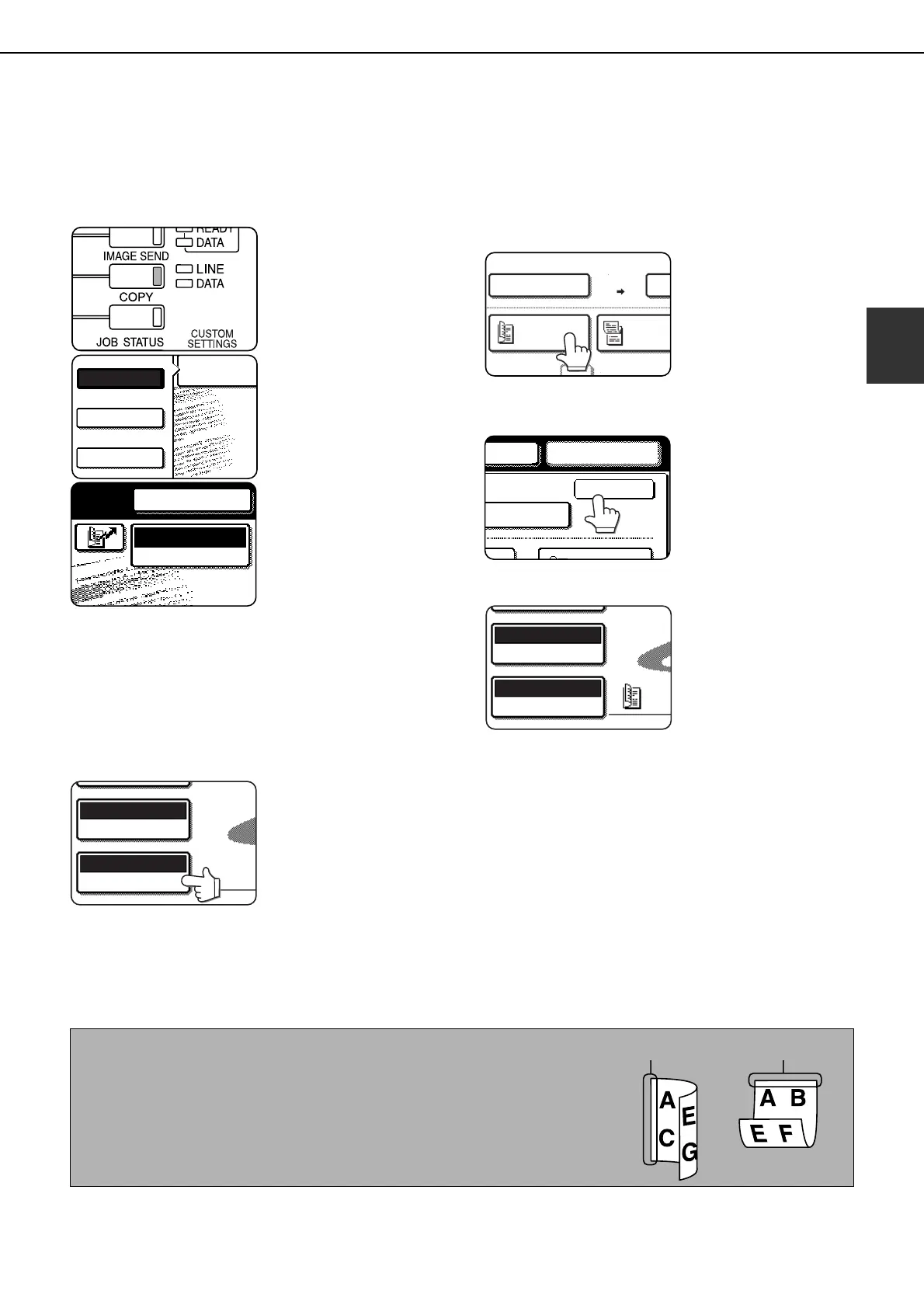
A two-sided document can be automatically transmitted using the automatic document feeder. Follow the steps
below to automatically send a two-sided document.
1
Make sure the machine is in fax mode.
When the [IMAGE
SEND] key light is on,
the machine is in fax
mode. If the light is not
on, press the [IMAGE
SEND] key.
If the network scanner
option is installed, touch
the [MODE SWITCH]
key and then the [FAX]
key to switch to fax
mode.
When fax mode is
selected, "FAX" appears
in the top half of the
[MODE SWITCH] key.
2
Place the original in the automatic
document feeder (see "USING THE
AUTOMATIC DOCUMENT FEEDER" on
page 1-7) .
3
Touch the [ORIGINAL] key.
If the address book
screen appears, touch
the [CONDITION
SETTINGS] key to
display the condition
settings screen (see
page 1-5).
When you touch the [ORIGINAL] key, check the
original size that appears in the key. If the size was
not detected correctly, specify the correct size.
(See "MANUALLY SETTING THE SCANNING
SIZE" on page 1-8.)
4
Touch the [2-SIDED BOOKLET] key or the
[2-SIDED TABLET] key as appropriate for
the original you loaded.
5
Touch the [OK] key.
You will return to the
initial screen.
A two-sided original icon
appears next to the
[ORIGINAL] key.
Example:
The icon that appears
when the [2-SIDED
BOOKLET] key is
touched.
6
Continue from step 4 of "BASIC
PROCEDURE FOR SENDING FAXES"
(pages 2-2 to 2-3).
FAX
E-MAIL/FTP
MODE SWITCH
INTERNET FAX
AUTO 8 X11
ORIGINAL
STANDARD
RESOLUTION
1
/
2
SEND
100%
STORE
AUTO 8 X11
2-SIDED
BOOKLET
2-SIDE
TABLET
1
/
2
AUTO 8 X11
ORIGINAL
STANDARD
RESOLUTION
1
/
2
NOTES
● Booklets and tablets
Two-sided originals that are bound at the side are booklets, and two-sided
originals that are bound at the top are tablets.
● Two-sided scanning turns off after the document is stored in memory.
Pressing the [CA] key will also cancel two-sided scanning.
Booklet Tablet
Tiger2_fax_sec.book 7 ページ 2004年9月16日 木曜日 午前8時53分



 To Next Page