SETTINGS
This function allows software updates by
inserting a USB memory device with the update
file into the BD STORAGE/SERVICE terminal on
this player.
Regarding how to obtain the software
update file, please call 1-800-BE-SHARP
_! CAUTION
• Do not remove the USB memory device or unplug
the AC cord while the software is being updated,
2
3
4
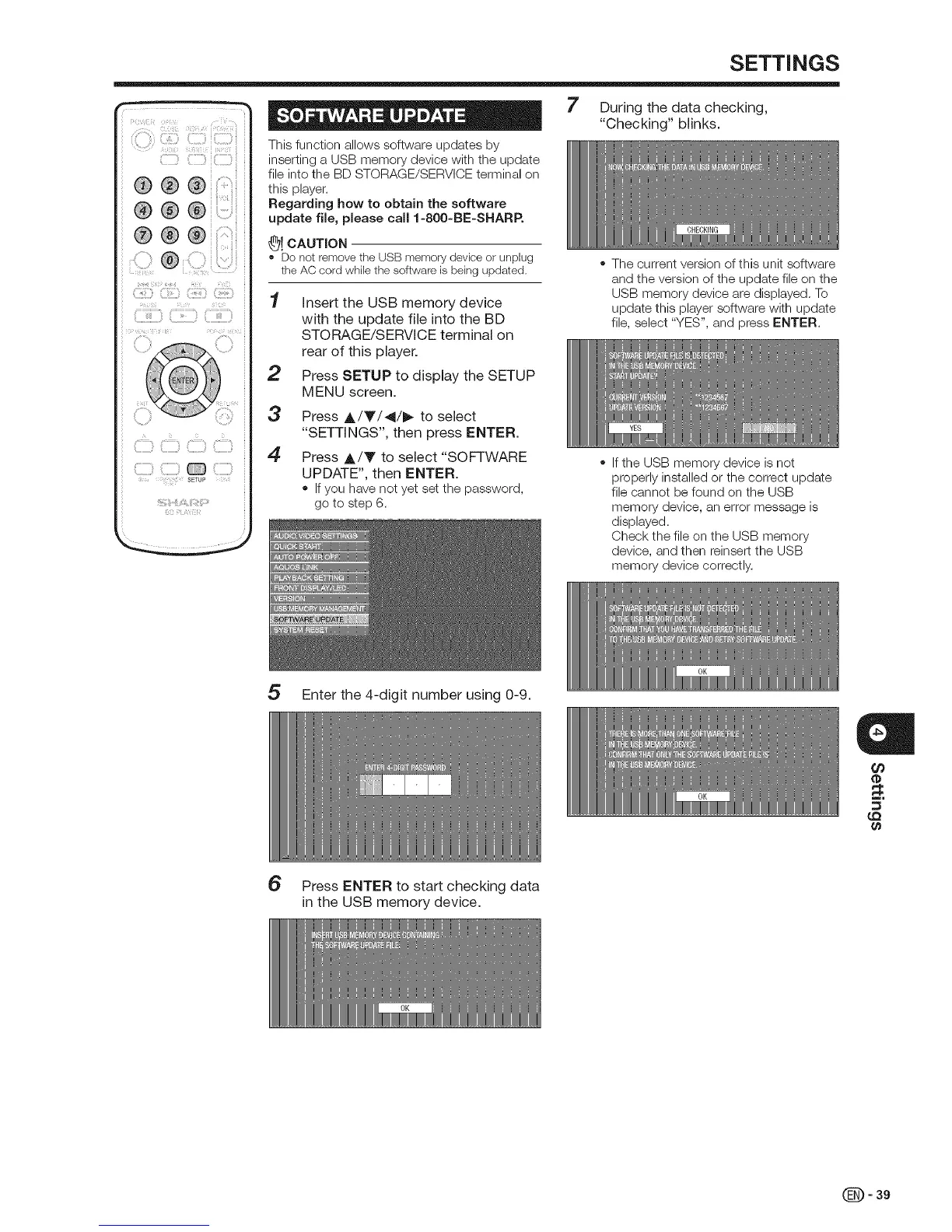
Insert the USB memory device
with the update file into the BD
STORAGE/SERVICE terminal on
rear of this player.
Press SETUP to display the SETUP
MENU screen.
Press A/Y/41/_ to select
"SETTINGS", then press ENTER.
Press A/Y to select "SOFTWARE
UPDATE", then ENTER.
• If you have not yet set the password,
go to step 6.
7 During the data checking,
"Checking" blinks.
• The current version of this unit software
and the version of the update file on the
USB memory device are displayed. To
update this player software with update
file, select "YES", and press ENTER.
• Ifthe USB memory device is not
properly installed or the correct update
file cannot be found on the USB
memory device, an error message is
displayed.
Check the file on the USB memory
device, and then reinsert the USB
memory device correctly.
5 Enter the 4-digit number using 0-9.
a
¢o
(D
_=.
6 Press ENTER to start checking data
in the USB memory device.
(_)- 39


 To Next Page