36
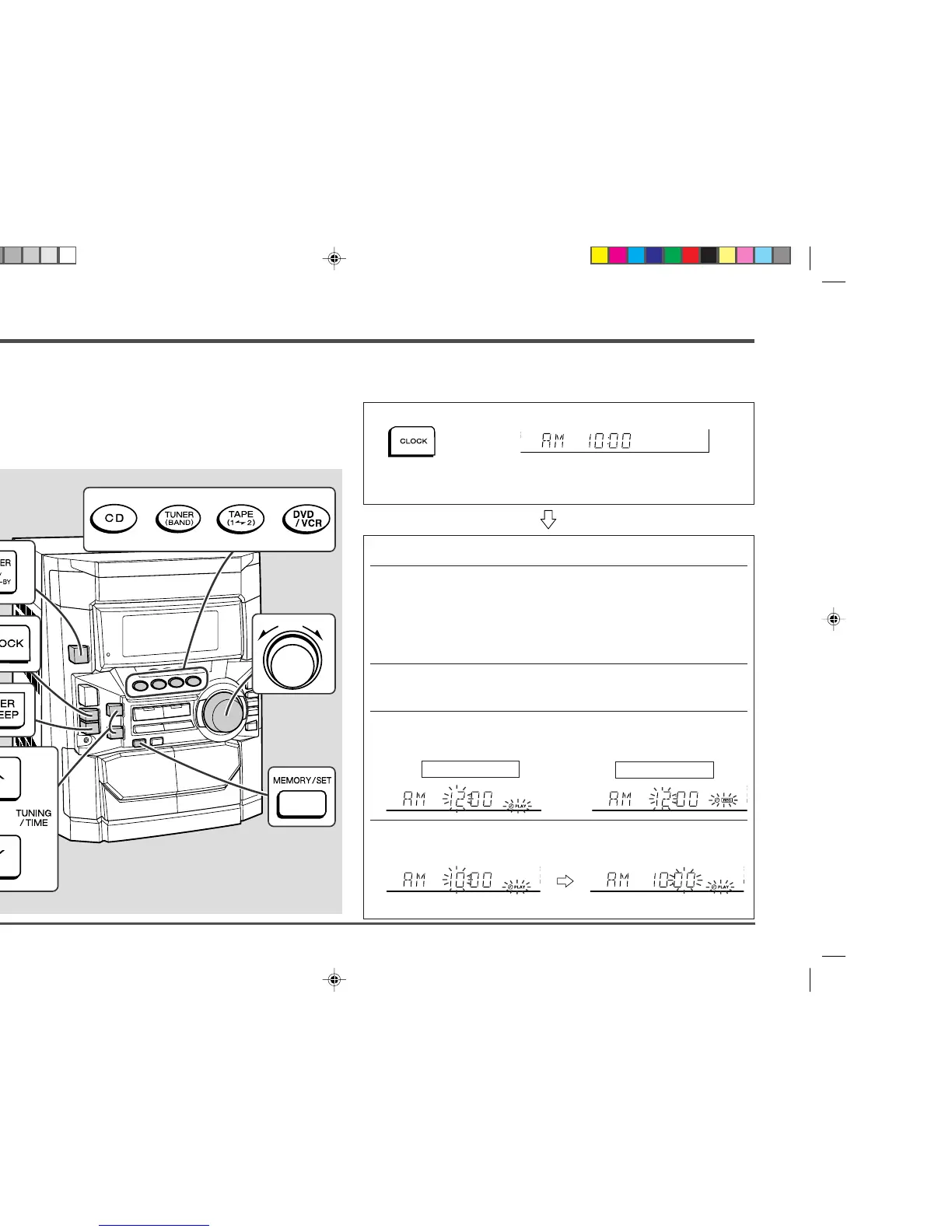
1 Press the POWER button to turn the power on.
2 Press the CD, TUNER (BAND) or TAPE (1
VV
VV
V 2) button to select the
desired function.
To select the timer playback source: CD, TUNER (BAND) or TAPE (1 V 2).
To select the timer recording source: TUNER (BAND).
When you selected the TUNER (BAND), tune in to the desired sta-
tion.
3 Adjust the volume using the VOLUME control.
Do not turn the volume up too high.
4 Press the TIMER/SLEEP button repeatedly until “
f f
f f
f PLAY” or
“
f f
f f
f REC” is displayed.
5 Press the TUNING/TIME (
X X
X X
X or
WW
WW
W) button to specify the hour to
start, then press the MEMORY/SET button.
The illustrations show the timer playback setting.
■
Timer playback or Timer recording
Before setting timer:
1. Press the CLOCK button to check that the clock is on time.
2. For timer playback: Load a cassette or discs to be played.
For timer recording: Load a cassette for recording in the TAPE 2
cassette compartment.
Timer and Sleep Operation
Timer playback:
The unit turns on and plays the desired source (CD, tuner, tape) at the preset time.
Timer recording:
The unit turns on and starts recording from the tuner at the preset time.
Sleep operation:
The radio, compact disc and cassette tape can all be turned off automatically.
Advanced Features
– Timer and Sleep Operation –
■ Setting the Clock (See page 17.)
For timer playback
For timer recording
*CD_DD4500_P36_39 2001.4.19, 11:43 PM36


 To Next Page