EasyManua.ls Logo

Sharp CE-515P - Page 22

Sharp CE-515P
34 pages
Print Icon
To Next Page IconTo Next Page
To Previous Page IconTo Previous Page
Loading...
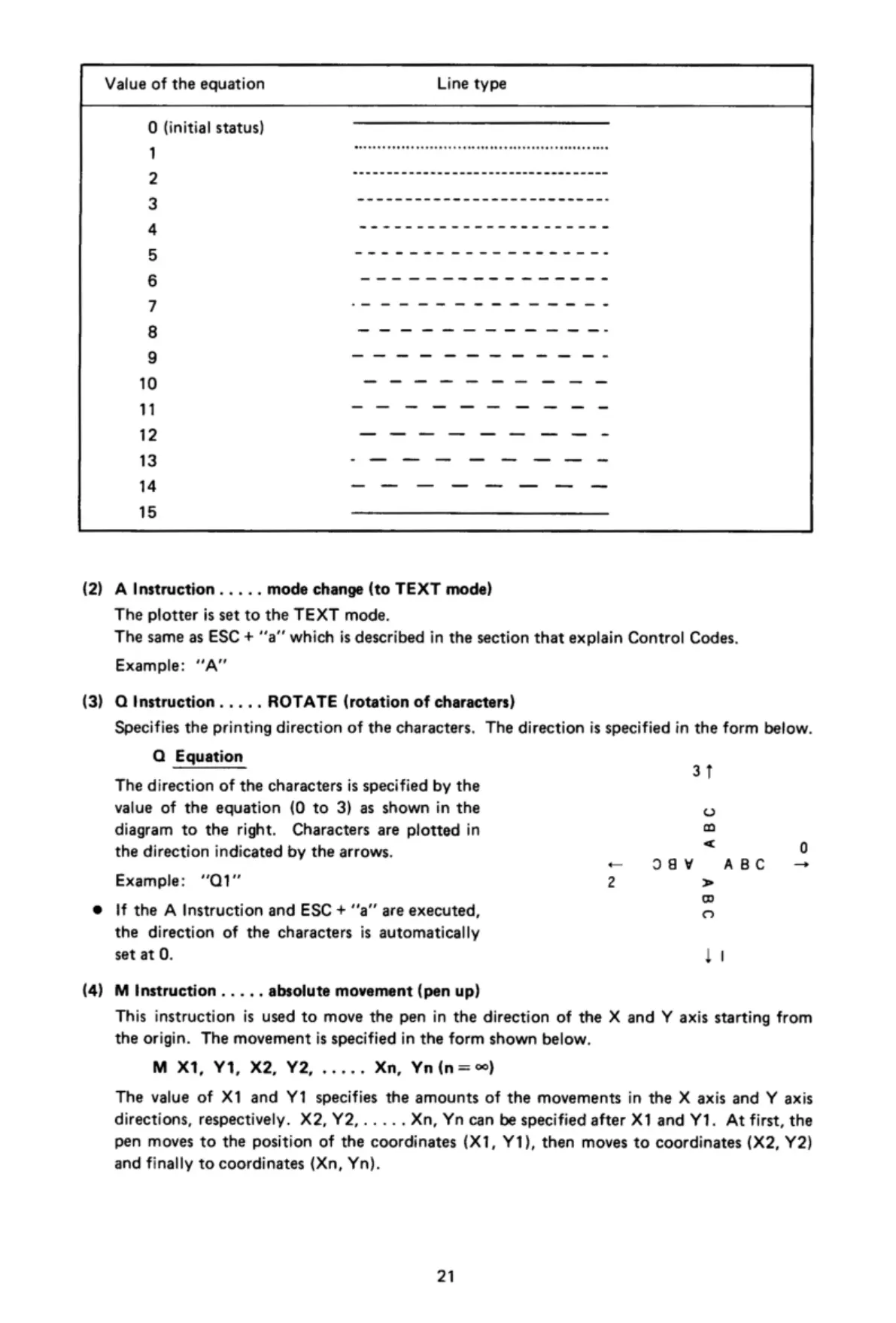
Value
of
the
equation
Line
type
0
(initial
status)
.......................................................
------------------------------------
___________________________
______________________
___________________
________________
———————————————
o
s
am
e
e
o
mm e
-
-
e
e
mm
e
me
e
e
e
e
o
e
W
00
N
O
OB
W
N
=
)
|
|
|
|
|
|
|
[
|
|
W
N
=
' |
|
:
|
|
'
|
|
|
|
| |
I
|
Ly
Ly
T
|
T
|
|
I
I
I
l
I
l
l
(¢]
(2)
(3)
(4)
A
Instruction
..
...
mode
change
(to
TEXT
mode)
The
plotter
is
set
to
the
TEXT
mode.
The
same
as
ESC
+
““a”
which
is
described
in
the
section
that
explain
Control
Codes.
Example:
“A"
Q
Instruction
. .
...
ROTATE
(rotation
of
characters)
Specifies
the
printing
direction
of
the
characters.
The
direction
is
specified
in
the
form
below.
Q
Equation
31
The
direction
of
the
characters
is
specified
by
the
value
of
the
equation
(0
to
3) as
shown
in
the
diagram
to
the
right.
Characters
are
plotted
in
the
direction
indicated
by
the
arrows.
ABC
lo
a8y ABC
~1
Example:
Q1"
29V
If
the
A
Instruction
and
ESC
+
"'a’’
are
executed,
the
direction
of
the
characters
is
automatically
set
at
0.
I
M
Instruction
.
..
..
absolute
movement
(pen
up)
This
instruction
is
used
to
move
the
pen
in
the
direction
of
the
X
and
Y
axis
starting
from
the
origin.
The
movement
is
specified
in
the
form
shown
below.
M
X1,
Y1,
X2,
Y2,
.....
Xn,
Yn
(n
=)
The
value
of
X1
and
Y1
specifies
the
amounts
of
the
movements
in
the
X
axis
and
Y
axis
directions,
respectively.
X2,Y2,.....
Xn,
Yn
can
be
specified
after
X1
and
Y1.
At
first,
the
pen
moves
to
the
position
of
the
coordinates
(X1,
Y1),
then
moves
to
coordinates
(X2,
Y2)
and
finally
to
coordinates
(Xn,
Yn).
21

Related product manuals