EasyManua.ls Logo

Sharp CE-515P - Page 23

Sharp CE-515P
34 pages
Print Icon
To Next Page IconTo Next Page
To Previous Page IconTo Previous Page
Loading...
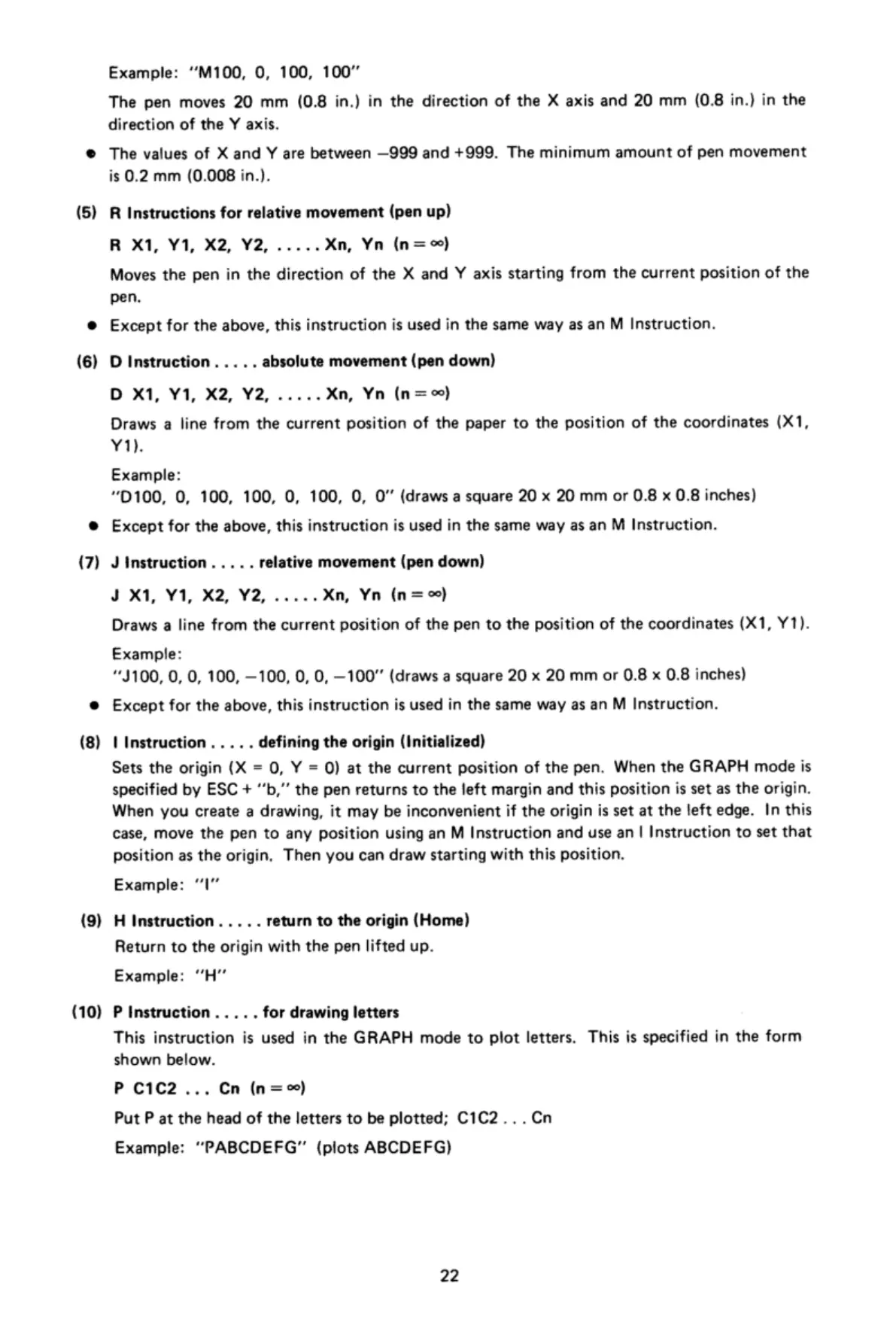
(5)
(6)
(7)
(8)
(9)
(10)
Example:
“M100,
0,
100,
100"
The
pen
moves
20
mm
(0.8
in.)
in
the
direction
of
the
X axis
and
20
mm
(0.8
in.}
in
the
direction
of
the
Y
axis.
The
values
of
X
and
Y
are
between
—999
and
+999.
The
minimum
amount
of
pen
movement
is
0.2
mm
(0.008
in.).
R
Instructions
for
relative
movement
(pen
up)
R
X1,
Y1,
X2, Y2,
.....
Xn,
Yn
(n=
)
Moves
the
pen
in
the
direction
of
the
X
and
Y
axis
starting
from
the
current
position
of
the
pen,
Except
for
the
above,
this
instruction
is
used
in
the
same
way
as
an
M
Instruction.
D
Instruction.
..
..
absolute
movement
(pen
down)
D
X1,
Y1, X2,
Y2,
.....
Xn,
Yn
(n=o0)
Draws
a
line
from
the
current
position
of
the
paper
to
the
position
of
the
coordinates
(X1,
Y1)
Example:
D100,
0,
100,
100,
0,
100,
O,
O
(draws
a
square
20
x
20
mm
or
0.8
x
0.8
inches)
Except
for
the
above,
this
instruction
is
used
in
the
same
way
as
an
M
Instruction.
J
Instruction.....
relative
movement
(pen
down)
J
X1, Y1,
X2,
Y2,
.....Xn,
Yn
(n=)
Draws
a
line
from
the
current
position
of
the
pen
to
the
position
of
the
coordinates
(X1,
Y1).
Example:
“J100,
0,
0,
100,
—100,
0,
0,
—100""
{(draws
a
square
20
x
20
mm
or
0.8
x
0.8
inches)
Except
for
the
above,
this
instruction
is
used
in
the
same
way
as
an
M
Instruction.
t
Instruction
.
.
...
defining
the
origin
(Initialized)
Sets
the
origin
(X
=
0,
Y
=
Q)
at
the
current
position
of
the
pen.
When
the
GRAPH
mode
is
specified
by
ESC
+
’b,””
the
pen
returns
to
the
left
margin
and
this
position
is
set
as
the origin.
When
you
create
a
drawing,
it
may
be
inconvenient
if
the
origin
is
set
at
the
left
edge.
In
this
case,
move
the
pen
to
any
position
using
an
M
Instruction
and
use
an
|
Instruction
to
set
that
position
as
the
origin.
Then
you
can
draw
starting
with
this
position.
Il|ll
Example:
H
Instruction.
..
..
return
to
the
origin
(Home)
Return
to
the
origin
with
the
pen
lifted
up.
Example:
"H”
P
Instruction
..
...
for
drawing
letters
This
instruction
is
used
in
the
GRAPH
mode
to
plot
letters.
This
is
specified
in
the
form
shown
below.
P
C1C2
...
Cn
(n=)
Put
P
at
the
head
of
the
letters
to
be
plotted;
C1C2...Cn
Example:
“PABCDEFG"
(plots
ABCDEFG)
22

Related product manuals