EasyManua.ls Logo

Sharp CE-515P - Page 8

Sharp CE-515P
34 pages
Print Icon
To Next Page IconTo Next Page
To Previous Page IconTo Previous Page
Loading...
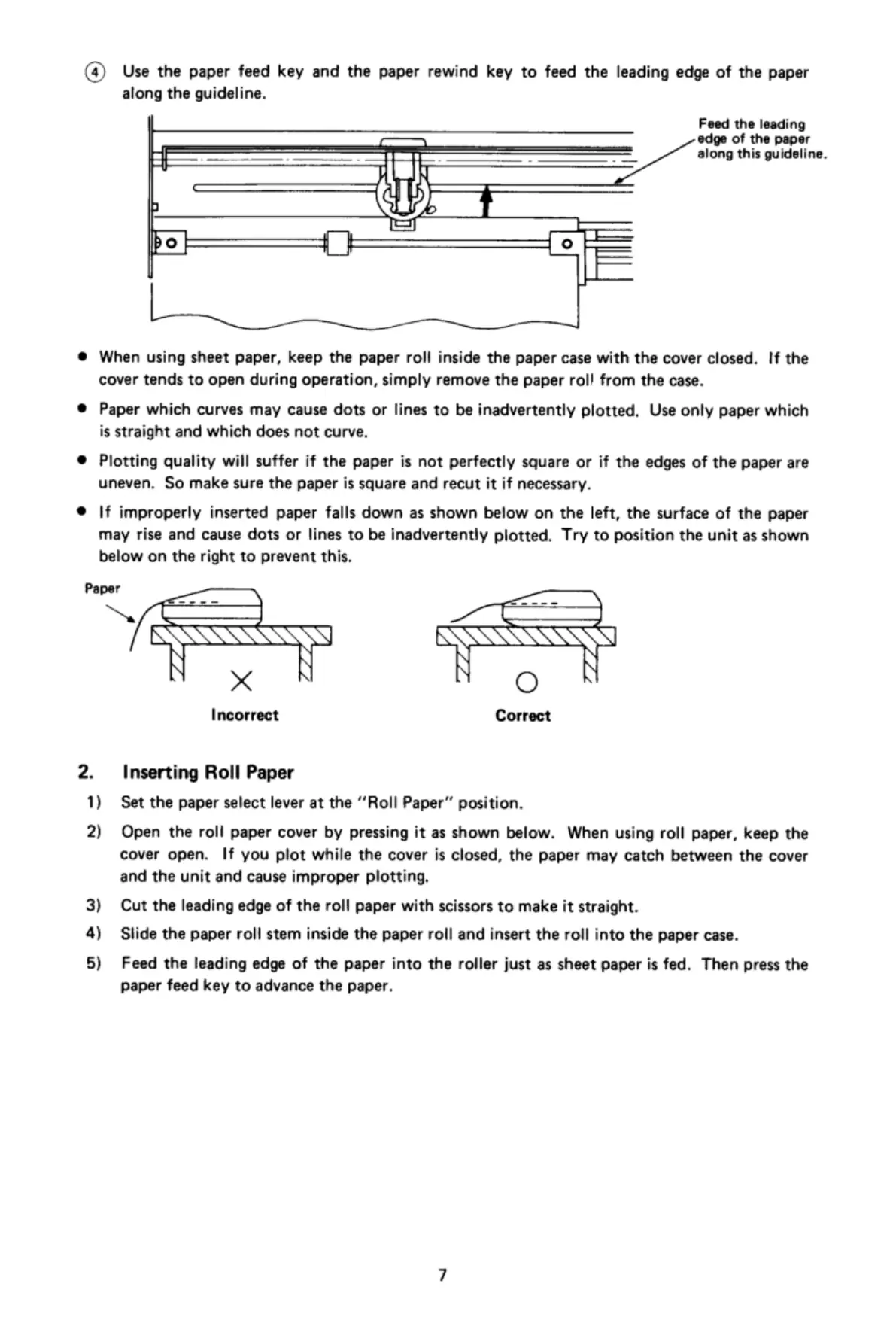
(4)
Use
the
paper
feed
key
and
the
paper
rewind
key
to
feed
the
leading
edge
of
the
paper
along
the
guideline.
Feed
the
leading
edge
of
the
paper
;
-
. =
=
/along
this
guideline.
(
_
@t
p
AN
f
=
bo|
il
=
®
When
using
sheet
paper,
keep
the
paper
roll
inside
the
paper
case
with
the
cover
closed.
If
the
cover
tends
to
open
during
operation,
simply
remove
the
paper
roll
from
the
case.
®
Paper
which
curves
may
cause
dots
or
lines
to
be
inadvertently
plotted.
Use
only
paper
which
is
straight
and
which
does
not
curve.
®
Plotting
quality
will
suffer
if
the
paper
is
not
perfectly
square
or
if
the
edges
of
the
paper
are
uneven.
So
make
sure
the
paper
is
square
and
recut
it
if
necessary.
®
|f
improperly
inserted
paper
falls
down
as
shown
below
on
the
left,
the
surface
of
the
paper
may
rise
and
cause
dots
or
lines
to
be
inadvertently
plotted.
Try
to
position
the
unit
as
shown
below
on
the
right
to
prevent
this.
Paper
)
D
S—
‘@
[:_\N\\\\A\\\fifl
&\Frlm\\ill
X
O
Incorrect
Correct
2.
Inserting
Roll
Paper
1)
Set the
paper
select
lever
at
the
“’Roll
Paper”
position.
2)
Open
the
roll
paper
cover
by
pressing
it
as
shown
below.
When
using
roll
paper,
keep
the
cover
open.
|f
you
plot
while
the
cover
is
closed,
the
paper
may
catch
between
the
cover
and
the
unit
and
cause
improper
plotting.
3}
Cut
the
leading
edge
of
the
roll
paper
with
scissors
to
make
it
straight.
4)
Slide
the
paper
roll
stem
inside
the
paper
roll
and
insert
the
roll
into
the
paper
case.
5)
Feed
the
leading
edge
of
the
paper
into
the
roller
just
as
sheet
paper
is
fed.
Then
press
the
paper
feed
key
to
advance
the
paper.

Related product manuals