ER-A410/ER-A420 OPTIONS
– 5 –
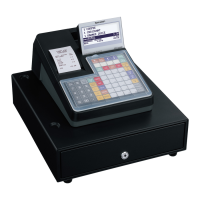
7. DRAWER
[OUTLINE]
• Standard equipment: Yes
• Max. number of additional drawers: 1
• The drawer consists of:
1) Drawer box (outer case) and drawer
2) Money case
3) Lock (attached to the drawer)
[SPECIFICATION]
7-1. DRAWER BOX AND DRAWER
7-2. MONEY CASE
7-3. LOCK (LOCK KEY: LKGIM7331BHZZ)
• Location of the lock: Front
• Method of locking and unlocking:
CHAPTER 2. OPTIONS
1. OPTIONS
2. SERVICE OPTIONS
Model name of the drawer
box
SK420
Size 355 (W) x 424 (D) x 120 (H) mm
color Gray 368
Material Metal
Bell –
Release lever Standard equipment: situated at the bot-
tom
Drawer open sensor YES
Separation from the drawer Allowed
Separation of the bill compartments from the coin
compartments
Allowed
Bill separator Disallowed
Number of compartments 5B/8C
To lock, insert the drawer lock key into the lock and turn
it 90 degrees counter clockwise.
To unlock, insert the drawer lock key and turn it 90
degrees clockwise.
Key No: SK1-1
5B/8C
SK1-1
L
o
c
k
u
n
l
o
c
k
NO CLASSIFICATION COMPONENT NAME MODEL NAME REMARK
1 Drawer Remote drawer ER-03DW
ER-04DW
ER-05DW
ER-06DW
2 EFT function EFT terminal I/F ER-03EF
3 Key kit 1 x 1 key top kit ER-11KT7
1 x 2 key top kit ER-12KT7
2 x 2 key top kit ER-22KT7
1 x 1 dummy key kit ER-11DK7G
5 x 1 dummy key kit ER-51DK7G
NO NAME PARTS CODE PRICE RANK REMARK
1SRV key LKGIM7113RCZZ AK
2 Water proof switch cover GCOVH2541BHZB AY
3 Water proof keyboard cover GCOVH2541BHZA BC For ER-A410
4 Text preset key cover GCOVH2541BHSA BD For ER-A410
5 Blank sheet PSHEK3008BHZZ AL For ER-A420



 To Next Page