EasyManua.ls Logo

Sharp GF-9000H - Page 12

Sharp GF-9000H
32 pages
Print Icon
To Next Page IconTo Next Page
To Previous Page IconTo Previous Page
Loading...
e
Battery
Condition
Meter
Check
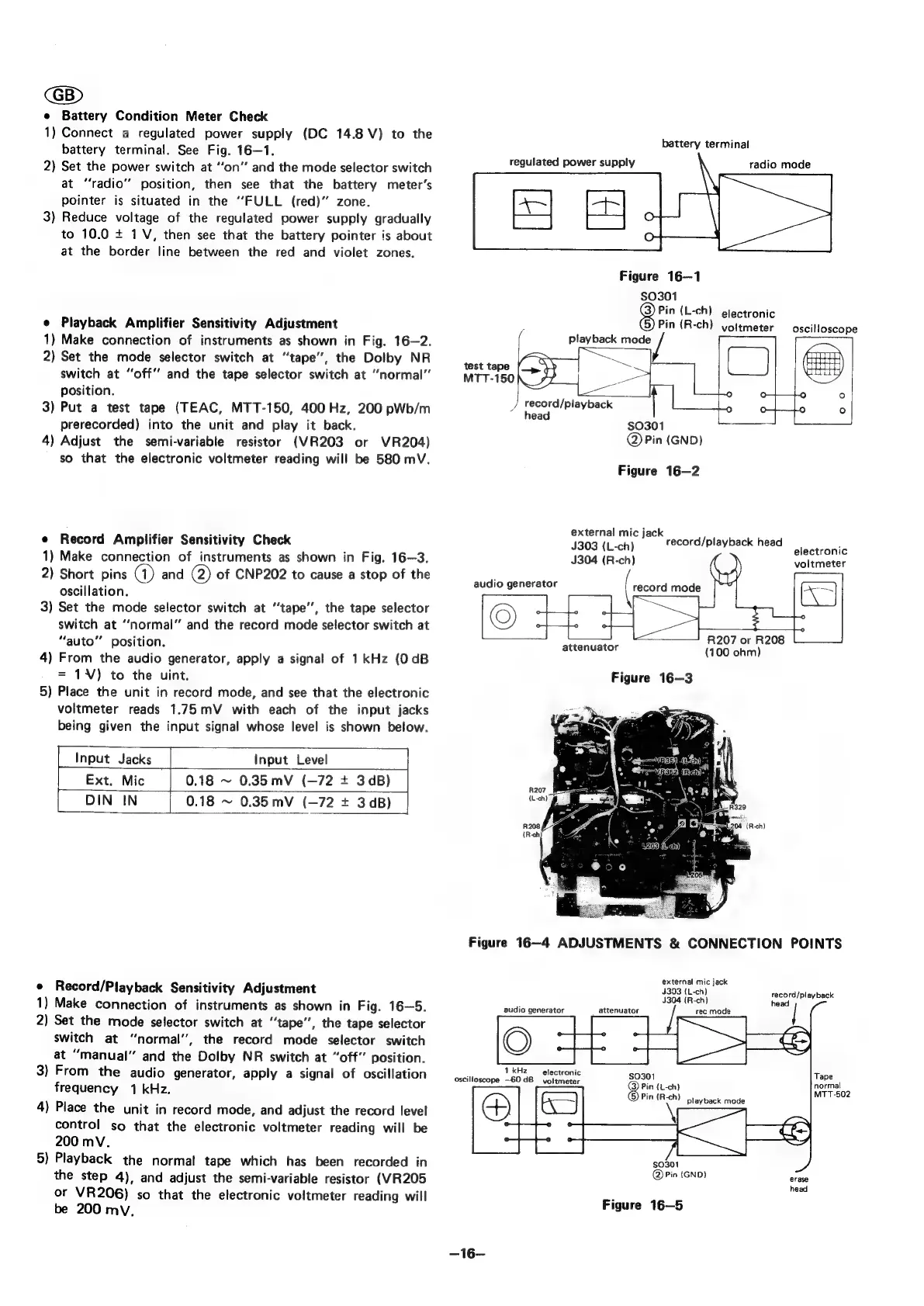
1)
Connect
a
regulated
power
supply
(DC
14.8
V)
to
the
battery
terminal.
See
Fig.
16—1.
2)
Set
the
power
switch
at
“‘on”
and
the
mode
selector
switch
at
“radio”
position,
then
see
that
the
battery
meter’s
pointer
is
situated
in
the
“FULL
(red)”
zone.
3)
Reduce
voltage
of
the
regulated
power
supply
gradually
to
10.0
+
1V,
then
see
that
the
battery
pointer
is
about
at
the
border
line
between
the
red
and
violet
zones.
e
Playback
Amplifier
Sensitivity
Adjustment
1)
Make
connection
of
instruments
as
shown
in
Fig.
16—2.
2)
Set
the
mode
selector
switch
at
“tape”,
the
Dolby
NR
switch
at
“off’’
and
the
tape
selector
switch
at
“normal”
position.
3)
Put
a
test
tape
(TEAC,
MTT-150,
400
Hz,
200
pWb/m
prerecorded)
into
the
unit
and
play
it
back.
4)
Adjust
the
semi-variable
resistor
(VR203
or
VR204)
so
that
the
electronic
voltmeter
reading
will
be
580
mV.
e
Record
Amplifier
Sensitivity
Check
1)
Make
connection
of
instruments
as
shown
in
Fig.
16—3.
2)
Short
pins
@)
and
2)
of
CNP202
to
cause
a
stop
of
the
oscillation.
3)
Set the
mode
selector
switch
at
“tape’’,
the
tape
selector
switch
at
“normal”
and
the
record
mode
selector
switch
at
“auto”
position.
4)
From
the
audio
generator,
apply
a
signal
of
1
kHz
(0
dB
=
1¥V)
to
the
uint.
5)
Place
the
unit
in
record
mode,
and
see
that
the
electronic
voltmeter
reads
1.75mV
with
each
of
the
input
jacks
being
given
the
input
signal
whose
level
is
shown
below.
Input
Jacks
|
Input
Level
Ext.
Mic
0.18
~
0.35
mV
(—72
+
3dB)
DIN
IN
0.18
~
0.35
mV
(-72
+
3dB)
|
e
Record/Playback
Sensitivity
Adjustment
1)
Make
connection
of
instruments
as
shown
in
Fig.
16—5.
2)
Set
the
mode
selector
switch
at
“tape”,
the
tape
selector
switch
at
“normal”,
the
record
mode
selector
switch
at
“manual”
and
the
Dolby
NR
switch
at
“off”
position.
3)
From
the
audio
generator,
apply
a
signal
of
oscillation
frequency
1
kHz.
4)
Place
the
unit
in
record
mode,
and
adjust
the
record
level
control
so
that
the
electronic
voltmeter
reading
will
be
200
mV.
5)
Playback
the
normal
tape
which
has
been
recorded
in
the
step
4),
and
adjust
the
semi-variable
resistor
(VR205
or
VR206)
so
that
the
electronic
voltmeter
reading
will
be
200
mv.
battery
terminal
regulated
power
supply
radio
test
tape
MTT-150
3
record/playback
head
(
playback
mode
J
Figure
16—1
$0301
grin
{L-ch)
electronic
Pin
(R-ch)
voltmeter
$0301
@)
Pin
(GND)
Figure
16—2
external
mic
jack
J303
(L-ch)
J304
(R-ch)
audio
generator
attenuator
(100
ohm)
Figure
16—3
record/playback
head
R207
or
R208
mode
oscilloscope
electronic
voltmeter
Figure
16—4
ADJUSTMENTS
&
CONNECTION
POINTS
audio
generator
:
1
kHz
electronic
oscilloscope
—60dB
voltmeter
—16—
external
mic
jack
4303
(L-ch)
4304
(R-ch}
attenuator
$0301
8
Pin
(L-ch)
Pin
(R-ch)
playback
mode
$0301
@
Pin
(GND)
Figure
16—5
record/playback
head
|
Coy
Nee

Related product manuals