EasyManua.ls Logo

Sharp GF-9000H - Page 4

Sharp GF-9000H
32 pages
Print Icon
To Next Page IconTo Next Page
To Previous Page IconTo Previous Page
Loading...
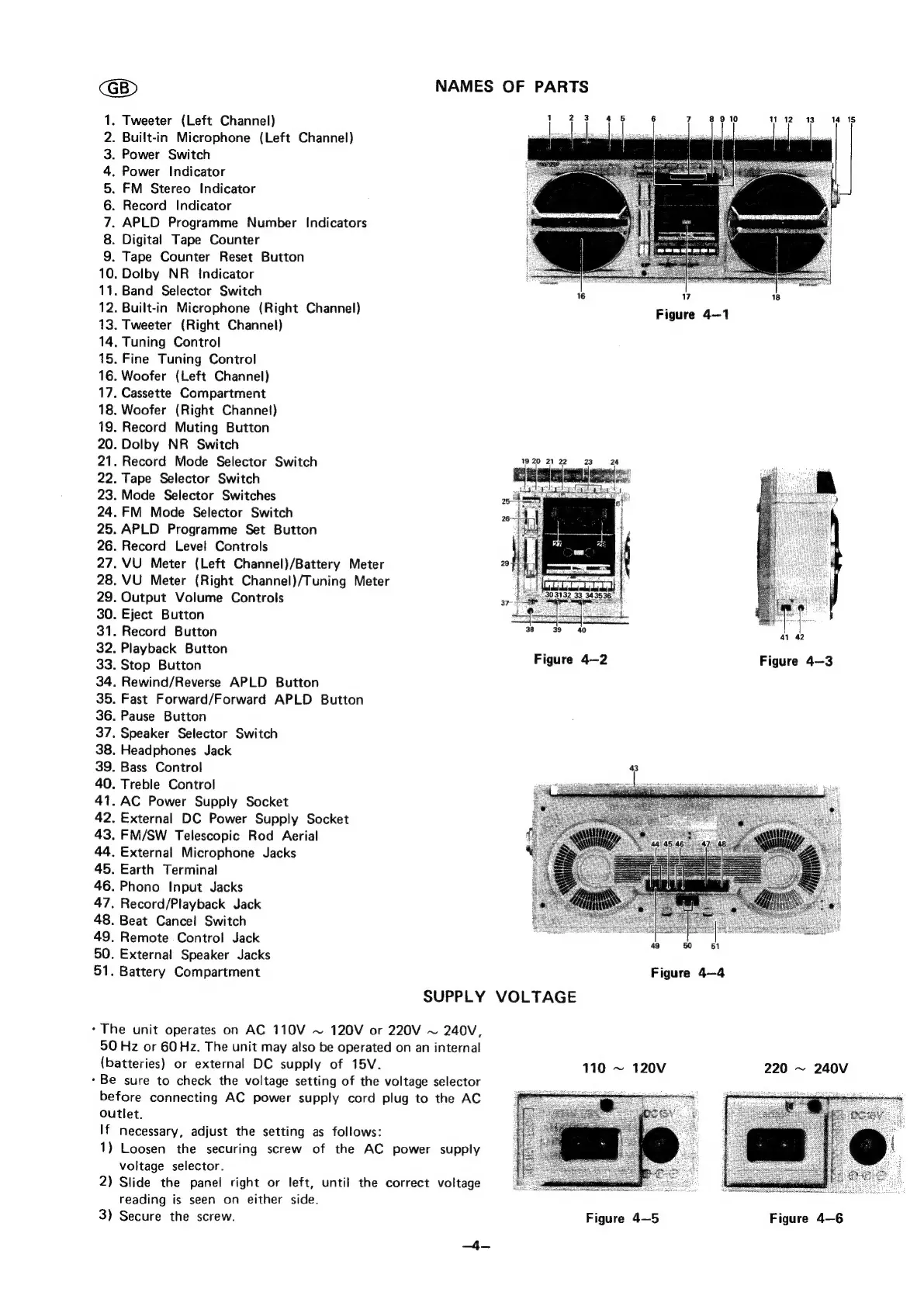
NAMES
OF
PARTS
.
Tweeter
(Left
Channel)
.
Built-in
Microphone
(Left
Channel)
Power
Switch
Power
Indicator
FM
Stereo
Indicator
.
Record
Indicator
.
APLD
Programme
Number
Indicators
.
Digital
Tape
Counter
.
Tape
Counter
Reset
Button
.
Dolby
NR
_
Indicator
.
Band
Selector
Switch
.
Built-in
Microphone
(Right
Channel)
.
Tweeter
(Right
Channel)
.
Tuning
Control
.
Fine
Tuning
Control
.
Woofer
(Left
Channel)
.
Cassette
Compartment
.
Woofer
(Right
Channel)
.
Record
Muting
Button
.
Dolby
NR
Switch
.
Record
Mode
Selector
Switch
.
Tape
Selector
Switch
.
Mode
Selector
Switches
.
FM
Mode
Selector
Switch
.
APLD
Programme
Set
Button
.
Record
Level
Controls
.
VU
Meter
(Left
Channel)/Battery
Meter
.
VU
Meter
(Right
Channel)/Tuning
Meter
.
Output
Volume
Controls
.
Eject
Button
.
Record
Button
.
Playback
Button
.
Stop
Button
.
Rewind/Reverse
APLD
Button
.
Fast
Forward/Forward
APLD
Button
.
Pause
Button
.
Speaker
Selector
Switch
.
Headphones
Jack
.
Bass
Control
.
Treble
Control
-
AC
Power
Supply
Socket
.
External
DC
Power
Supply
Socket
.
FM/SW
Telescopic
Rod
Aerial
.
External
Microphone
Jacks
.
Earth
Terminal
.
Phono
Input
Jacks
.
Record/Playback
Jack
.
Beat
Cancel
Switch
.
Remote
Control
Jack
.
External
Speaker
Jacks
.
Battery
Compartment
OONAMNARWNH=
19
20
21
22
SUPPLY
VOLTAGE
-
The
unit
operates
on
AC
110V
~
120V
or
220V
~
240V,
50
Hz
or
60
Hz.
The
unit
may
also
be
operated
on
an
internal
(batteries)
or
external
DC
supply
of
15V.
-
Be
sure
to
check
the
voltage
setting
of
the
voltage
selector
before
connecting
AC
power
supply
cord
plug
to
the
AC
outlet.
If
necessary,
adjust
the
setting
as
follows:
1)
Loosen
the
securing
screw
of
the
AC
power
supply
voltage
selector.
2)
Slide
the
panel
right
or
left,
until
the
correct
voltage
reading
is
seen
on
either
side.
3)
Secure
the
screw.
4
23
Figure
4—2
13
14 15
17
Figure
4—1
41
42
Figure
4—3
43
49
50
51
Figure
4—4
110
~
120V
220
~
240V
Figure
4—5
Figure
4—6

Related product manuals