EasyManua.ls Logo

Sharp GF-9000H - Page 8

Sharp GF-9000H
32 pages
Print Icon
To Next Page IconTo Next Page
To Previous Page IconTo Previous Page
Loading...
12
346
67
@ ©
©
|CNPIO!
0365
Sw203-C
L-CH
Soe
|
Sw2ol-a
|
hears
:
a
ane
cee
erg
nae
2
Pe
T6OI
Power
Trans,
Ge
ee
met
oe
24
D601
+
~~
thy
1
-74
1
1
1
SW60!
1
0364
Dolby
#1
indicator
A
APSS
SW
SW703
Volume}
Solenoid
SOL7OI
VR40-A
VR402-A
VRSO!|
Bass
VR40I-8
VR402-B
VR502
I
Q.
OF
ae
aa
S
i
ol
74
eS
a
ee
toe
roi
os
3
-4
ES
;
%
+P
1B
6
|
BROS
a
Ba
.
ey
1
823
'
cir
-t----
Sy
ig
21
a
Hot
gs
ieee
‘i
aoe
:
i?
ee
5
1
8
:
F
lel
33
pene
é
1B
48t
toe
SS
eS
ti
Pee
Ree
tele
th
el
ee
nS
eee
eke
hates
heel
ab
Sie
Se
a
ac
ge
ee
eS
he
APSS
+B
Record
Equalizer
2
SS
SSS
as
Stas,
Voltage
Regulator
Oscillation
Circuit
Bias
D366)
Phono
Equalizer
Amp,
©
[>
L-CH|
|
Sw206-F
Sw208-D
Wa
&
&)
Sw206-D
VR204
Adjust,
PLAY
Record/Playback
Amp.
1
\
1
@203
Switching
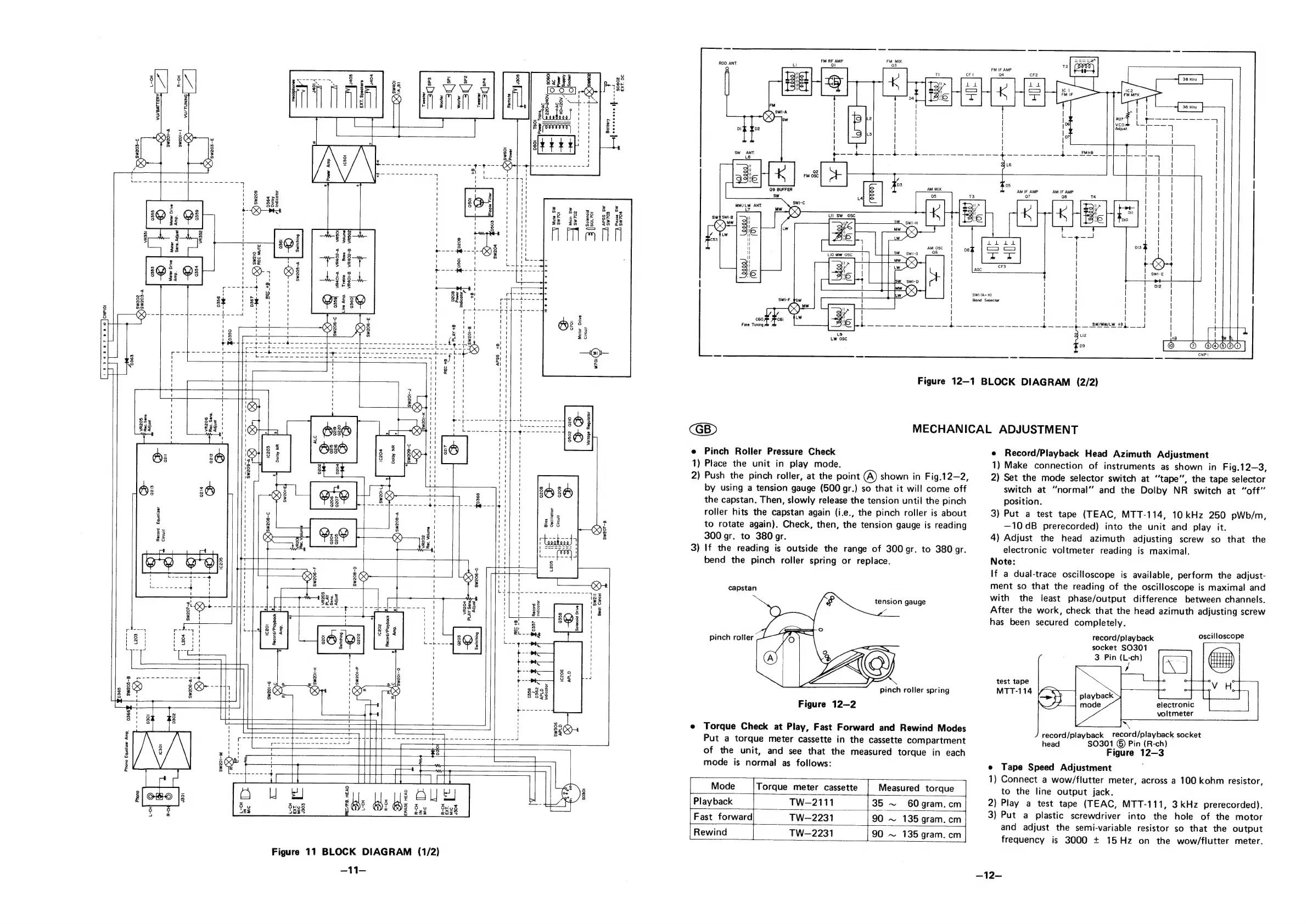
Figure
11
BLOCK
DIAGRAM
(1/2)
-11-
3
2381
ge
com
185
(ooo,
i.
é
i
gf
Tt
al
Th
Pause
Sw
Sw704
FM
RF
AMP
Ql
Q
L
FM
IF
AMP
-)
H
TI
CFI
04
cF2
Bit
K
La
La
eed
it
|
t
«
(=|
ba
ie
a
os
ve
|
Ty
5
ee
swi-A
|
|
Op
1
|Pr
f
|
|
13
(or
looses
a
aS
ol
02
|
|
|
|
Adjust.
I
7
|
Ls
|
|
|
o7|
|
!
!
=
!
|
|
sw
ANT.
oe
ane
—-4+--4
aaa
~4+----—--—-~—
4——
fe
_
ff
ft
|
ts
Wh
af
.
It!
FM
0SC
re
03
05
Q9
BUFFER
AM
IF
AMP
AM
IF
AMP.
ow
‘a
7
98
swi-c
MW/LW
ANT
LZ
mw
1?
%)
SWI
(A~H)
Band
Selector
ae
|
ttt
c
[66
65005]
CNP
I
=
=
ig
l=
Ny
=
Figure
12—1
BLOCK
DIAGRAM
(2/2)
e
Pinch
Roller
Pressure
Check
1)
Place
the
unit
in
play
mode.
2)
Push
the
pinch
roller,
at
the
point
A)
shown
in
Fig.12—2,
by
using
a
tension
gauge
(500
gr.)
so
that
it
will
come
off
the
capstan.
Then,
slowly
release
the
tension
until
the
pinch
roller
hits
the
capstan
again
(i.e.,
the
pinch
roller
is
about
to
rotate
again).
Check,
then,
the
tension
gauge
is
reading
300
gr.
to
380
gr.
If
the
reading
is
outside
the
range
of
300
gr.
to
380
gr.
bend
the
pinch
roller
spring
or
replace.
3
capstan
tension
gauge
pinch
roller
pinch
roller
spring
Figure
12—2
e
Torque
Check
at
Play,
Fast
Forward
and
Rewind
Modes
Put
a
torque
meter
cassette
in
the
cassette
compartment
of
the
unit,
and
see
that
the
measured
torque
in
each
mode
is
normal
as
follows:
Mode
Torque
meter
cassette
Measured
torque
Playback
TW-—2111
35
~
60gram.cm
Fast
forward
TW-2231
90
~
135
gram.
cm
Rewind
TW-2231
{90
~
136
gram.
cm
MECHANICAL
ADJUSTMENT
e
Record/Playback
Head
Azimuth
Adjustment
1)
Make
connection
of
instruments
as
shown
in
Fig.12—3,
2)
Set the
mode
selector
switch
at
“tape”,
the
tape
selector
switch
at
“normal”
and
the
Dolby
NR
switch
at
“off”
position.
3)
Put
a
test
tape
(TEAC,
MTT-114,
10
kHz
250
pWb/m,
—10dB
prerecorded)
into
the
unit
and
play
it.
4)
Adjust
the
head
azimuth
adjusting
screw
so
that
the
electronic
voltmeter
reading
is
maximal.
Note:
If
a
dual-trace
oscilloscope
is
available,
perform
the
adjust-
ment
so
that
the
reading
of
the
oscilloscope
is
maximal
and
with
the
least
phase/output
difference
between
channels.
After
the
work,
check
that
the
head
azimuth
adjusting
screw
has
been
secured
completely.
record/playback
oscilloscope
socket
SO301
3
Pin
ie
test
tape
MTT-114
electronic
voltmeter
record/playback
record/playback
socket
head
$0301
©
Pin
(R-ch)
Figure
12—3
e
Tape
Speed
Adjustment
1)
Connect
a
wow/flutter
meter,
across
a
100
kohm
resistor,
to
the
line
output
jack.
2)
Play
a
test
tape
(TEAC,
MTT-111,
3kHz
prerecorded).
3)
Put
a
plastic
screwdriver
into
the
hole
of
the
motor
and
adjust
the
semi-variable
resistor
so
that
the
output
frequency
is
3000
+
15Hz
on
the
wow/flutter
meter.
—12—

Related product manuals