EasyManua.ls Logo

Sharp HT-C21DS1 - User Manual

Sharp HT-C21DS1
22 pages
Print Icon
To Next Page IconTo Next Page
Loading...
HT-C21DS1
OPERATION MANUAL
MODEL
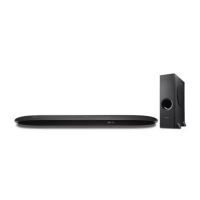
SOUND BAR HOME THEATER SYSTEM
Thank you for purchasing this SHARP product. To obtain the best performance from this product, please read
this manual carefully. It will guide you in operating your SHARP product.
HT-C21DS1 consisting of HT-C21DS1 (Sound Bar Home Theater System) and CP-SW21D1 (Active Subwoofer
System).
22D R AS 1
TINSEA570AWZZ
B
arcodesof
t
http://www.barcodesoft.com
Barcode Symbology:
Code 93
; Font Facename:
Code93
M
Data To Encode:
TINSEA570AWZZ
Point Size 8 :
*TINSEA570AWZZ5L*|
Point Size 10 :
*TINSEA570AWZZ5L*|
Point Size 12 :
*TINSEA570AWZZ5L*|
Point Size 14 :
*TINSEA570AWZZ5L*|
Notes:
This product is designed for HDMI ARC (Please set Dolby Audio or PCM output for TV).
This product’s Bluetooth is designed for smart phone or other external device only. For TV connectivity,
HDMI is highly recommended for optimal TV performance.

Questions and Answers

  • S
    Samuel CaseAug 16, 2025
    Why is my Sharp Home Theater System remote control not working?
    • A
      aclayAug 16, 2025
      If the remote control for your Sharp Home Theater System isn't working correctly, first check that the batteries are inserted with the correct polarity. If they are, try replacing the batteries. Ensure that there are no obstructions between the remote and the sound bar, and that you are within the correct distance and angle. Also, strong light shining on the remote sensor or another remote sensor being used simultaneously can interfere with the signal. Try eliminating strong light sources and ensuring only one remote sensor is in use.
  • S
    Samuel PerezAug 19, 2025
    Why is there no sound from my Sharp Home Theater System?
    • M
      Michael HunterAug 19, 2025
      If you are not hearing any sound from your Sharp Home Theater System, first ensure that the input signal is set correctly. Then, check that the volume level is not set to “0” and that muting is deactivated. Verify that the equipment used with this system is HDMI compliant and that the HDMI cable is correctly connected. Avoid connecting or disconnecting the HDMI cable while the power is on.
  • D
    Donna HeathAug 22, 2025
    What to do if my Sharp Home Theater System power is not turned on?
    • T
      Tyler MurphyAug 22, 2025
      If your Sharp Home Theater System isn't powering on, ensure that the sound bar is plugged in. If it is, the protection circuit may be activated. Unplug the power lead and plug it back in after 5 minutes or more.
  • K
    Kathleen CummingsAug 25, 2025
    Why is Bluetooth sound interrupted on my Sharp Home Theater System?
    • S
      smithsarahAug 26, 2025
      If you experience interrupted or distorted Bluetooth sound with your Sharp Home Theater System, the unit may be too close to a device generating electromagnetic radiation. Try moving the unit away from such devices.
  • M
    Michael StantonAug 28, 2025
    Why no sound from Sharp Home Theater System via Bluetooth?
    • M
      Michael BautistaAug 28, 2025
      If your Sharp Home Theater System isn't producing sound, and you're using a Bluetooth connection, make sure the unit is not too far from the Bluetooth stereo audio source device. If the distance is not the issue, try pairing the unit with the Bluetooth source device.
  • B
    blackluisAug 31, 2025
    What to do if Sharp Home Theater System doesn't detect device?
    • H
      Heather TranAug 31, 2025
      If your Sharp Home Theater System isn't detecting your device or playback won't start, make sure the device contains MP3/WAV/FLAC files. Ensure the device is properly plugged in and that it is not an MTP device. If the device only contains AAC files, use a device with MP3/WAV/FLAC files. Also, check that a false MP3/WAV/FLAC file is not being played back.
  • E
    Elizabeth DavenportSep 3, 2025
    Why are 3D/4K images not displayed on my Sharp Home Theater System?
    • P
      Phillip GonzalezSep 3, 2025
      If you're not seeing 3D images and/or 4K content displayed on your TV when using your Sharp Home Theater System, confirm that your HDMI cable supports 3D images and 4K content. Also, check the operation manual of the TV and video component, as depending on the TV and video component, 3D images and 4K content may not be displayed.
  • J
    Julie AlexanderSep 6, 2025
    Why is there noise during Sharp Home Theater System playback?
    • R
      Robyn JohnsonSep 6, 2025
      If you hear noise during playback on your Sharp Home Theater System, move the speaker away from any computers or mobile phones.
  • J
    Jennifer WeissSep 9, 2025
    What to do if the Sharp Home Theater System sound bar doesn't respond?
    • L
      langphillipSep 9, 2025
      If your Sharp Home Theater System sound bar does not respond when a button is pressed, set the sound bar to the standby mode and then turn it back on.
  • U
    uhayesSep 12, 2025
    How to fix background noise on Sharp Home Theater System with RCA connection?
    • J
      Jodi EdwardsSep 12, 2025
      If you're experiencing background noise when connecting with an RCA audio output terminal from a TV-set, Blu-ray, or DVD disc player to your Sharp Home Theater System, change to HDMI/ARC or the headphone terminal from the TV-Set, Blu-ray, or DVD disc player.

Summary

Product Accessories

Included Accessories List

Lists all items included in the product package, such as remote control, batteries, and cables.

Important Precautions

General Safety and Usage Guidelines

Safety and operational guidelines for general use, including ventilation and environmental factors.

Critical Safety Warnings

Critical safety advisories and potential hazards to avoid during operation and maintenance.

Volume Level Guidance

Guidance on sound level management and advice for comfortable listening.

Sound Bar Controls and Indicators

Sound Bar Component Identification

Identification of buttons, ports, and indicators on the sound bar's front and top views.

Device Controls and Connections

Sound Bar Connection Terminals

Details of rear and side connection ports on the sound bar unit.

Subwoofer Front and Rear Views

Identification of components and ports on the subwoofer's front and rear.

Remote Control Layout

Remote Control Button Identification

Diagram and labeling of all buttons on the remote control unit.

System Placement and Safety

Recommended Installation Layout

Diagram illustrating the optimal placement of the TV, sound bar, and subwoofer.

Subwoofer Stand Assembly

Instructions for assembling and positioning the subwoofer stand correctly.

Falling Prevention Measures

Securing the Sound Bar

Methods and advice for using safety wires to prevent the sound bar from falling.

HDMI Connectivity

HDMI Connection for eARC;ARC

Step-by-step guide for connecting via HDMI for audio return channel functionality.

Advanced HDMI Connections

HDMI Connection Without eARC;ARC

Guide for connecting to TVs that do not support eARC/ARC functionality.

Alternative Audio Connections

Optical and Analog Audio Input

Instructions for connecting via optical digital and analog audio input terminals.

Power Supply Connections

AC Power Lead Setup

Instructions for connecting the AC power leads to the sound bar and subwoofer.

Remote Control Operations

Battery Installation and Testing

Steps for installing batteries and testing the remote control's functionality.

Basic System Operations

Power On and Standby Modes

Procedures for turning the system on and setting it to standby mode.

Eco Mode Functionality

How to activate and deactivate the energy-saving Eco mode.

Advanced System Operations

Automatic Power Off (APC)

Functionality for automatic power off based on signal detection.

Subwoofer Wireless Pairing

Steps for automatic and manual subwoofer wireless linking.

Further General Operations

Subwoofer Level and Display Brightness

Adjusting the subwoofer's bass level and the display's brightness.

3 D Surround Sound Mode

Engaging and understanding the 3D surround sound effect.

Volume, Muting, and DRC Controls

Controlling volume, muting the audio, and adjusting dynamic range compression.

Audio Settings and Input Selection

Tone, AV Sync, and Speaker Output

Adjusting treble, bass, AV sync, and selecting speaker output.

Clear Voice and Input Source Selection

Using Clear Voice function and selecting audio input sources.

Sound Modes and Audio Switching

Selecting various sound modes and switching between audio streams.

USB Mass Storage Playback

USB Playback and Functions

How to play music files from a USB storage device and available functions.

Proper USB Device Removal

Correct procedure for disconnecting USB storage devices.

Repeat and Random Playback Modes

Controlling track playback modes like repeat one, repeat all, and random.

Bluetooth Device Connectivity

Bluetooth Technology Overview

Understanding Bluetooth technology and its use with mobile phones.

Pairing Bluetooth Devices

Initial setup and pairing process for connecting Bluetooth devices.

Bluetooth Audio Streaming

Listening to Sound via Bluetooth

Steps to stream audio from a connected Bluetooth device.

Disconnecting Bluetooth Devices

Procedures for ending a Bluetooth connection.

Bluetooth Playback Functions

Remote control functions for managing Bluetooth audio playback.

Audio Decoder Information

Supported Audio Formats

Explanation of compatibility with various audio formats and decoders.

Troubleshooting Common Issues

General System Problems

Common issues, their causes, and solutions for general system operation.

Remote Control Troubleshooting

Troubleshooting problems related to the remote control's functionality.

Bluetooth Connectivity Issues

Troubleshooting Bluetooth connection and sound interruption problems.

USB Device Detection Problems

Troubleshooting issues with USB device detection and playback.

Advanced Troubleshooting

Condensation and Operational Errors

Handling condensation and resolving operational errors.

Factory Reset Procedure

Steps to reset the system to its factory default settings.

Product Maintenance

Cabinet Cleaning Instructions

Recommended methods for cleaning the unit's exterior cabinet.

Error Indicators and Warnings

Interpreting Error Messages

Explanation of system error messages and their corresponding meanings.

Product Specifications

Bluetooth Specifications

Detailed technical specifications for the Bluetooth wireless interface.

Sound Bar Technical Details

Detailed technical specifications for the main sound bar unit.

USB Interface Specifications

Detailed technical specifications for the USB host interface.

Subwoofer Technical Details

Detailed technical specifications for the subwoofer unit.

Sharp HT-C21DS1 Specifications

General IconGeneral
TypeHome Theater System
USB PlaybackYes
BluetoothNo
DVD PlayerYes
Remote ControlYes
RadioNo

Related product manuals