EasyManua.ls Logo

Sharp HT-CN300H - User Manual

Sharp HT-CN300H
44 pages
Print Icon
To Next Page IconTo Next Page
Loading...
Thank you for purchasing this SHARP product. To obtain the best
performance from this product, please read this manual carefully.
It will guide you in operating your SHARP product.
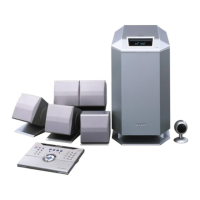
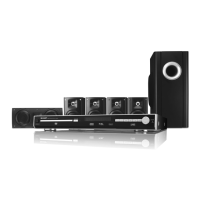
HT-CN300H Home Cinema Command consisting of HT-CN300H (main
unit), CP-CN300HF (front speakers), CP-CN300HC (center speaker)
and CP-CN300HR (surround speakers).
HOME CINEMA COMMAND
MODEL
HT-CN300H
OPERATION MANUAL
If you require any advice or assistance regarding
your Sharp product, please visit our web-site
www.sharp.co.uk/support.
Customers without Internet access may telephone
08705 274277 during office hours (or (01) 676 0648
if telephoning from Ireland).
0101

Other manuals for Sharp HT-CN300H

Questions and Answers

  • M
    Michelle SmithAug 12, 2025
    Why is there no sound coming from my Sharp Home Theater System?
    • J
      Joseph CampbellAug 13, 2025
      If you can't hear any sound from your Sharp Home Theater System, check if the volume level is set to "0". Also, verify that the speaker wires are correctly connected and that the speaker size is not set to NO (OFF). Finally, ensure that all other equipment is connected properly.
  • A
    Aaron RobertsAug 16, 2025
    Why is my Sharp Home Theater System remote control not working properly?
    • B
      beanjamieAug 16, 2025
      If your Sharp Home Theater System's remote control isn't working, consider these potential causes: ensure that the remote control isn't plugged in, verify the battery polarity, check if the batteries are dead, ensure the distance or angle is correct, check for obstructions in front of the remote control sensor, confirm the remote control sensor is connected to the main unit, check that the LEARN/TRANSMIT selector switch is not set to LEARN, ensure the remote control sensor is not exposed to strong light, and verify that a remote control for other equipment is not used simultaneously.
  • S
    Sarah WeissAug 20, 2025
    Why won't my Sharp HT-CN300H turn on with the remote control?
    • C
      Christopher BuckAug 20, 2025
      If your Sharp Home Theater System unit doesn't turn on with the remote, check if the AC power lead of the unit is plugged in. Also, make sure the remote control isn't plugged in and that the batteries are properly inserted.
  • S
    Susan WilliamsAug 23, 2025
    What to do if the sounds from speakers are not well balanced on Sharp HT-CN300H?
    • K
      Kathy PopeAug 23, 2025
      If the sounds from speakers of your Sharp Home Theater System are not well balanced, check if the speaker leads are connected to the wrong channels. Also, verify that each speaker is placed at the same distance from the listener and that all speakers are adjusted to the same level.
  • E
    Elizabeth HancockAug 27, 2025
    What to do if Sharp HT-CN300H Home Theater System does not respond when a button is pressed?
    • J
      jbrownAug 27, 2025
      If your Sharp Home Theater System is not responding when you press a button, set the unit to the power stand-by mode and then turn it back on. If the unit still malfunctions, reset it.
  • D
    diazpeterAug 31, 2025
    Why signals are not memorised in operation buttons for other equipment on Sharp Home Theater System?
    • C
      Christina AndrewsAug 31, 2025
      If signals are not memorised in operation buttons for other equipment of your Sharp Home Theater System, ensure that the remote control isn't plugged in and that the angle or the distance is correct for memorisation.
  • J
    jhughesSep 3, 2025
    How to fix a dark display on my Sharp HT-CN300H?
    • J
      Juan YoungSep 4, 2025
      If the display on your Sharp Home Theater System unit is dark, press the DIMMER button on the remote control.
  • K
    Kristin MaxwellSep 7, 2025
    What to do if timer playback does not start on Sharp Home Theater System?
    • J
      Jacob BlairSep 7, 2025
      To fix timer playback that doesn't start on your Sharp Home Theater System, reset the clock.

Summary

Important Instructions

Notes for UK and Ireland Users

Specific guidance for users in the UK and Ireland regarding the mains lead and plug.

Safety Warnings and Precautions

Critical safety information regarding power, voltage, and environmental hazards.

Product Overview

Included Accessories List

Lists all accessories provided with the SHARP HT-CN300H Home Cinema Command system.

Manual Contents Overview

Provides a summary of the manual's sections and their corresponding page numbers.

General Information

General Safety and Usage Precautions

Guidelines on positioning, ventilation, and avoiding hazards for safe operation.

Remote Control Layout and Buttons

Details the buttons and indicators on the remote control for system operation.

Main Unit Controls and Indicators

Identifies and explains the controls and displays on the main unit and subwoofer.

Speaker and Remote Sensor Details

Describes front, centre, surround speakers and the remote control sensor.

Connections

Connecting the Speakers

Step-by-step guide to connecting all speakers to the main unit by colour-coding.

Connecting Sensor and Aerials

Instructions for connecting the remote control sensor and FM/AM aerials.

Connecting External Devices

Guide to connecting TV, camcorder, satellite receiver, DVD player, VCR, and tape deck.

Connecting TV and DVD Player

Details for connecting TV via video/S-video and DVD player with audio/video inputs.

Connecting VCR, Camcorder, and Tape Deck

Specific connection instructions for VCR, camcorder, satellite receiver, and tape deck.

Powering the System

Instructions for plugging in the main unit and remote control for power.

Speaker Installation

Optimal Speaker Placement

Recommended arrangement of speakers for the best surround effect.

Wall Mounting Speakers

Detailed guide on how to securely mount speakers on a wall.

Remote Control

Remote Control Setup and Testing

Instructions for battery installation, testing, and opening the remote control cover.

Remote Control Main Unit Buttons

Explanation of buttons used to control the main SHARP unit.

Remote Control for Other Equipment

Details on switching control modes and buttons for operating other Sharp equipment.

Memory Buttons for External Devices

Describes how to use memory buttons for controlling DVD, TV, and VCR.

Programming Remote Control Buttons

Step-by-step guide to teaching the remote to control other equipment.

Storing and Initializing Remote Functions

Instructions for storing Memory 1 operations and resetting remote control to factory settings.

Basic Operation

Setting the System Clock

How to set the clock for accurate timer and display functions.

Display Brightness and Sound Settings

Adjusting display brightness, volume, bass, and equalizer modes.

Understanding Surround Sound Modes

Explains how Dolby Digital, DTS, and Dolby Pro Logic II provide surround sound effects.

Acoustic Effects of Sound Modes

Describes the acoustic effects of Standard, Dynamic, Virtual, and Stereo sound modes.

Selecting Sound Modes

How to select Standard, Virtual, and Stereo sound modes during playback.

Tuning and Receiving Radio Stations

Guide to tuning in to FM and AM radio stations, including auto-tuning.

Storing and Recalling Radio Stations

How to save favorite radio stations and recall them later.

Advanced Features

Introduction to Radio Data System (RDS)

Explains the RDS service and information displayed on the unit.

RDS Programme Type Codes

Details PTY codes for programme types, TP, and TA (Traffic Announcement).

Auto Station Programme Memory (ASPM)

How to automatically scan and store up to 40 RDS radio stations.

Recalling Stations by PTY and Name

How to search and select stations using programme type or station name.

Notes on RDS Operation and PTY Languages

Important notes regarding RDS reception, radio text, and PTY language settings.

Setting Clock via RDS Time Signal

Using the RDS time signal (CT data) to automatically set the unit's internal clock.

Setting Speaker Size and Type

How to configure speaker sizes and types for optimal sound.

Setting Speaker Delay and Test Tone

Adjusting speaker delay for sound staging and using the test tone.

Speaker Level Adjustment and Test Tone

Fine-tuning speaker volume levels and testing sound output.

Setting the Timer for Playback

How to set the unit to turn on and play a radio station at a specific time.

Sleep Timer Functionality

Setting the unit to automatically turn off after a specified duration.

References

Troubleshooting Common Issues

A guide to diagnosing and resolving operational problems with the system.

Remote Control and System Reset Procedures

Solutions for remote control malfunctions and how to reset the unit.

Error Messages and Indicators

Explains system error messages and what they signify.

Cleaning and Care Instructions

Guidelines for cleaning the unit's cabinet and avoiding damage.

General Specifications and Terminals

Overview of power, dimensions, weight, and input/output terminals.

Detailed Amplifier and Speaker Specifications

Detailed technical specifications for the amplifier, tuner, and speaker components.

TERMS OF GUARANTEE

Product Guarantee Terms and Conditions

Outlines the conditions, duration, and coverage of the product guarantee.

Sharp HT-CN300H Specifications

General IconGeneral
TypeHome Theater System
DVD PlayerYes
Supported MediaDVD, CD, USB
USB PortYes
HDMI OutputYes
BluetoothYes
Number of Speakers5.1

Related product manuals