IM-MT899H/IM-MT899W
– 20 –
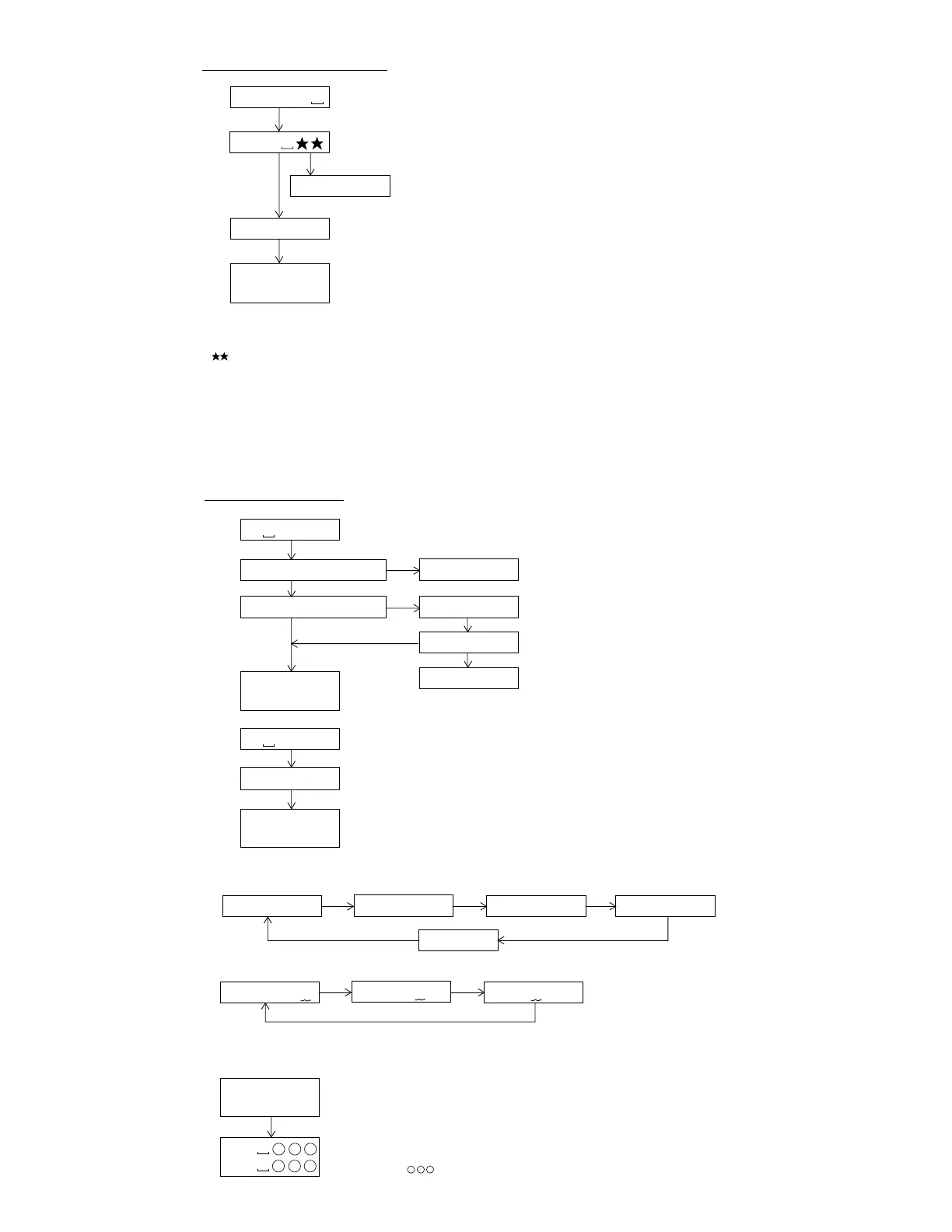
: ATT auto adjustment menu
: ATT adjustment error (adjustment value output)
: During ATT auto adjustment
Adjustment error
Normal end
: ATT adjustment error (adjustment value output)
: Continuous playback (high reflection)
: Continuous playback (low reflection)
PLAY
PLAY
A U T O 2
Servo ATT Auto Adjustment
A D J . O K
A D J . N G
S Q # # # #
A P # # # #
A T 2
* When the [STOP] button is pressed in specific menu, the "TEST MODE STOP" state is set.
* Move the pickup lens manually to the innermost periphery before performing the servo
ATT auto adjustment. (Refer to "Change of test mode menus" for the operation method.)
* " " represent the adjustment number as follows.
0 0 : Thread moving toward the most inner circumference
0 3 : Pit section tracking ATT setting
0 4 : Pit section focus ATT setting
0 6 : Sled external periphery move (low reflection only)
0 7 : TCRS ATT setting (low reflection only)
0 8 : Groove section tracking ATT setting (low reflection only)
0 9 : Groove section focus ATT setting (low reflection only)
: Continuous playback menu
SQ : Continuous playback (pit section)
AP : Continuous playback (groove section)
# # # # : Address
: Continuous playback (pit section)
: Continuous playback (groove section)
# # # # : Address
Continuous Playback
* When the [STOP] button is pressed in specific menu, the "TEST MODE STOP" state is set.
* In the start address set state the start address changes as follows when the [GROUP/CLEAR] button is pressed.
0 0 3 2
H
(initial value) 0 3 C 0
H
0 7 0 0
H
0 8 A 0
H
A d 0 0 3 2
A d 0 3 C 0
GROUP/
CLEAR
GROUP/
CLEAR
GROUP/CLEAR
GROUP/
CLEAR
A d 0 7 0 0
A d 0 8 A 0
* In the start address setting state the start address change digit changes when the [MODE/DISPLAY] button is pressed.
1st digit (initial value) 2nd digit 3rd digit
A d 0 0 5 0
A d 0 0 5 0
MODE/
DISPLAY
A d 0 0 5 0
• Continuous playback from current pickup position
: Continuous playback menu
: Start address setting
GROUP/CLEAR
T P L A Y
A d 0 0 3 2
PLAY
S Q # # # #
A P # # # #
• Continuous playback from any address
* In the start address set state the value of selection digit changes in the range of "0h to Fh"
when the [SKIP UP/DOWN] button is pressed.
* If the [MODE/DISPLAY] button is pressed in the continuous playback state, the mode is changed to the B-ATT setting
state of the ATT manual adjustment.
A d 0 9 5 0
PLAY
T P L A Y
S Q # # # #
A P # # # #
AUTO1 Practice finish ?
AUTO2 Practice finish ?
YES
YES
E r A D J
AUTO2 Practice
No error ?
A D J. N G
NO
NO
YES
NO
0 9 5 0
H
MODE/
DISPLAY
H B
L B
S Q # # # #
A P # # # #
: Continuous playback (pit section)
: Continuous playback (groove section)
# # # # : Address
: High-reflection pit section B-ATT (focus) setting
: Low-reflection groove section B-ATT (focus) setting
: ATT setting
MODE/
DISPLAY
MODE/
DISPLAY


 To Next Page