EasyManua.ls Logo

Sharp KC-A50E - User Manual

Sharp KC-A50E
62 pages
Print Icon
To Next Page IconTo Next Page
Loading...
R
Device of this mark is a trademark
of Sharp Corporation.
“Plasmacluster” and “Device of a cluster of
grapes” are registered trademarks of Sharp
Corporation in Japan, USA and elsewhere.
“High-Density 7000” is a trademark of
Sharp Corporation.
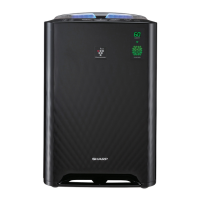
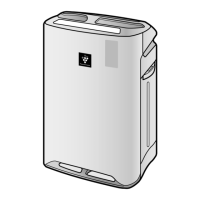
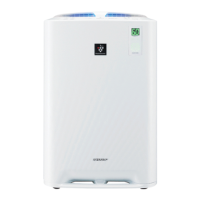
KC-A60E
KC-A50E
KC-A40E
Free standing type
Jenis berdiri sendiri
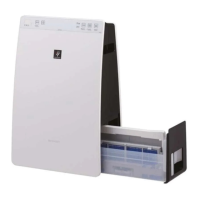
AIR PURIFIER
with Humidifying Function
OPERATION MANUAL
PEMBERSIH UDARA
dengan Fungsi Pelembapan
BUKU PANDUAN OPERASI
加湿空气净化器
使用说明书
ENGLISHMALAYSIA
直立式
中文
* The number in this technology mark indicates an
approximate number of ions supplied into air of 1 cm
3
,
which is measured around the center of a room with
the “high-density plasmacluser 7000” applicable floor
area (at 1.2 m height above the oor) at the maximum
wind volume in humidifying & air purifying mode, or
in air purifying mode, when a humidifier/air purifier or
an air purifier using the high-density plasmacluster
ion evolving device is placed close to a wall.
This product is equipped with a device corresponding to
this capacity.
KC-A60EA50EA40E-en.indd1 2011/05/1714:46:51

Questions and Answers

  • J
    Jorge MillsAug 17, 2025
    How to reset Sharp KC-A50E filter light?
    • K
      kimdanielAug 17, 2025
      If the Filter Indicator Light is illuminated on your Sharp Air Cleaner, replace the filters, connect the power cord to an outlet, and then press the Filter Reset Button.
  • J
    Jessica FoxAug 19, 2025
    Why does my Sharp Air Cleaner have an odor?
    • R
      raymond95Aug 20, 2025
      The discharged air from your Sharp Air Cleaner may have an odor if the filters are heavily soiled. Clean or replace the filters. Also, Plasmacluster Air Purifiers emit small traces of ozone which may produce an odour.
  • M
    Mike HamiltonAug 22, 2025
    What to do if Sharp KC-A50E Air Cleaner monitor is red when the air is clean?
    • C
      calvincruzAug 23, 2025
      If the Front Monitor on your Sharp Air Cleaner illuminates orange or red even when the air is clean, the dust sensor openings may be dirty or clogged. Gently clean the dust sensors.
  • T
    Trevor HurstAug 26, 2025
    Why Sharp Air Cleaner doesn't work with cigarette smoke?
    • S
      Scott ToddAug 26, 2025
      If your Sharp Air Cleaner doesn't operate when cigarette smoke is in the air, check the unit's location. Ensure the sensor can detect smoke and that the dust sensor openings aren't blocked. If they are, clean the openings.
  • M
    Mark PriceAug 28, 2025
    What to do if Sharp KC-A50E Air Cleaner monitor is green when the air is impure?
    • T
      Terry LopezAug 28, 2025
      If the Front Monitor on your Sharp Air Cleaner illuminates green even when the air is impure, unplug the unit, wait one minute, and plug it in again.
  • R
    rebeccalaneAug 31, 2025
    What does it mean when fan speed is flashing on Sharp Air Cleaner?
    • L
      Laura AndersonAug 31, 2025
      If the Fan Speed Indicator Light is flashing on your Sharp Air Cleaner, turn the power OFF to cancel the error display, wait one minute, and then turn the power ON.
  • R
    Rebekah WilsonSep 2, 2025
    Why water level in Sharp Air Cleaner doesn't decrease?
    • M
      Michelle KingSep 2, 2025
      If the water level in the tank of your Sharp Air Cleaner does not decrease or decreases slowly, check if the Humidifying Tray and Water Tank are correctly installed. Also, inspect the Humidifying Filter and clean or replace it if heavily soiled.
  • T
    Timothy SimonSep 5, 2025
    Why Sharp KC-A50E Air Cleaner water supply light doesn't work?
    • P
      Patrick WheelerSep 5, 2025
      If the Water Supply Indicator Light does not illuminate when the tank is empty on your Sharp Air Cleaner, check the Styrofoam float for impurities. Clean the Humidifying Tray and ensure the unit is on a level surface.
  • K
    Kimberly StewartSep 7, 2025
    What does it mean when clean air light is flashing on Sharp KC-A50E Air Cleaner?
    • T
      Tim HooverSep 8, 2025
      If the Clean Air & Humidify Indicator Light is flashing on your Sharp Air Cleaner, verify if the Humidifying Filter, Humidifying Tray, and Water Tank are properly installed, and then turn the power ON again.
  • A
    Anthony DanielsSep 12, 2025
    Why is Sharp KC-A50E Air Cleaner monitor turned off?
    • S
      Stacey RomeroSep 12, 2025
      If the Front Monitor is turned off on your Sharp Air Cleaner, check to see if the Lights OFF Mode is selected. If so, then press the Lights Control Button to activate the indicator lights.

Summary

Important Safety Instructions

Warning

Key warnings to reduce risks of shock, fire, or injury.

Cautions Concerning Operation

Precautions for operating the unit safely and correctly.

Installation Guidelines

Proper placement and setup instructions for optimal performance.

Filter Guidelines

Recommendations for filter care and maintenance.

Part Names

Front and Back

Identification of external and internal parts of the unit.

Included Accessories

List of items included with the air purifier.

Preparation

Filter Installation

Step-by-step guide for installing the air filters.

Refilling the Water Tank

Instructions on how to fill the water tank for humidification.

Operation

Clean Air & Humidify

Operating mode for cleaning air and adding humidity.

Clean Air

Operating mode for air purification without humidification.

Clean Ion Shower

Mode for releasing Plasmacluster ions with strong airflow.

Fan Speed

Adjusting the fan speed for different operation modes.

Plasmacluster Ion On;Off

Control for activating or deactivating the Plasmacluster function.

Useful Function

Light Control

Adjusting the brightness of the unit's indicator lights.

Child Lock

Locking the unit's controls to prevent accidental changes.

Sound Indicator Setting

Configuring audible alerts for unit status.

Adjustment of Sensor Detection Sensitivity

Customizing sensor sensitivity for air quality monitoring.

Care and Maintenance

Filter Indicator

Understanding the filter replacement indicator light.

Care Index

Overview of parts requiring maintenance and their indicators.

Humidifying Disinstallation

Procedure for removing humidifying parts for cleaning.

Water Tank

Instructions for cleaning the water tank.

Humidifying Filter

Cleaning procedures for the humidifying filter.

Humidifying Tray and Cover

Cleaning the humidifying tray and its cover.

Back Panel

How to clean the back panel, including the pre-filter.

Deodorizing Filter

Instructions for washing and drying the deodorizing filter.

Unit

Cleaning the exterior of the air purifier unit.

Filter Replacement

Replacement Timing

Guidance on when to replace the air filters.

Replacement Filter Model

Information on ordering replacement filter models.

Disposal of Filters

Proper methods for disposing of used filters.

Troubleshooting

Common Issues and Remedies

Troubleshooting common operational problems and their solutions.

Float and Roller Installation

Instructions for installing the float and roller components.

Auto Restart Function

Explanation and settings for the automatic restart feature.

Error Display Codes

Interpreting digital indications and error codes.

Specifications

Model Specifications

Detailed technical specifications for each model.

Notes on Specifications

Explanations and conditions related to specification data.

Standby Power

Information on the unit's standby power consumption.

Sharp KC-A50E Specifications

General IconGeneral
FunctionsAir Purification, Humidification
Recommended Room SizeUp to 38 m²
Filter TypeHEPA Filter, Activated Carbon Filter
Humidification Capacity500 ml/h
Weight7.5 kg
TypeAir Purifier with Humidifier

Related product manuals