2008-03-14
LC-19LE430E/UK, LC-22LE430E/UK, LC-26LE430E/UK, LC-32LE430E/UK
43
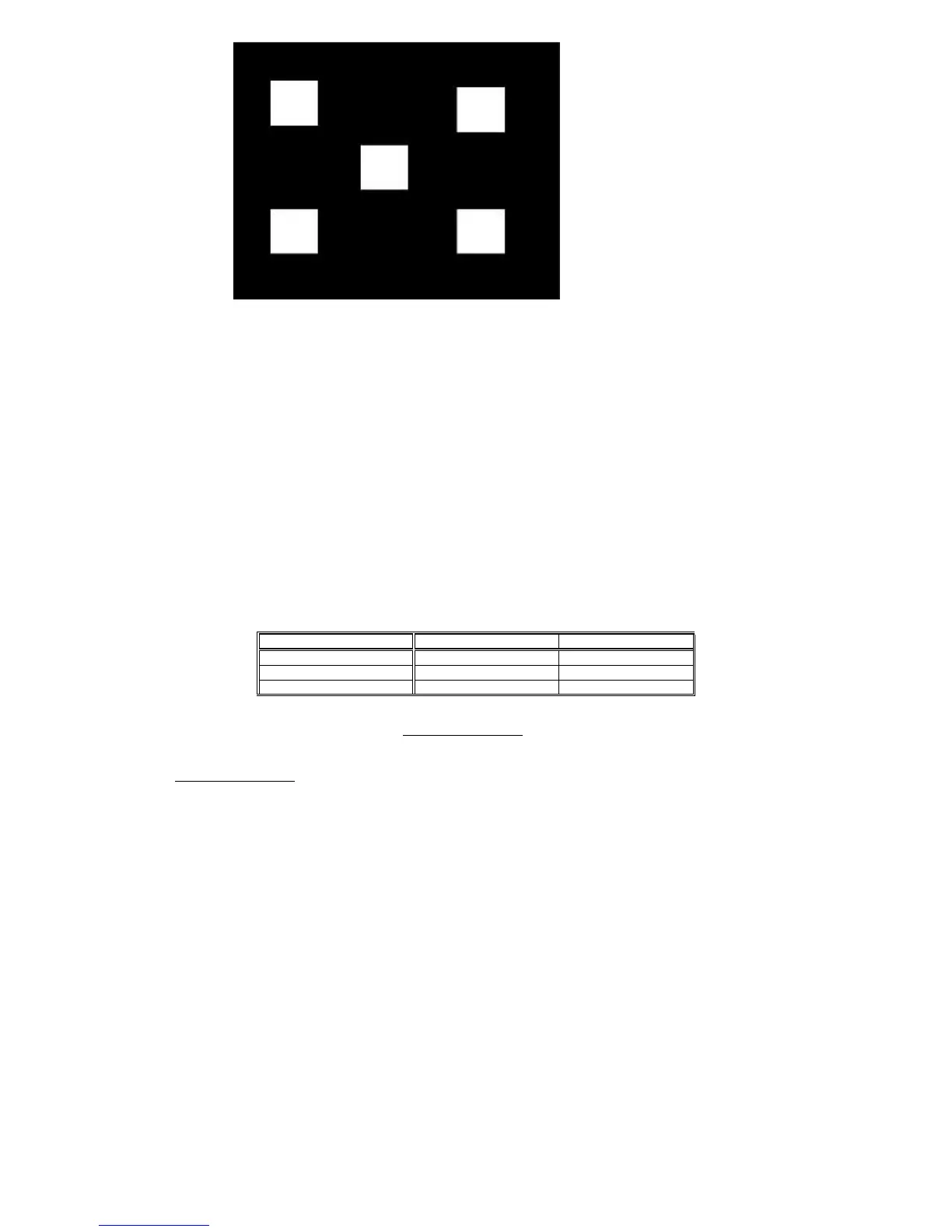
Pattern-1
Alignment method:
Initial Set-up:
1. Select source as “PC”.
2. Set Contrast = 58 (Sharp) and Brightness=100 (Sharp) , at normal menu mode.
3. Apply “5 white block”(pattern-1) pattern by VGA pattern generator.
4. Enter factory mode menu: press MENU + Numeric keys “1999” + press PRE PR (factory mode menu).
Alignment:
At factory mode menu, select AUTO_COLOR item. Then press “OK” key to adjust ADC_GAIN_R, ADC_GAIN_G, ADC_GAIN_B and
ADC_OFFSET_R, ADC_OFFSET_G, ADC_OFFSET_B. Then store those values to NVM.
Set Contrast = 100 (Sharp) and Brightness=100 (Sharp)
Check color temperature specification with PC mode.
Color temperature Normal/Warm/Cool (x, y) co-ordinates specification:
Table 5: Reading with Konica Minolta CS-200
.
Note:
1. Use Konica Minolta CS-200
. for color coordinates and luminance check.
2. For suitable mass production at factory, colour analyzers CA-210 can be applied. But, befor measureing ,all CA-210 should be coordinates
and proofread with a Charoma Meter (CS-200) or equivalent instrument and a reference TV set.
3. Check the luminance in the center of the screen with 100% White. And to Brightness control at 100; Contrast control at 100
Luminance > 200 cd/m
2
(Typ.) [ For LC-19LE430E only at color temp.- *warm mode ]
> 200 cd/m
2
(Typ.) [ For LC-22LE430E only at color temp.-*warm mode ]
> 400 cd/m
2
(Typ.) [ For LC-26LE430E only at color temp.- cool mode ]
>450 cd/m
2
(Typ.) [ For LC-32LE430E only at color temp.- cool mode ]
> 450 cd/m2 (Typ.) [ For LC-37LE320E/RU/E(UK) only at color temp.- cool mode ]
> 450 cd/m2 (Typ.) [ For LC-42LE320E/RU/E(UK) only at color temp.- cool mode ]
Picture Mode x y
Cool (12000K) 0.272±0.010 0.277±0.010
Normal (9000K) 0.289±0.015 0.291±0.015
Warm (6500K) 0.314±0.015 0.319±0.015






 To Next Page