Using external equipment
You can connect many types of external equipment to your TV like a DVD player, VCR, Digital TV tuner, HDMI
equipment, game console or camcorder.
POWER
DISPLAY INPUT
CD
MUTE
CD
@®®
(9@@
FREEZE FLASHBACK
SLEEP MENU
6v' E5 E
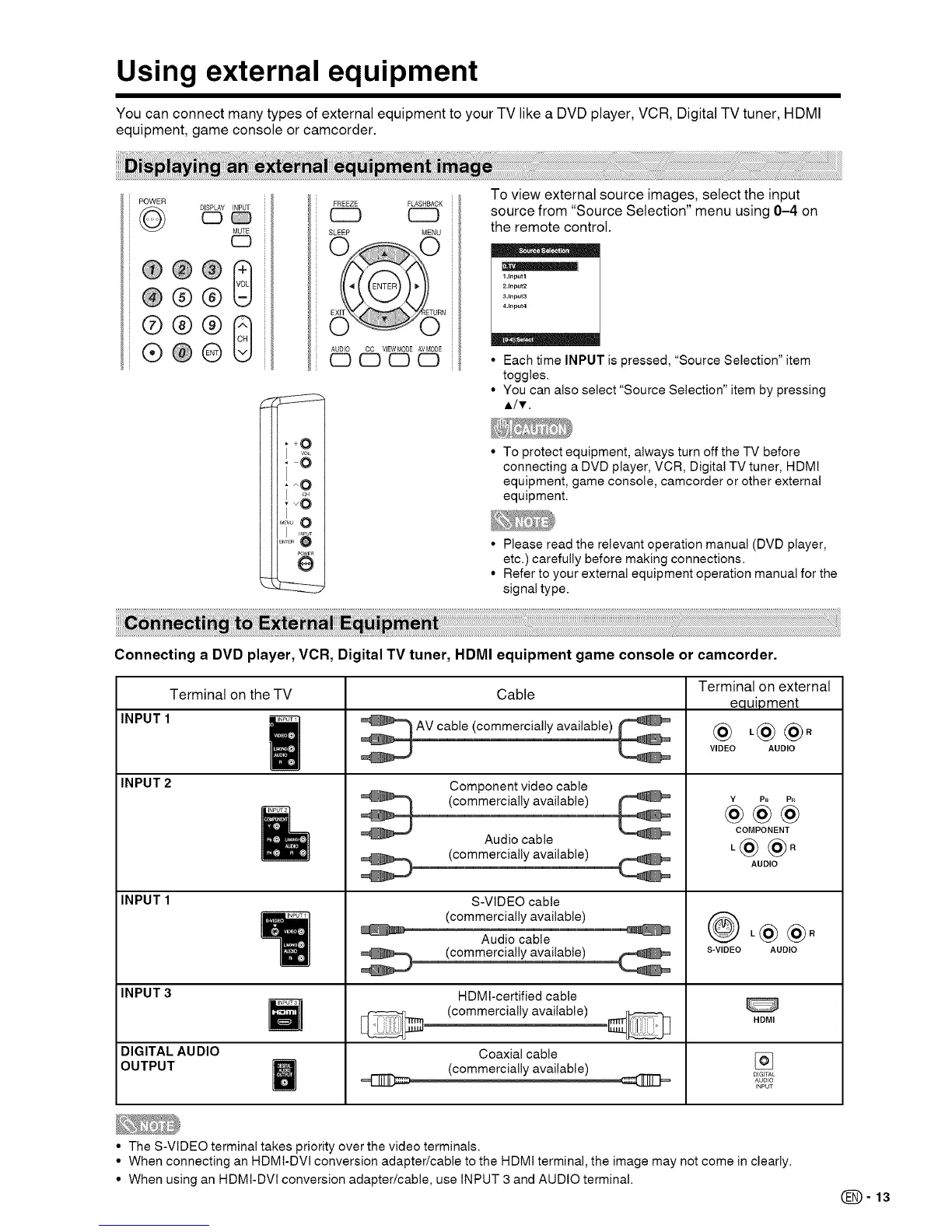
To view external source images, select the input
source from "Source Selection" menu using 0-4 on
the remote control.
1.Input1
2.Input2
3.Input3
4.Input4
Each time INPUT is pressed, "Source Selection" item
toggles.
You can also select "Source Selection" item by pressing
A/T.
To protect equipment, always turn off the TV before
connecting a DVD player, VCR, Digital TV tuner, HDMt
equipment, game console, camcorder or other external
equipment.
• Please read the relevant operation manual (DVD player,
etc.) carefully before making connections.
• Refer to your external equipment operation manual for the
signal type.
Connecting a DVD player, VCR, Digital TV tuner, HDMI equipment game console or camcorder.
Terminal on the TV
INPUT 1
INPUT 2
INPUT 1
INPUT 3
DIGITAL AUDIO
OUTPUT
I_UT1
|
!
Cable
,_AV cable (commercially available)
Component video cable
(commercially available)
Audio cable
S-VIDEO cable
(commercially available)
Audio cable
(commercially available)
HDMt-certified cable
(commercially available)
Coaxial cable
(commercially available)
Terminal on external
equipment
@ ,@@°
VIDEO AUDIO
Y PB P_
@@@
COMPONENT
,@@°
AUDIO
,@@.
S-VIDEO AUDIO
HDMI
DIGI (AL
AUDIO
INPUT
• The S-VIDEO terminal takes priority over the video terminals.
• When connecting an HDMt-DVl conversion adapter/cable to the HDMI terminal, the image may not come in clearly.
• When using an HDMI-DVI conversion adapter/cable, use INPUT 3 and AUDIO terminal.
(_=13




 To Next Page