Appendix
iiiiiii'_i!_i_i_iii!iili_ii_iiii_iiii_i!_!i_!i_!i_!i_!i_!i_!i_!i_!i_!i_!i_!i_!i_!i_!i_!i_!i_!i_!i_!i_!i_!i_!i_!i_!i_!i_!i_!i_!i_!i_!i_!i_!i_!i_!i_!i_!i_!i_!i_!i_!i_!i_!i_!i_!i_!i_!i_!i_!i_!i_!i_!i_!i_!i_!i_!i_!i_!i_!i_!i_!i_!i_!i_!i_!i_!i_!i_!i_!i_!i_!i_!i_!i_!i_!i_!i_!i_!i_!i_!i_!i_!i_!i_!i_!i_!i_!i_!i_!i_!i_!i_!i_!i_!i_!i_!i_!i_!i_!i_!i_!i_!i_!i_!i_!i_!i_!i_!i_!i_!i_!i_!i_!i_!i_!i_!i_!i_!i_!i_!i_!i_!i_!i_!i_!i_!i_!i_!i_!i_!i_!i_!i_!i_!i_!i_!i_!i_!i_!i_!i_!i_!i_!i_!i_!i_!i_!i_!i_!i_!i_!i_!i_!i_!i_!i_!i_!i_!i_!i_!i_!i_!i_!i_!i_!i_!i_!i_!i_!i_!i_!i_!i_!i_!i_!i_!i_!i_!i_!i_!i_!i_!i_!i_!i_!i_!i_!i_!i_!i_!i_!i_!i_!i_!i_!i_!i_!i_!i_!i_!i_!i_!i_!i_!i_!i_!i_!i_!i_!i_!i_!i_!i_!i_!i_!i_!i_!i_!i_!i_!i_!i_!i_!i_!i_!i_!i_!i_!i_!i_!i_!i_!i_!i_!i_!i_!i_!i_!i_!i_!i_!i_!i_!i_!i_!i_!i_!i_!i_!i_!i_!i_!i_!i_!i_!i_!i_!i_!i_!i_!i_!i_!i_!i_!i_!i_!i_!i_!i_!i_!i_!i_!i_!i_!i_!i_!i_!i_!i_!i_!i_!i_!i_!i_!i_!i_!i_!i_!i_!i_!i_!i_!i_!i_!i_!i_!i_!i_!i_!i_!i_!i_!i_!i_!i_!i_!i_!i_!i_!i_!i_!i_!i_!i_!i_!i_!i_!i_!i_!i_!i_!i_!i_!i_!i_!i_!i_!i_!i_!i_!i_!i_!i_!i_!i_!i_!i_!i_!i_!i_!i_!i_!i_!i_!i_!i_!i_!i_!i_!i_!i_!i_!i_!i_!i_!i_!i_!i_!i_!i_!i_!i_!i_!i_!i_!i_!i_!i_!i_!i_!i_!i_!i_!i_!i_!i_!i_!i_!i_!i_!i_!i_!i_!i_!i_!i_!i_!i_!i_!i_!i_!i_!i_!i_!i_!i_!i_!i_!i_!i_!i_!i_!i_!i_!i_!i_!i_!i_!i_!i_!i_!i_!i_!i_!i_!i_!i_!i_!i_!i_!i_!i_!i_!i_!i_!i_!i_!i_!i_!i_!i_!i_!i_!i_!i_!i_!i_!i_!i_!i_!i_!i_!i_!i_!i_!i_!i_!i_!i_!i_!i_!i_!i_!i_!i_!i_!i_!i_!i_!i_!i_!i_!i_!i_!i_!i_!i_!i_!i_!i_!i_!i_!i_!i_!_
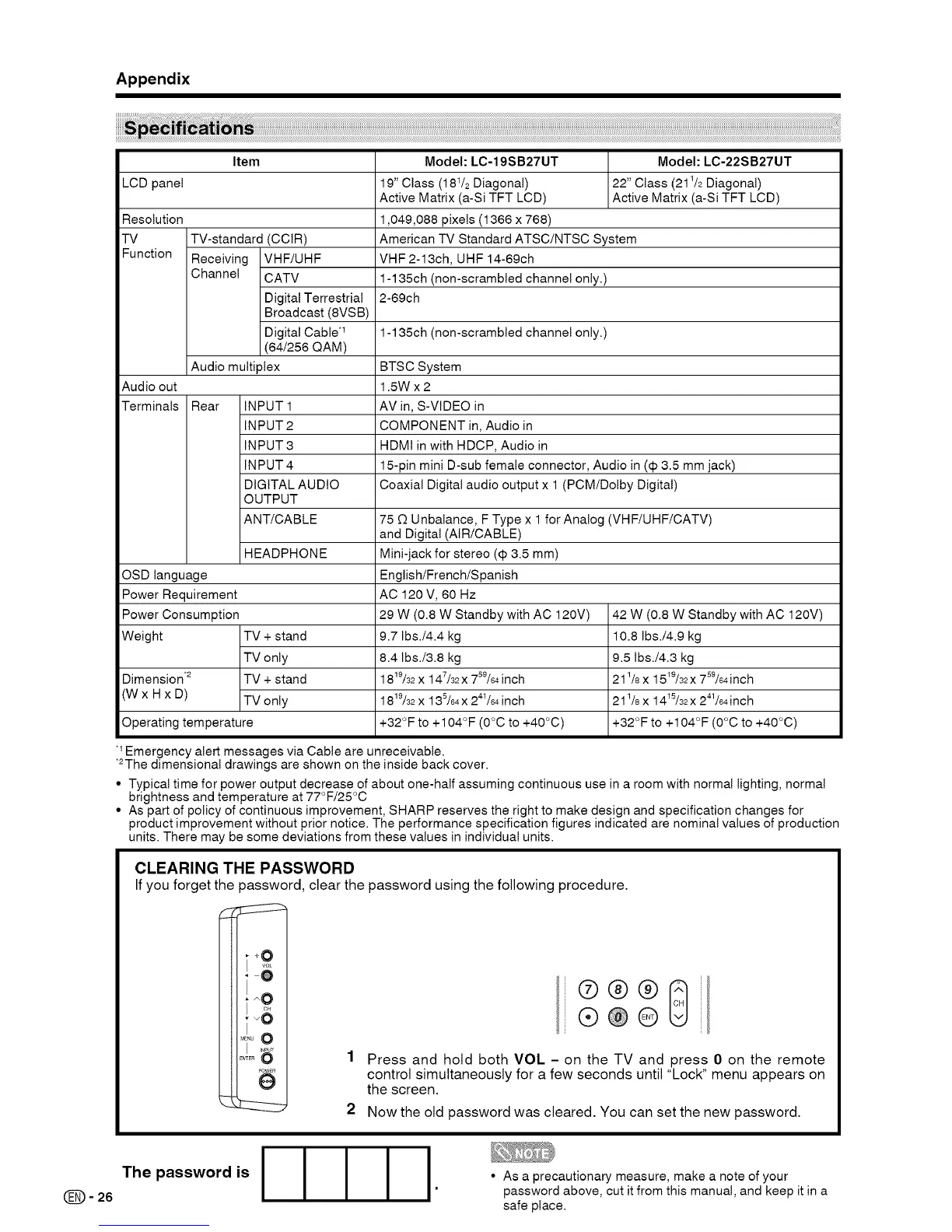
Item Model: LC-19SB27UT Model: LC-22SB27UT
LCD panel 19" Class (181/2 Diagonal) 22" Class (211/2Diagonal)
Active Matrix (a-Si TFT LCD) Active Matrix (a-Si TFT LCD)
Resolution 1,049,088 pixels (1366 x 768)
TV TV-standard (CCIR) American TV Standard ATSC/NTSC System
Function Receiving VHF/UHF VHF 2-13ch, UHF 14-69ch
Channel CATV 1-135ch (non-scrambled channel only.)
Digital Terrestrial 2-69ch
Broadcast (8VSB)
Digital Cable .1 1-135ch (non-scrambled channel only.)
(64/256 QAM)
Audio multiplex BTSC System
Audio out 1.5W x 2
Terminals Rear INPUT 1 AV in, S-VIDEO in
INPUT 2 COMPONENT in, Audio in
INPUT 3 HDMI in with HDCP, Audio in
INPUT 4 15-pin mini D-sub female connector, Audio in (€ 3.5 mm jack)
DIGITAL AUDIO Coaxial Digital audio output x 1 (PCM/Dolby Digital)
OUTPUT
ANT/CABLE 75 [3 Unbalance, F Type x 1 for Analog (VHF/UHF/CATV)
and Digital (AIR/CABLE)
HEADPHONE Mini-jack for stereo (€ 3.5 mm)
OSD language English/French/Spanish
Power Requirement AC 120 V, 60 Hz
Power Consumption 29 W (0.8 W Standby with AC 120V) 42 W (0.8 W Standby with AC 120V)
Weight TV + stand 9.7 Ibs./4.4 kg 10.8 1bs./4.9 kg
TV only 8.4 1bs./3.8 kg 9.5 lbs./4.3 kg
Dimension .2 TV + stand 1819/32X 147/32X 759/64 inch 211/8x 1519/32x 799/94inch
(W x H x D) TV only 1819/32x 139/64x 241/64inch 211/8x 1419/32x 241/94inch
Operating temperature +32°F to +104°F (O°C to +40°C) +32°F to +104°F (O°C to +40°C)
Emergency alert messages via Cable are unreceivable.
*2The dimensional drawings are shown on the inside back cover.
• Typical time for power output decrease of about one-half assuming continuous use in a room with normal lighting, normal
brightness and temperature at 77°F/25°C
• As part of policy of continuous improvement, SHARP reserves the right to make design and specification changes for
product improvement without prior notice. The performance specification figures indicated are nominal values of production
units. There may be some deviations from these values in individual units.
CLEARING THE PASSWORD
If you forget the password, clear the password using the following procedure.
_ :zz:z::h
_ L:z:z:_ 2
®@@
®®@_
Press and hold both VOL - on the TV and press 0 on the remote
control simultaneously for a few seconds until "Lock" menu appears on
the screen.
Now the old password was cleared. You can set the new password.
(_= 26
The password is
• As a precautionary measure, make a note of your
password above, cut it from this manual, and keep it in a
safe place.




 To Next Page