13
LC-26GA5E
LC-32GA5E
LC-26GA5E
LC-32GA5E
Adjustment Recommendations
The adjustment values are set to the optimum conditions at the factory before shipping. If a value should become
improper or an adjustment is required due to part replacement, make an adjustment according to the following order:
1. AGC (IF Menu). Page 15.
2. Colour OSC. Page 16.
3. Common Bias. Page 19 (LCD CONT Menu - COMBIAS)
4. ADC. Page 18.
5. TV mode White Balance. Page 19 (WBALANC Menu).
6. HD Components White Balance. Page 22.
7. PC White Balance. Page 22.
NOTE: Do not change any other adjustment of those above listed, unless you have been advised to do so by a
Sharp representative.
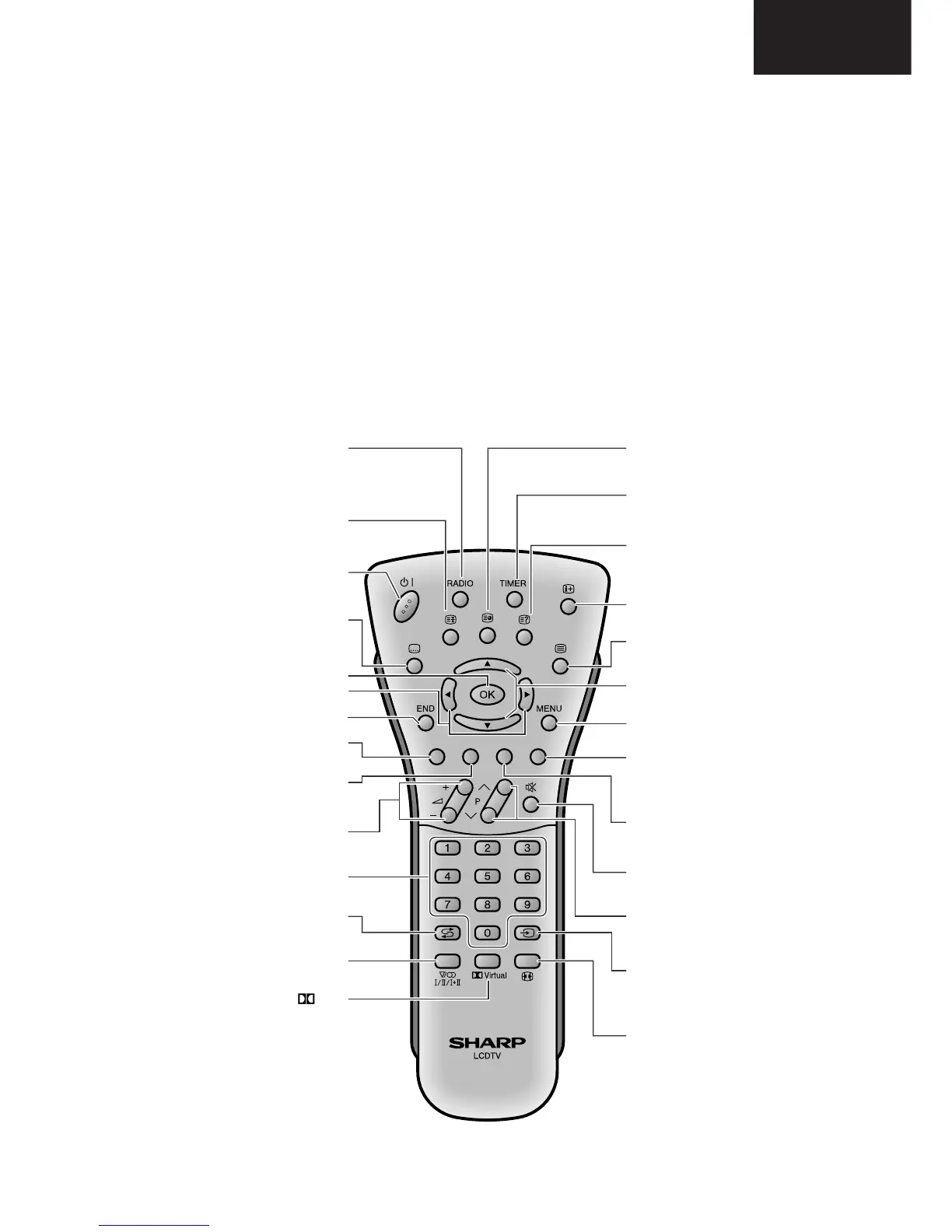
Remote Control Unit
RADIO
Displays the RADIO Menu
screen and make adjustments
for FM RADIO mode.
(3 Hold)
Temporarily holds the
current Teletext page.
B (Standby/On)
Turns on and off the power or
enters standby mode.
[ (Subtitle)
Displays the Teletext
Subtitle directly.
END
Returns to normal screen.
i (e)/(f) (Volume)
i (e) Increases the volume.
i (f) Decreases the volume.
Programme Select
Changes channels or sets the
page in Teletext mode.
A (Flashback)
Returns to the previous
channel.
Sound
Select the sound multiplex mode.
Virtual
Displays the SOUND DOLBY
EFFECTS Menu screen.
1 (Subpage)
Displays the Teletext Subpage.
TIMER
Displays the FEATURE TIMERS
Menu screen directly.
k (Reveal)
Displays hidden information
such as solutions to riddles and
puzzles in Teletext mode.
p (Display/Info)
Displays the programme
information.
m (Teletext)
Displays the Teletext mode
M (Mute)
Switches the sound on and off.
b (Input mode)
Displays the input source
between TV, EXT1, EXT2, EXT2
S-VIDEO, EXT3, EXT3 S-VHS,
EXT4 and PC INPUT modes.
f (WIDE mode)
Displays the WIDE MODES
Menu screen directly, to select
your desired screen size.
Sets the area of maginification in
Teletext mode.
MENU
Displays the menu.
P (r)/(s)
r Increases programme number.
s Decreases programme number.
Red
Displays the PICTURE LEVELS
Menu directly.
Volume and Right/
Left Selection
OK
Green
Displays the SOUND SPEAKER
LEVELS Menu directly.
Programmes list, Upwards/
Downwards Selection
Blue
Teletext mode: Select a page.
Menu mode: MaKe some
adjustments.
Yellow
Teletext mode: Select a page.







 To Next Page