38
Using a PC
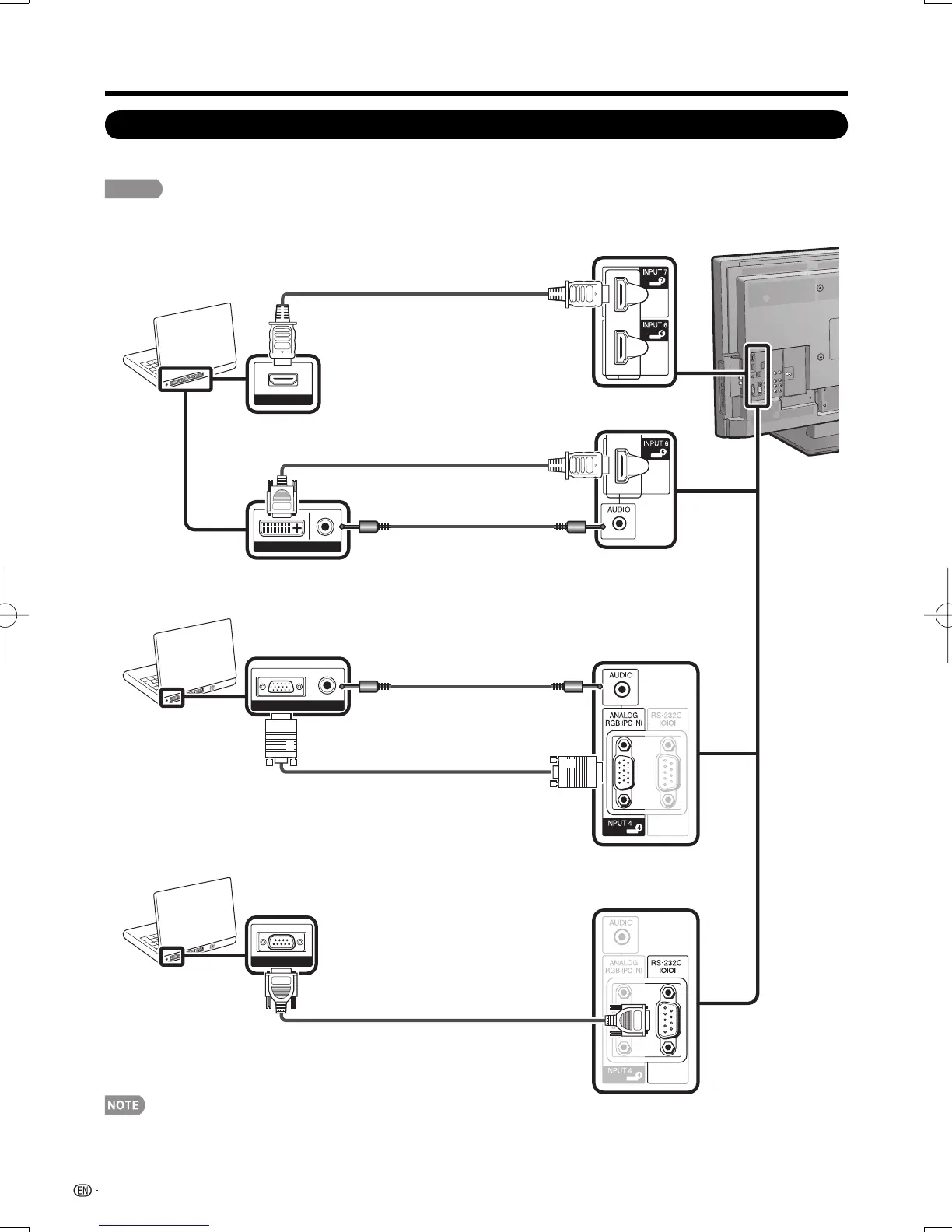
For connecting the TV to a PC, use commercially available cables.
CAUTION
To protect the PC, always turn off the TV before connecting it.
■
When using HDMI cable:
•
• When connecting a PC to the INPUT 4, set "PC Audio Select" to "Input 4 (PC)". (See page 40.)
• When connecting a PC to the INPUT 6, set "PC Audio Select" to "Input 6 (HDMI)". (See page 40.)
• The HDMI terminals only support digital signal.
• Refer to page 40 for a list of PC signals compatible with the TV.
Connecting a PC
RS-232C
AUDIORGB
HDMI OUT
AUDIODVI OUT
HDMI-certifi ed cable
HDMI-DVI conversion cable
INPUT 6
Ø 3.5 mm stereo minijack cable
■
When using analog RGB cable:
■
When using RS-232C serial control cable:
Ø 3.5 mm stereo minijack cable
RGB cable
INPUT 4
RS-232C serial control cable (cross type)
RS-232C
INPUT 5, 6, 7 or 8
LC-32LE700UNE.indb38LC-32LE700UNE.indb38 2009/06/2422:53:212009/06/2422:53:21












 To Next Page