LC-42/46/52D85X
6 – 18
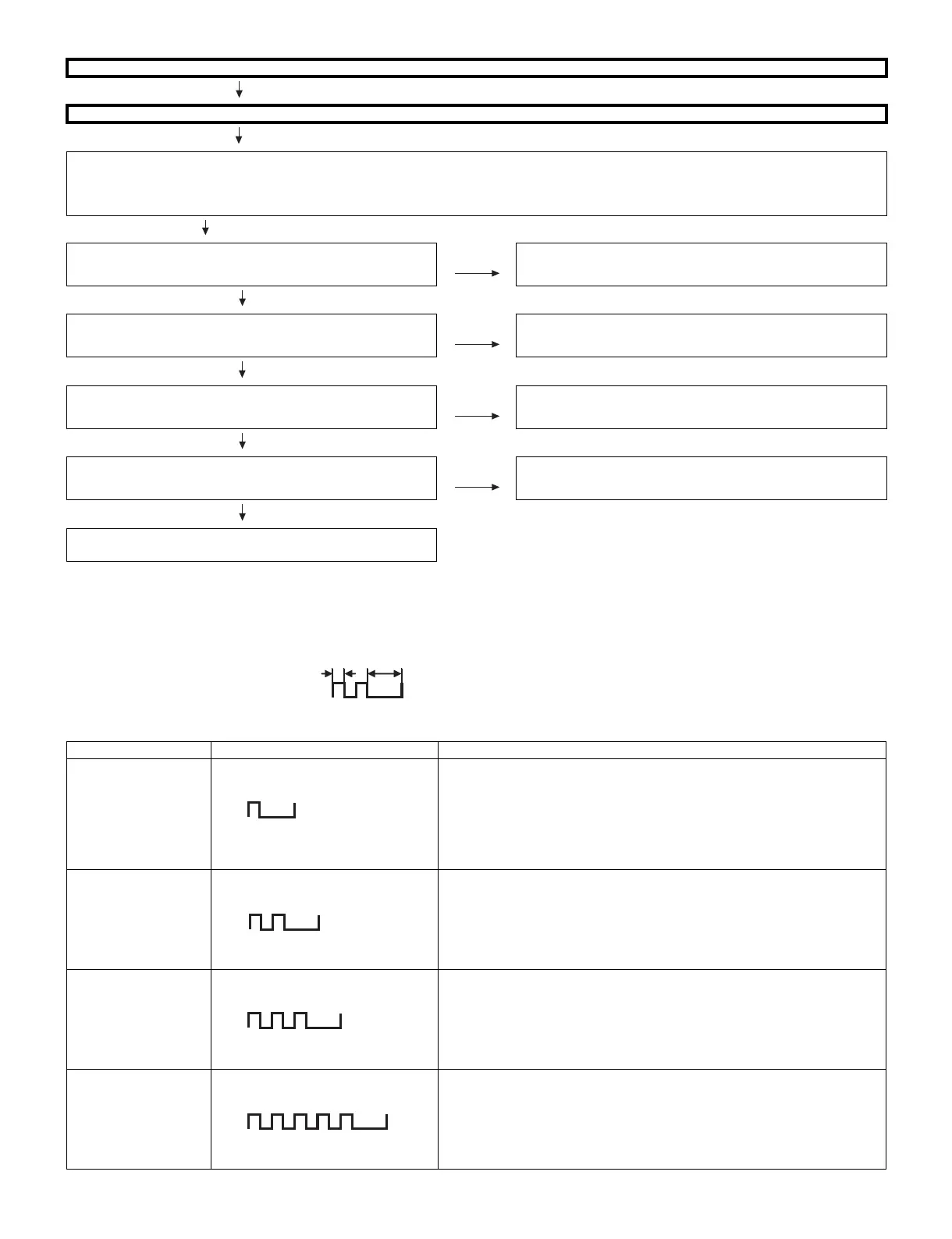
<During external connection> No picture on the monitor (4)
SCART2:
No picture from INPUT3 appears on MONITOR OUT- connected monitor.
Checklist:
1) The picture is sent to the monitor in a CVBS signal if the source during display is TV, CVBS or Y/C of INPUT1-3.
When sent by component, etc., that signal is not sent to the monitor.
2) When the monitor picture is not sent and is not displayed on the monitor, refer to “No picture” for each terminal.
SUB UNIT:
Is CVBS signal input from pin (51) of IC506 to pin (6) of
MONITOR OUT (J1701)?
YES Check the setting of an external input device that connects of
J1701.
NO
Is CVBS signal input from pin (5) of the connector P501 to pin (3)
of IC506 (VIDEO SELECTOR)?
YES Check the IC506 and its peripheral circuits.
MAIN UNIT: NO
Is CVBS signal input from pin (6) of the input terminal J901 to pin
(5) of the connector (P501)?
YES Check the connector (P501/P901)
NO
Is V3_PLUG signal of the CVBS signal detection function from
pin (7) of the input terminal J901 normal?
YES Check the setting of an external input device that connects of
J901.
NO
Check between V3_PLUG_LINE J901 and pin (2) of IC506 in the
SUB UNIT. (Connector P901/P501, etc.)
LED flashing patterns for error notification
1) Power red LED Remarks
Error type Power red LED operation (1 cycle) Description
Lamp failure
Flashes once: Fast
ERR_PNL(IC2002_43pin): Abnormal L. Confirmed after 5 consecutive detec-
tions at 1 second intervals (detected during backlight light on)
Note that after five detection counts, the lamp cannot be activated except in the
monitoring process. (For the first time, at inverter reset only, error is not OFF)
Accumulated counts are cleared to 0 when the corresponding setting in the pro-
cess A is made, when the power is ON by pressing the [CH_DOWN] and
[VOL_UP] key together at the LCD TV set.
Power failure
Flashes twice
Refer to “Power failure details”.
Communication failure
with main CPU
Flashes 3 times
Refer to “Communication failure details”.
Communication line failure or main CPU(IC8101) communication failure.
→ Check main CPU (IC8101).
Monitor temp. failure
Flashes 5 times
If the panel temperature is 60°C or more for 15 seconds or more in a row, CAU-
TION appears on the OSD of AVC.
If the panel temperature is 60°C or more for 15 seconds or more in a row, error
standby is activated.
(MONITOR MAX TEMP of process adjustment (28/32): Change of temperature
failure AD value): Thermistor
250ms 1sec
H: On
L: Off
H: On
L: Off
H: On
L: Off
H: On
L: Off




 To Next Page