LC-42/46/52D85X
2 – 3
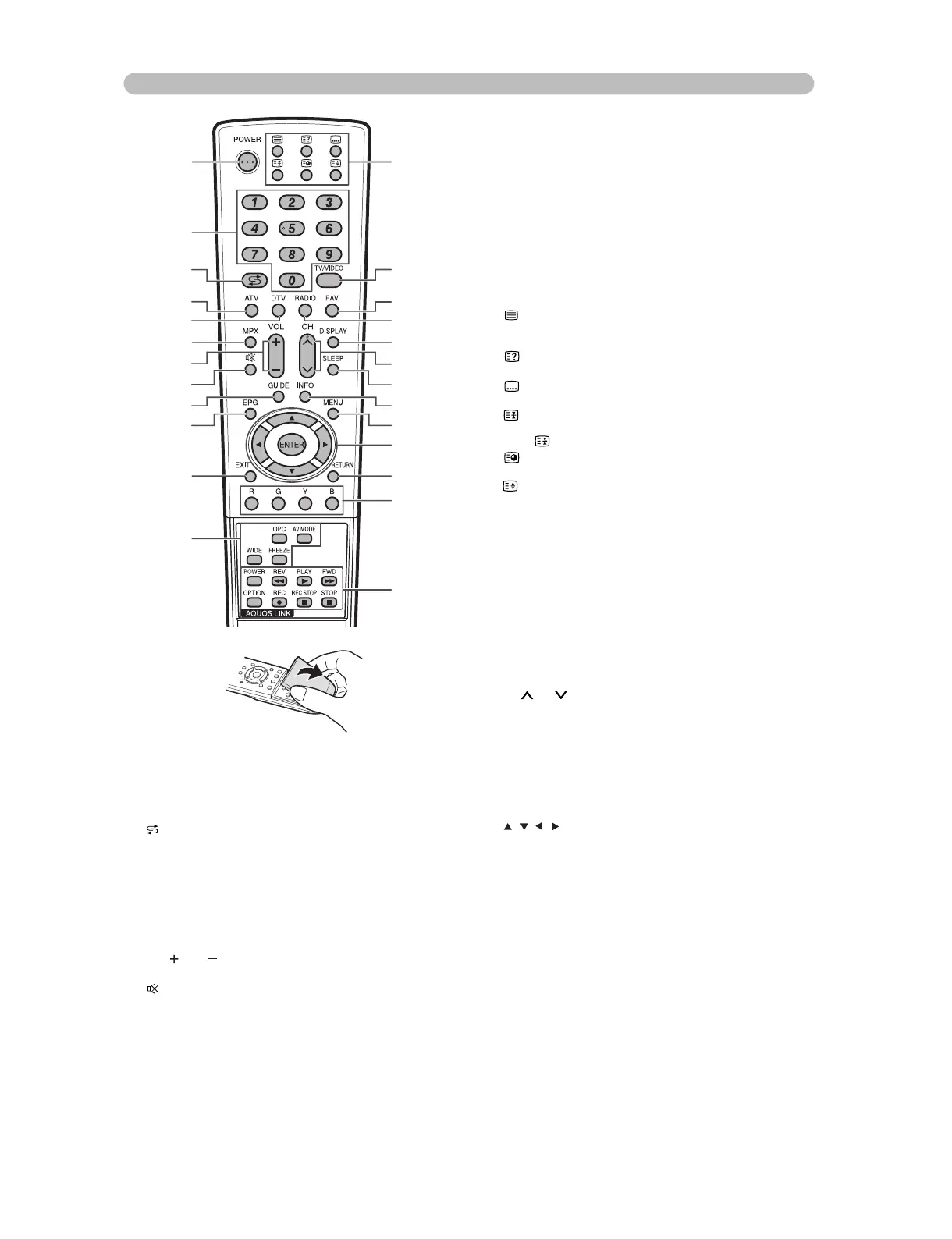
Remote control unit
1 POWER (STANDBY/ON)
To switch the power on and off.
2
3
0–9
Set the channel.
TELETEXT mode: Set the page.
(Flashback)
Press to return to the previous selected channel or external input
mode.
4ATV
Press to access ANALOGUE mode.
5DTV
Press to access DTV mode.
6 MPX
Select the sound multiplex mode.
7 VOL /VOL
Set the volume.
8 (Mute)
Mute the sound.
9 GUIDE
DTV mode: Display the programme list.
10 EPG
DTV mode: To display EPG (Electronic Programme Guide) screen.
11 EXIT
Turn off the On-Screen Display.
12 OPC
To switch the Optical Picture Control on and off.
AV MODE
Select a video setting.
WIDE
Change the wide image mode.
FREEZE
Freeze a motion picture on the screen.
13 (TELETEXT)
Select the TELETEXT mode. (all TV image, all TEXT image, TV/
TEXT image)
(Reveal hidden for TELETEXT)
TELETEXT mode: Display hidden characters.
(SUBTITLE for TELETEXT)
To turn the subtitles on and off.
(Hold)
TELETEXT mode: Stop updating Teletext pages automatically.
Press again to release the hold mode.
(Subpage)
Display the Teletext subpage directly.
(Top/Bottom/Full)
TELETEXT mode: Set the area of magnification.
14 TV/VIDEO (INPUT SOURCE)
Select an input source. (TV, INPUT 1, INPUT 2, INPUT 3, INPUT 4,
INPUT 5, INPUT 6, INPUT 7 (PC))
15 FAV.
Display the favourite channel setting.
16 RADIO
Press to access RADIO mode.
17 DISPLAY
Displays the channel or input information.
DTV mode: Displays the time information included in the DTV
broadcast.
TELETEXT mode: Displays the time information included in the
Teletext broadcast.
18 CH /CH
TV input mode: Select the channel.
TELETEXT mode: Select the page.
19 SLEEP
Set the Sleep timer.
20 INFO
DTV mode: Display the programme information.
21 MENU
Display the menu screen.
22 / / / (Cursor)
Select a desired item on the setting screen.
ENTER
Execute a command.
23 RETURN
MENU mode: Return to the previous menu screen.
24 Colour (Red/Green/Yellow/Blue)
Select four preset favourite channels in four different categories.
While watching, you can toggle the selected channels by pressing
R, G, Y and B.
TELETEXT mode: Select a page.
25 AQUOS LINK buttons
If external equipment such as a AQUOS BD Player is connected
via HDMI cables and is AQUOS LINK compatible, you can use
these AQUOS LINK buttons.
2
6
11
12
1
8
7
10
5
9
17
18
23
21
20
14
15
19
16
24
25
22
13
4
3




 To Next Page