20
LC-42LB261U Sharp 42" LED TV
www.sharpusa.com
Component video (better)
1 Make sure that your TV’s power cord is unplugged and the DVD or Blu-ray player is turned off.
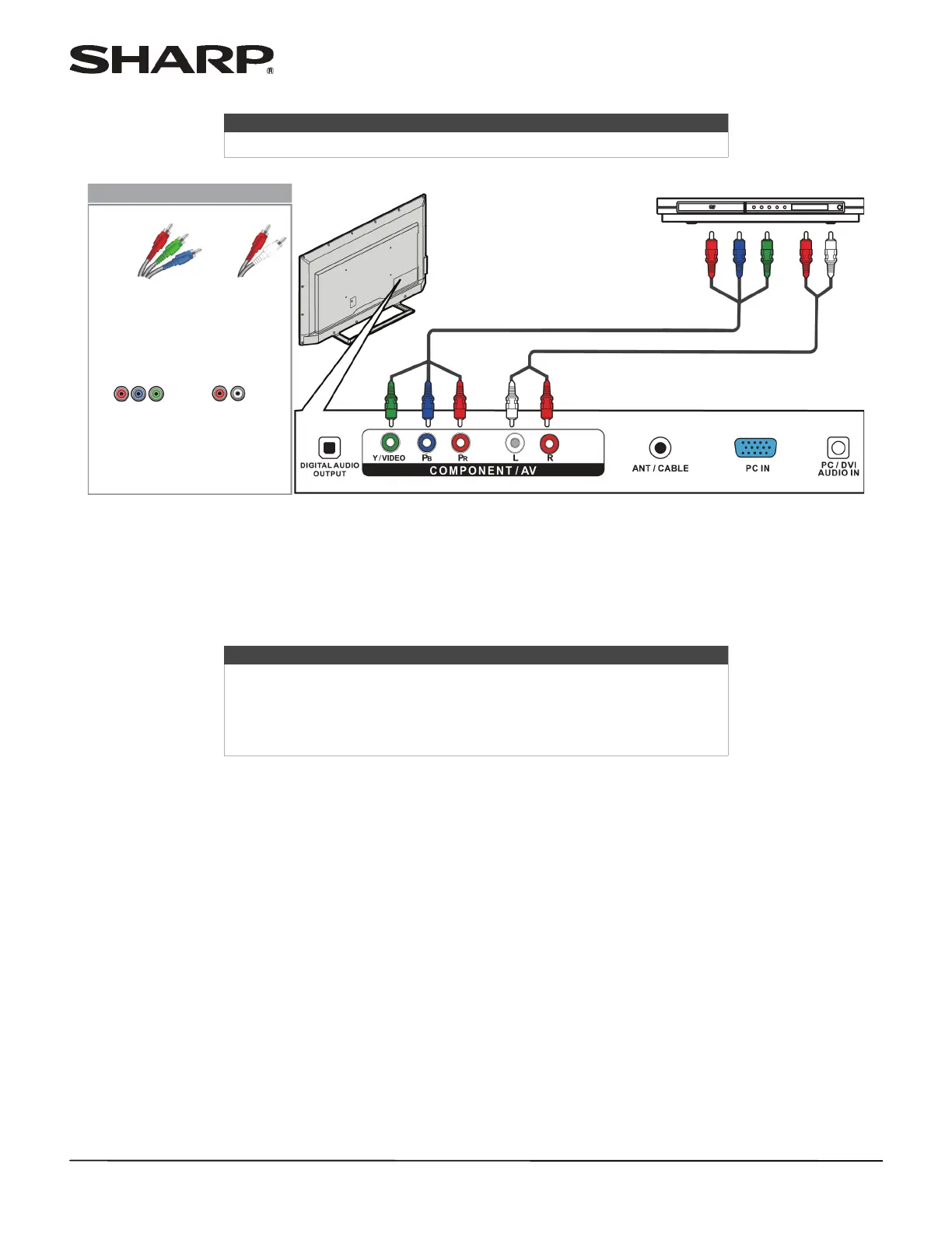
2 Connect a component video cable (not provided) to the Y/VIDEO, P
B, and PR jacks on the back of your TV and to the
COMPONENT OUT jacks on the DVD or Blu-ray player.
3 Connect an audio cable (not provided) to the L and R audio jacks on the back of your TV and to the L and R AUDIO
OUT jacks on the DVD or Blu-ray player.
4 Plug your TV’s power cord into a power outlet, then turn on your TV and the DVD or Blu-ray player.
5 Press INPUT to open the INPUT SOURCE list.
6 Press
S or T to select Component, then press ENTER.
Note
Cables are often color-coded to match color-coded jacks.
Notes
•The Y/VIDEO, P
B, and PR video jacks (used to connect a component
video device) share the L and R audio jacks with the Y/VIDEO jack (used
to connect a composite video device).
• When you connect the audio using the L and R audio jacks, the audio
output is analog.
Back of TV
Audio cable
Component video cable
DVD or Blu-ray player
Component
video cable
connectors
Audio cable
connectors
Component
video jacks
Analog
audio jacks
On your TV



 To Next Page