EasyManua.ls Logo

Sharp LC-52LE920UN - Page 58

Sharp LC-52LE920UN
80 pages
Print Icon
To Next Page IconTo Next Page
To Previous Page IconTo Previous Page
Loading...
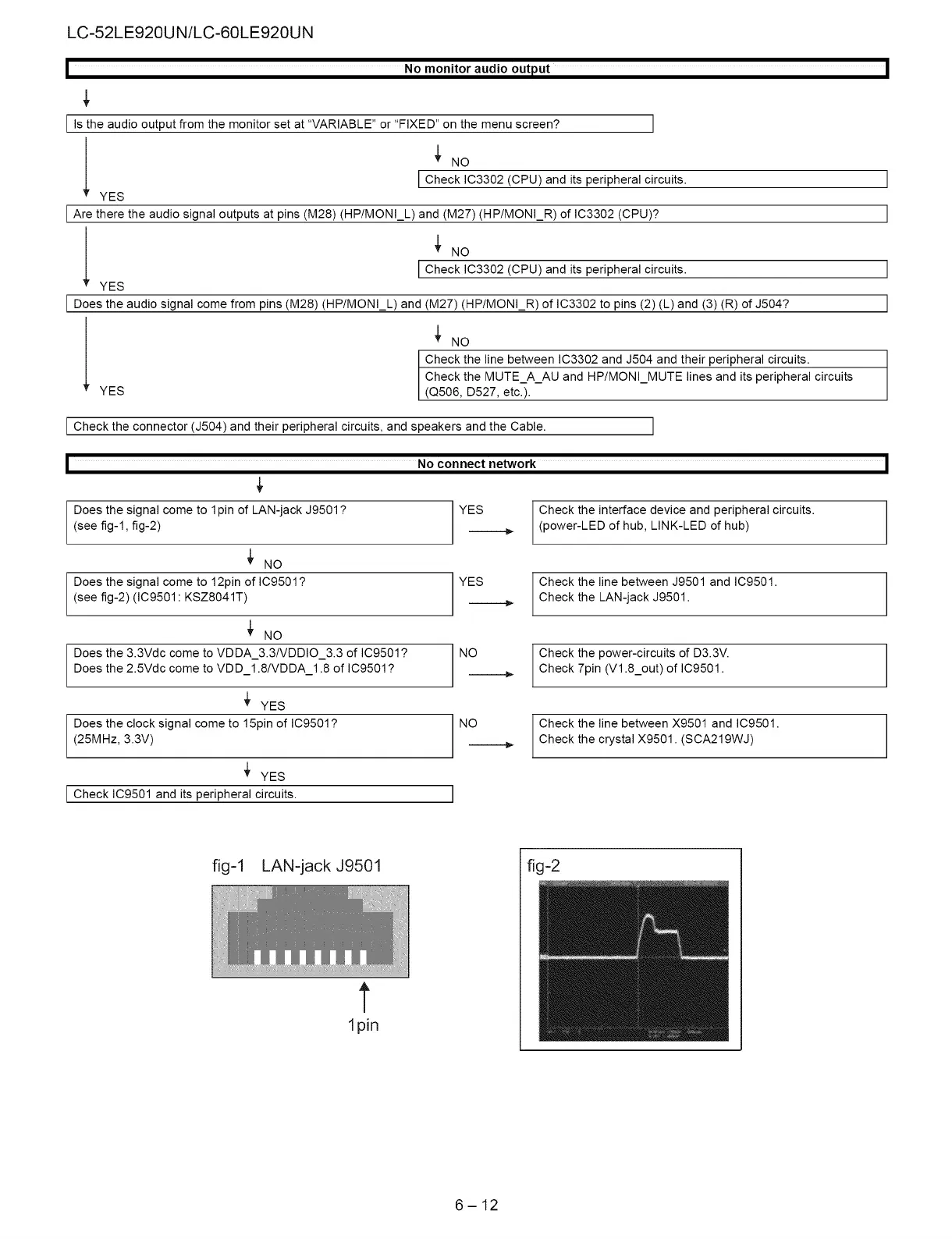
LC-52LE920UN/LC-60LE920UN
|
No
monitor
audio
output
|
Is
the
audio
output
from
the
monitor
set
at
“VARIABLE”
or
“FIXED”
on
the
menu
screen?
v
YES
¥
No
|
Check
1C3302
(CPU)
and
its
peripheral
circuits.
Are
there
the
audio
signal
outputs
at
pins
(M28)
(HP/MONI_L)
and
(M27)
(HP/MONI_R)
of
IC3302
(CPU)?
Y
YES
¥
No
|
Check
1C3302
(CPU)
and
its
peripheral
circuits.
Does
the
audio
signal
come
from
pins
(M28)
(HP/MONI_L)
and
(M27)
(HP/MONI_R)
of
1C3302
to
pins
(2) (L)
and
(3)
(R)
of
J504?
Y
YES
+
No
Check
the
line
between
1C3302
and
J504
and
their
peripheral
circuits.
Check
the
MUTE_A_AU
and
HP/MONI_MUTE
lines
and
its
peripheral
circuits
(Q506,
D527,
etc.).
|
Check
the
connector
(J504)
and
their
peripheral
circuits,
and
speakers
and
the
Cabie.
I
y
No
connect
network
Does
the
signal
come
to
1pin
of
LAN-jack
J9501?
(see
fig-1,
fig-2)
YES
¥
No
Does
the
signal
come
to
12pin
of
IC9501?
(see
fig-2)
(IC9501:
KSZ8041T)
YES
¥
No
Does
the
3.3Vde
come
to
VDDA_3.3/VDDIO_3.3
of
1C9501?
Does
the
2.5Vde
come
to
VDD_1.8/VDDA_1.8
of
1C9501?
NO
YES
Does
the
clock
signal
come
to
15pin
of
IC9501?
(25MHz,
3.3V)
NO
YES
|
Check
1C9501
and
its
peripheral
circuits.
fig-1
LAN-jack
J9501
ipin
6-12
Check
the
interface
device
and
peripheral
circuits.
(power-LED
of
hub,
LINK-LED
of
hub)
Check
the
line
between
J9501
and
iC9501.
Check
the
LAN-jack
J9501.
Check
the
power-circuits
of
D3.3V.
Check
7pin
(V1.8_out)
of
IC9501.
Check
the
line
between
X9501
and
IC9501.
Check
the
crystal
X9501.
(SCA219W4J)
fig-2

Related product manuals