LC-60/70LE650U/C6500U/LE657U,LC-60/70LE755U/LE757U/LE857U/C7500U
4 – 17
[5] REMOVING OF MAJOR PARTS (LC-60LE755U/757U/LE857U/C7500U)
1. Removing of Stand Unit and Rear Cabinet Ass'y.
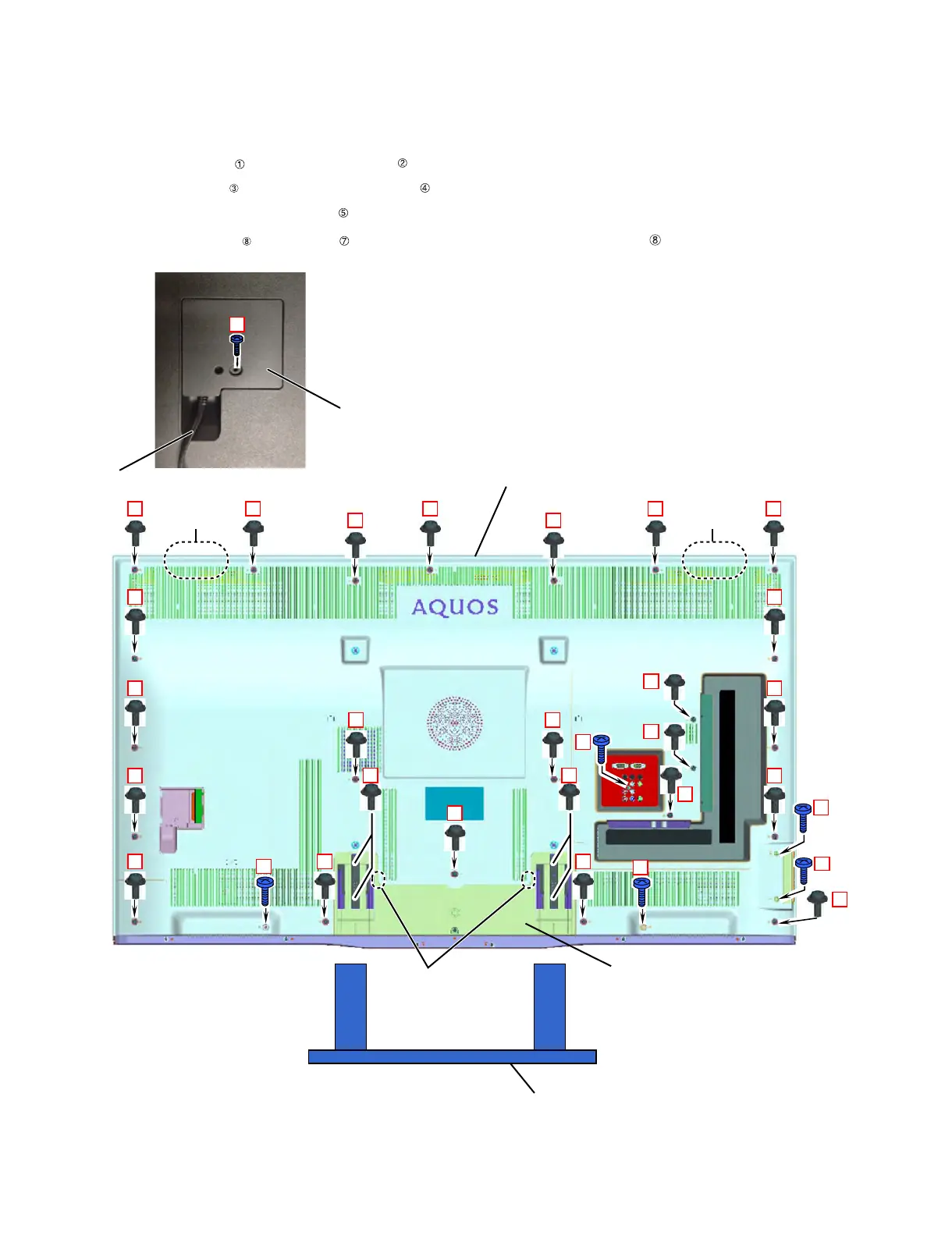
1. Remove the 1 lock screw and detach the Stand Safety Cover Ass'y. (LC-60LE857U)
Remove the 2 lock screws detach the Stand Safety Cover Ass'y. (LC-60LE755U/757U/C7500U)
2. Remove the 4 lock screws and detach the Stand Unit .
3. Remove the 1 lock screw and detach the AC Cord Cover .
4. Disconnect AC Wire and detach the AC Cord .
5. Remove the 23 lock screws , 5 lock screws and the 4 Hooks and detach the Rear Cabinet Ass'y .
1
1
ԙStand Unit
Stand Safety Cover Ass'y
㧟
ԛAC Cord Cover
Ԝ
AC Cord
*QQM
*QQM
*QQM
ԟ4GCT%CDKPGV#UU[




 To Next Page