En'o in Photo/Music/Movie Pla back
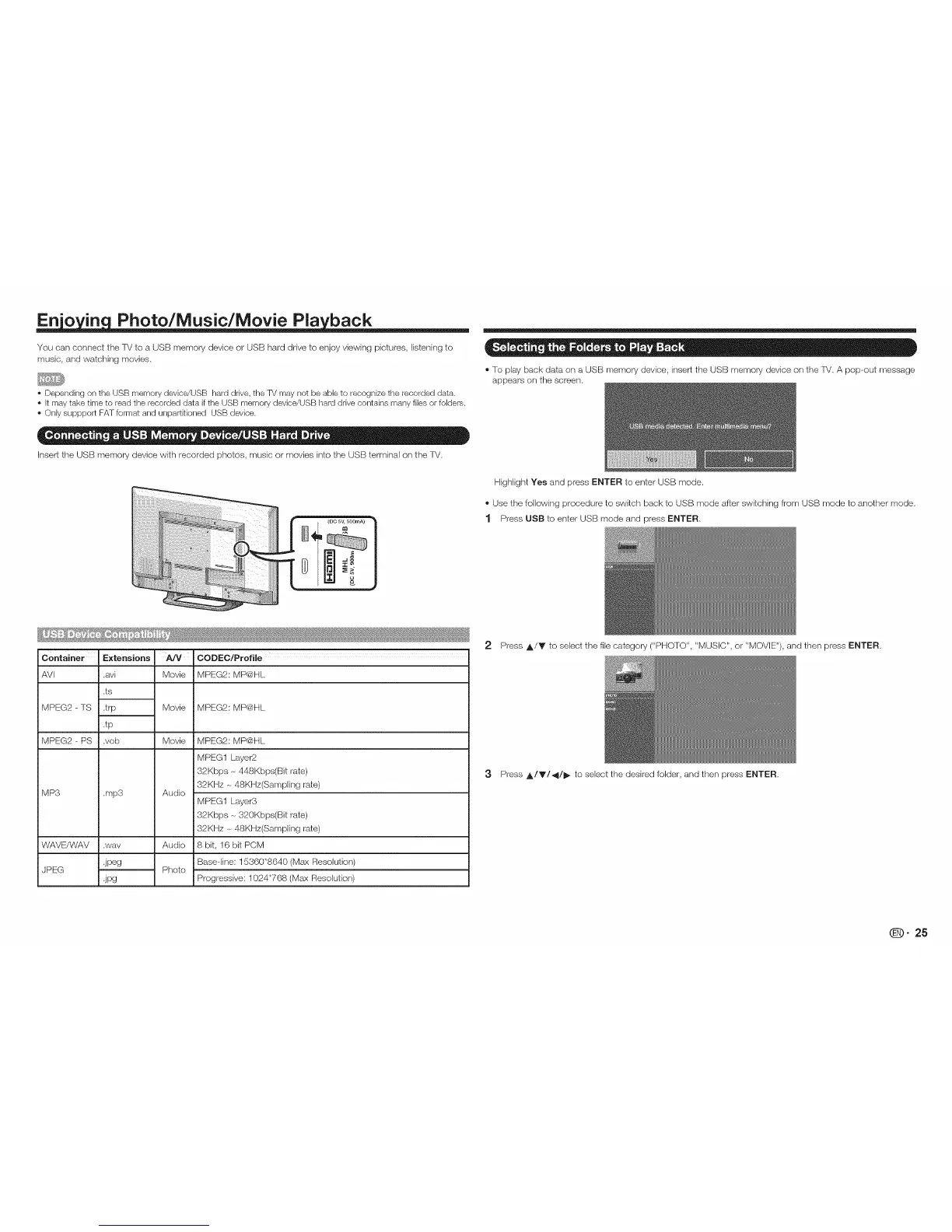
You can connect the TV to a USB memory device or USE]-}hard drive to enjoy viewing pictures, listening to
music, and watching movies,
• Depending on the USB memory device/USB hard drive, the TV may not be able to recognize the recorded data.
• It may take time to read the recorded data if the USB memory device/USB hard drive contains many files or folders.
• Only suppport FAT format and unpartRioned USB device.
Insert the USB memory device with recorded photos, music or movies into the USB terminal ors the TV.
_!!!!!!!!!!!!!!!!!!!!!!!!i;_i¸:@i¸ii¸iiiii!ii!iiiiilIiI{iI!iiiiiiii!ii{!i!!!!!!!!!il!iXsiii i_
@iiiiiiiiiiiiiiiiiiiiiiiiiiiiiiiiiiiiiiiii_!!_i_i_i 'ii'i_i_
il;!_!_SiiiiiiiiiWiii))i_!i!i!i!!ii!ii!i!ii!i, 'ii_i?'_;_'__-
CODEC/Profile
Movie MPEG2: MP@HL
Container
AVI
MPEG2 - TS
MPEG2 - PS
MP3
Extensions
.avi
,ts
.trp
.tp
.vob
.mp3
.wav
.jpeg
.jPg
WAVE/WAV
JPEG
Movie MPEG2: MP@HL
Movie MPEG2: MP@HL
MPEG1 Layer2
32Kbps -_448Kbps(Bit rate)
32KHz - 48KHz(Sampling rate)
Audio
MPEG1 Layer3
32Kbps -_320Kbps(Bit rate)
32KHz -_48KHz(Sampling rate)
Audio 8bit, 16bitPCM
Base-line: 15360"8640 (Max Resolution)
Photo
Progressive: 1024"768 (Max Resolution)
®To play back data on a USB memory device, insert the USB memory device ors the TV. A pop-out message
appears ors the screen,
Highlight Yes and press ENTER to enter USB mode.
®Use the following procedure to switch back to USB mode after switching from USB mode to another mode,
1 Press USB to enter USB mode and press ENTER,
2 Press ,_/Y to sebct the file category ("PHOTO", "MUSIC", or "MOVIE"), and then press ENTER,
3 Press A/V/4/I_ to select the desired folder, and then press ENTER,
qD" 25



 To Next Page