80
7
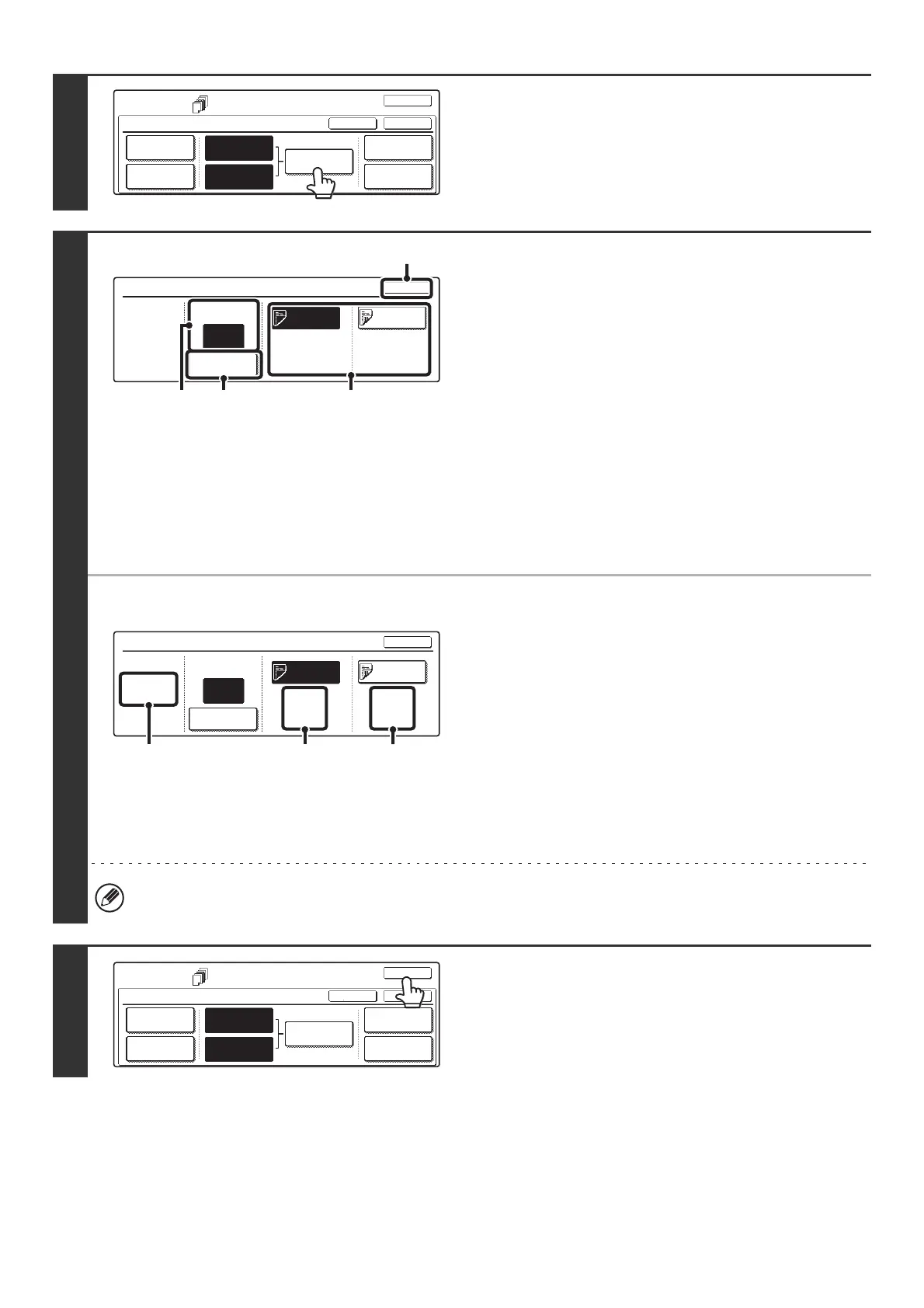
Touch the [Insertion Settings] key.
8
Specify the pages where inserts A and B
will be inserted.
(1) Touch the [Insertion Type A] key or the
[Insertion Type B] key.
Specify the page where the highlighted insert will be
inserted.
(2) Enter the page number where the insert
sheet will be inserted with the numeric
keys.
(3) Touch the [Enter] key.
(4) To insert another insert sheet, repeat steps
(1) to (3).
(5) Touch the [OK] key.
● Insertion settings screen
(A) This shows the total number of inserts. Up to 100 insert
sheets can be inserted. To insert multiple inserts, touch the
[Enter] key after entering each insertion page number
(insertion position) with the numeric keys.
(B) This shows the tray selected for insert type A and the paper
size and type.
(C) This shows the tray selected for insert type B and the paper
size and type.
When the [Insertion Type A] key is highlighted, the insert
settings are applied to [Insertion Type A Setting]. When the
[Insertion Type B] key is highlighted, the insert settings are
applied to [Insertion Type B Setting].
If both sides of the insert will be copied on, label sheets, transparency film, and tab paper cannot be used. Tab paper
can only be inserted.
9
Touch the [OK] key.
You will return to the base screen of copy mode.
To check your settings, touch the [Page Layout] key.
☞ CHANGING COVER/INSERT SETTINGS (Page Layout)
(page 81)
Special Modes
Covers/Inserts
OK
OKCancel
Front Cover
Back Cover
Insertion
Settings
Insertion
Type A Setting
Insertion
Type B Setting
Page Layout
Paper Tray
Settings
Insertion Settings
OK
Insertion Page
Enter
Insertion
Type A
Insertion
Type B
Bypass
Tray
A4
Plain
Bypass
Tray
A4
Plain
Insertion
Total:2
4
(2)
(3)
(5)
(1)
Insertion Settings
Insertion Page
Enter
Insertion
Type A
Insertion
Type B
4
OK
Bypass
Tray
A4
Plain
Bypass
Tray
A4
Plain
Insertion
Total:2
(B) (C)(A)
Special Modes
Covers/Inserts
OK
OKCancel
Front Cover
Back Cover
Insertion
Settings
Insertion
Type A Setting
Insertion
Type B Setting
Page Layout
Paper Tray
Settings



 To Next Page