MX3500N SIMULATION 7 – 47
41-3
Purpose
Operation test/Check
Function (Purpose)
Used to display the document sensor
detection level (A/D) in real time and to dis-
play the threshold value adjusted with SIM
41-2 in [ ] beside the sensor name.
Section
Other
Item
Operation
Operation/Procedure
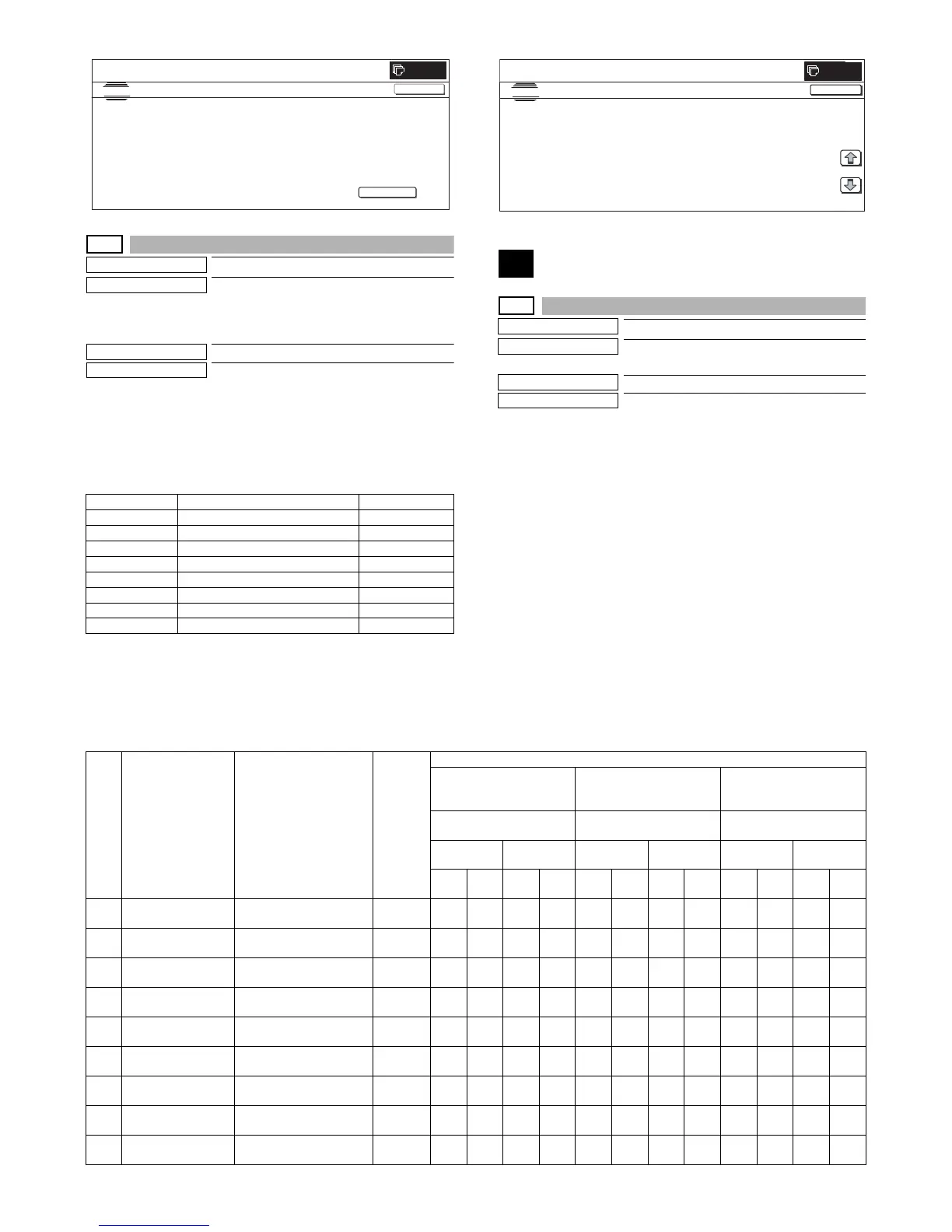
1) When the machine enters Simulation 41-03, the following
screen is displayed.
* ON/OFF detection of the OCSW sensor and the A/D value
check of each PD sensor are performed in real time.
<Display content>
* In an actual control, the A/D value is sent by polling at a regular
interval from the SCU or the controller.
43
43-1
Purpose
Setting
Function (Purpose)
Used to set the fusing temperature in each
operation mode.
Section
Fusing
Item
Operation
Operation/Procedure
1) Select the set item with [↑] and [↓] buttons.
The highlighted set value is switched and the value is dis-
played in the setting area.
* If there is any item over [↑], an active display is made and
item is shifted.
If there is no item over [↑], the display grays out and the
operation is invalid.
If there is any item under [↓], an active display is made and
item is shifted.
If there is no item over [↓], the display grays out and the
operation is invalid.
2) Enter the set value with 10-key.
* Press [C] key to clear the entered values.
3) When [OK] button is pressed, the currently entered data are
saved to EEPROM and RAM.
* When [↑], [↓] button, [COLOR], or [BLACK] key is pressed,
the current set values is saved in EEPROM and RAM.
<Fusing temperature setting range and default values>
Display Content Range
OCSW Original cover SW 0 – 1 ("1": Close)
PD1 Document detection 1 0 – 255
PD2 Document detection 2 0 – 255
PD3 Document detection 3 0 – 255
PD4 Document detection 4 0 – 255
PD5 Document detection 5 0 – 255
PD6 Document detection 6 0 – 255
PD7 Document detection 7 0 – 255
SIMULATION NO.41-02
TEST
DOCUMENT SIZE PHOTO-SENSOR SETUP
EXECUTE
0
CLOSE
WITH THE ORIGINAL COVEROPENED, TURN ON THE EXECUTE
KEY WITH THE ORIGINAL ON THE ORIGINAL TABLE.
OCSW
SIMULATION
NO.41
03
TEST
PD SENSOR DISPLAY
CLOSE
1
:
PD5[㪁㪁㪁]
㪁㪁㪁㩷
:
PD1[㪁㪁㪁]
㪁㪁㪁㩷
:
PD6[㪁㪁㪁]
㪁㪁㪁㩷
:
PD2[㪁㪁㪁]
㪁㪁㪁㩷
:
PD7[㪁㪁㪁]
㪁㪁㪁㩷
:
PD3[㪁㪁㪁]
㪁㪁㪁㩷
:
PD4[㪁㪁㪁]
㪁㪁㪁㩷
:
1/1
0
Item Display Content
Set
range
Default value
Switch A Switch B Switch C (Cool-down
control YES, default =
OFF)
Thin plain paper Thick plain paper General plain paper
(Cool-down control YES)
MX-3500N/
MX-3501N
MX-4500N/
MX-4501N
MX-3500N/
MX-3501N
MX-4500N/
MX-4501N
MX-3500N/
MX-3501N
MX-4500N/
MX-4501N
Gr. 1
*1
Gr. 2
*2
Gr. 1
*1
Gr. 2
*2
Gr. 1
*1
Gr. 2
*2
Gr. 1
*1
Gr. 2
*2
Gr. 1
*1
Gr. 2
*2
Gr. 1
*1
Gr. 2
*2
A HL_UM READY TH_UM set value in
READY standby
70 to 230 165 165 165 165 170 180 175 180 170 170 170 170
B HL_LM READY TH_LM set value in
READY standby
30 to 200 120 120 120 120 120 140 120 140 120 130 130 130
C HL_E READY TH_E set value in READY
standby
70 to 230 155 155 155 155 155 155 155 155 155 155 155 155
D HL_UM PLAIN
PAPER BW
BW normal paper TH_UM
set value
70 to 230 170 175 170 175 170 175 170 175 170 175 170 175
E HL_LM PLAIN
PAPER BW
BW normal paper TH_LM
set value
30 to 200 130 130 130 130 130 130 130 130 130 130 130 130
F HL_E PLAIN
PAPER BW
BW normal paper TH_E
set value
70 to 230 160 160 160 160 160 160 160 160 160 160 160 160
G HL_UM PLAIN
PAPER CL
COLOR normal paper
TH_UM set value
70 to 230 170 175 170 175 170 175 170 175 170 175 170 175
H HL_LM PLAIN
PAPER CL
COLOR normal paper
TH_LM set value
30 to 200 130 130 130 130 130 130 130 130 130 130 130 130
I HL_E PLAIN
PAPER CL
COLOR normal paper
TH_E set value
70 to 230 160 160 160 160 160 160 160 160 160 160 160 160



 To Next Page