LOADING PAPER
2-17
2
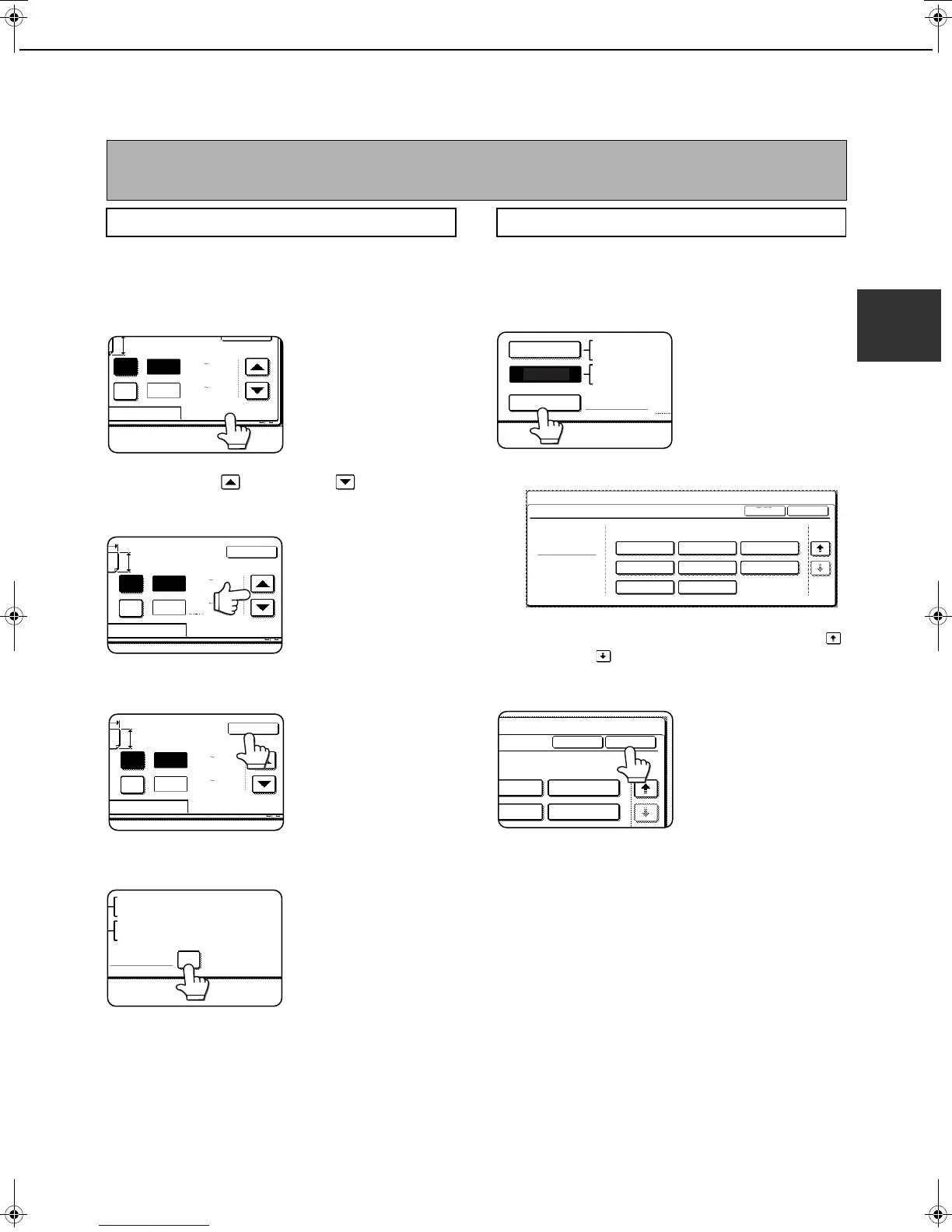
Setting the paper size when a special size is loaded
1
Perform steps 1 through 5 of "Setting the
paper type and paper size" (see page 2-14).
2
Touch the [SIZE INPUT] key and then
touch the [INCH] tab.
The size entry palette
appears.
3
Touch the key or the key to enter
the X (width) and Y (length) dimensions of
the paper.
X (width) is initially
selected. To enter Y
(length), touch the [Y]
key and then enter the
length.
4
Touch the [OK] key.
You will return to the size
setting screen of step 2.
5
If the paper is a non-standard size, select
the [NON STANDARD SIZE] checkbox.
6
Perform steps 8 through 10 of "Setting the
paper type and paper size" (pages 2-15).
1
Perform steps 1 through 5 of "Setting the
paper type and paper size" (see page 2-14).
2
Touch the [SIZE SELECT] key.
The size selection
screen appears.
3
Select the desired paper size.
There are separate screens for inch-based paper
selection and AB paper selection. Touch the
key or the key to switch between the screens.
4
Touch the [OK] key.
You will return to the size
setting screen of step 2.
5
Perform steps 8 through 10 of "Setting the
paper type and paper size" (pages 2-15).
NOTE
Special sizes of paper cannot be loaded in trays 1, 2, 4 and 5.
Trays 3 and the bypass tray
AB
Y
11
17
X
(5 1/2 17)
inch
INCH
OK
(5 1/2 11 5/8)
inch
Y
X
AB
Y
11
17
Y
X
INCH
OK
(5 1/2 17)
inch
(5 1/2 11 5/8)
inch
X
AB
Y
11
17
Y
X
INCH
OK
(5 1/2 17)
inch
(5 1/2 11 5/8)
inch
NON STANDARD
SIZE
11
X
17,8
X
14,8
X
11
1
/
2
1
/
2
8
X
11R,7
X
10 ,5
X
8 R
1
/
2
1
/
4
1
/
2
1
/
2
1
/
2
A3,A4,A4R,A5R,B4,B5
B5R,216x330(8 x13)
X17 Y11
5
/
8
1
/
2
Inserter (option)
SIZE SELECT
11
X
17,8
X
14,8
X
1
/
2
1
/
2
8
X
11R,7
X
10 ,5
1
/
2
1
/
4
1
/
2
A3,A4,A4R,A5R,B
AUTO-INCH
AUTO-AB
B5R
2/2
PLAIN
A3
OK
TYPE
INSERTER TYPE/SIZE SETTING
TYPE
SYSTEM SETTINGS
A4 A4R
A5R B4
B5R
B5
SIZE
216x330(8 x13)
1
/
2
dragonII_copy_sec.book 17 ページ 2006年10月18日 水曜日 午後7時39分


 To Next Page