EasyManua.ls Logo

Sharp MZ-800 - Page 103

Sharp MZ-800
221 pages
Print Icon
To Next Page IconTo Next Page
To Previous Page IconTo Previous Page
Loading...
SAVE
Format
Explanation
Example
SAVE
‘‘[<device
name>:]
<filename>”’
[,A]
<device
name>
must
be
CMT
or
RAM.
Abbreviated
Format
SA.
The
SAVE
command
assigns
a
file
name
to
the
BASIC
program
in
the
computer’s
memory
and
saves
it
onto
an
external
storage
device.
The
<device
name:
>
parameter
can
be
omitted
when
specifying
a
device
that
has
already
been
specified
in
a
DEFAULT
statement,
or
is
the
current
default
device.
The
<filename>
parameter
is
required
and
must
always
be
specified.
The
SAVE
command
saves
the
BASIC
program
text
in
the
ASCII
format
if
the
<A>
option
is
specified.
In
this
case,
the
BASIC
interpreter
attaches
BSD
to
the
file
name
as
the
file
type.
The
types
of
the
files
that
can
be
saved
with
the
SAVE
command
are
BTX
and
BSD.
SAVE
“'CMT:PROG"
..........
Saves
the
program
in
memory
on
cassette
tape
with
a
file
name
of
‘“‘PROG’’.
The
file
type
of
the
saved
program
is
assumed
to
be
BTX.
SAVE
‘'CMT:DEMO",A.......
Saves
the
program
in
memory
on
cassette
tape
in
AS-
CII
format
with
a
file
name
of
‘‘DEMO”’.
The
file
type
of
the
saved
program
is
assumed
to
be
BSD.
Note:
The
SAVE
command
saves
only
the
BASIC
program
text
(i.e.,
the
program
text
displayed
by
executing
the
LIST
command);
it
does
not
save
any
machine
language
program
in
the
machine
language
area.
When
using
SAVE,
make
a
note
of
the
tape
counter
reading
for
future
reference.
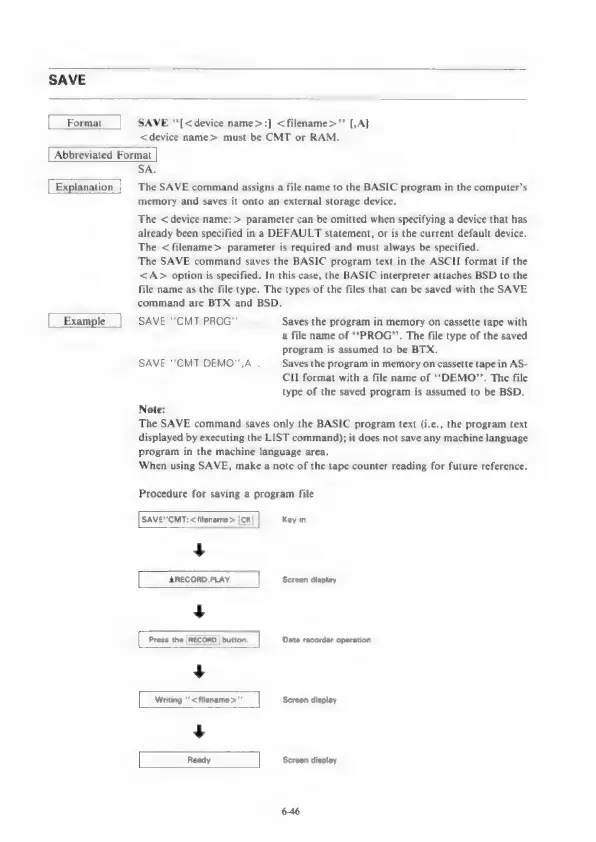
Procedure
for
saving
a
program
file
SAVE"CMT:
<filename>
[CR|
Key
in
——
Screen
display
Press
the
i
button.
Data
recorder
operation
——
Screen
display
ha
Screen
display
6-46

Other manuals for Sharp MZ-800

Related product manuals