EasyManua.ls Logo

Sharp MZ-800 - Page 179

Sharp MZ-800
221 pages
Print Icon
To Next Page IconTo Next Page
To Previous Page IconTo Previous Page
Loading...
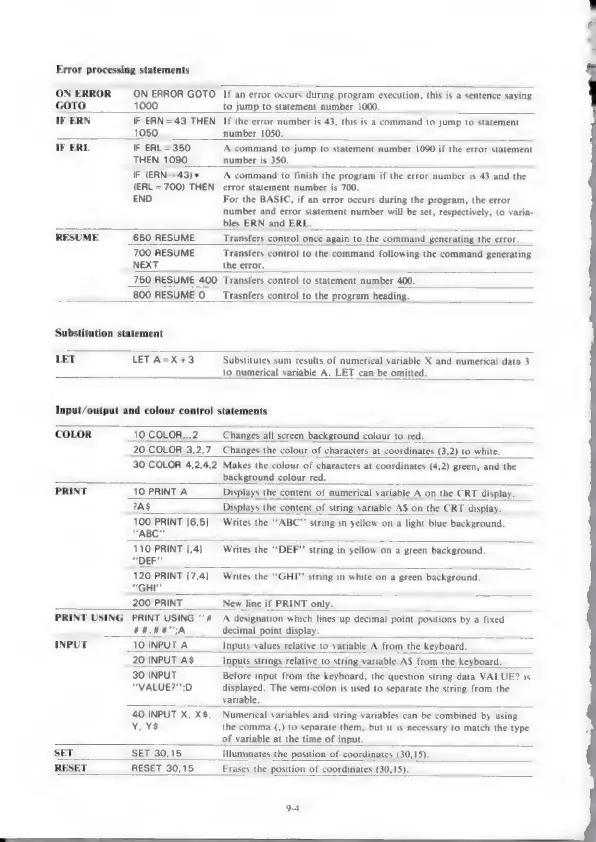
Error
processing
statements
ON
ERROR
ON
ERROR
GOTO
If
an
error
occurs
during
program
execution,
this
is
a
sentence
saying
GOTO
1000
to
jump
to
statement
number
1000.
IF
ERN
IF
ERN=43
THEN
If
the
error
number
is
43,
this
is
a
command
to
jump
to
statement
1050
number
1050.
IF
ERL
IF
ERL=350
A
command
to
jump
to
statement
number
1090
if
the
error
statement
THEN
1090
number
is
350.
IF
(ERN
=
43)*
A
command
to
finish
the
program
if
the
error
number
is
43
and
the
(ERL
=
700)
THEN
error
statement
number
is
700.
END
For
the
BASIC,
if
an
error
occurs
during
the
program,
the
error
number
and
error
statement
number
will
be
set,
respectively,
to
varia-
bles
ERN
and
ERL.
RESUME
650
RESUME
Transfers
control
once
again
to
the
command
generating
the
error.
700
RESUME
Transfers
control
to
the
command
following
the
command
generating
NEXT
the
error.
750
RESUME
400
Transfers
control
to
statement
number
400.
800
RESUME
0
__
Trasnfers
control
to
the
program
heading.
Substitution
statement
LET
LET
A=X+3
Substitutes
sum
results
of
numerical
variable
X
and
numerical
data
3
to
numerical
variable
A.
LET
can
be
omitted.
Input/output
and
colour
control
statements
COLOR
10
COLOR,,,2
Changes
all
screen
background
colour
to
red.
20
COLOR
3,2,7
Changes
the
colour
of
characters
at
coordinates
(3,2)
to
white.
30
COLOR
4,2,4,2
Makes
the
colour
of
characters
at
coordinates
(4,2)
green,
and
the
background
colour
red.
PRINT
10
PRINT
A
Displays
the
content
of
numerical
variable
A
on
the
CRT
display.
?AS
Displays
the
content
of
string
variable
A$
on
the
CRT
display.
100
PRINT
[6,5]
Writes
the
““ABC’’
string
in
yellow
on
a
light
blue
background.
“ABC
110
PRINT
[,4]
Writes
the
‘‘DEF”’
string
in
yellow
on
a
green
background.
“DEF”
120
PRINT
[7,4]
|
Writes
the
““GHI”’
string
in
white
on
a
green
background.
“GHI"
200
PRINT
New
line
if
PRINT
only.
PRINT USING
PRINT
USING
‘#
A
designation
which
lines
up
decimal
point
positions
by
a
fixed
HAAR
GA
decimal
point
display.
INPUT
10
INPUT
A
Inputs
values
relative
to
variable
A
from
the
keyboard.
20
INPUT
A$
Inputs
strings
relative
to
string
variable
A$
from
the
keyboard.
30
INPUT
Before
input
from
the
keyboard,
the
question
string
data
VALUE?
is
“VALUE?”;D
displayed.
The
semi-colon
is
used
to
separate
the
string
from
the
variable.
40
INPUT
X,
X$,
Numerical
variables
and
string
variables
can
be
combined
by
using
Y,
¥$
the
comma
(,)
to
separate
them,
but
it
is
necessary
to
match
the
type
J
of
variable
at
the
time
of
input.
SET
SET
30,15
Iluminates
the
position
of
coordinates
(30,15).
RESET
RESET
30,15
Erases
the
position
of
coordinates
(30,15).
9-4

Other manuals for Sharp MZ-800

Related product manuals