EasyManua.ls Logo

Sharp MZ-800 - Page 180

Sharp MZ-800
221 pages
Print Icon
To Next Page IconTo Next Page
To Previous Page IconTo Previous Page
Loading...
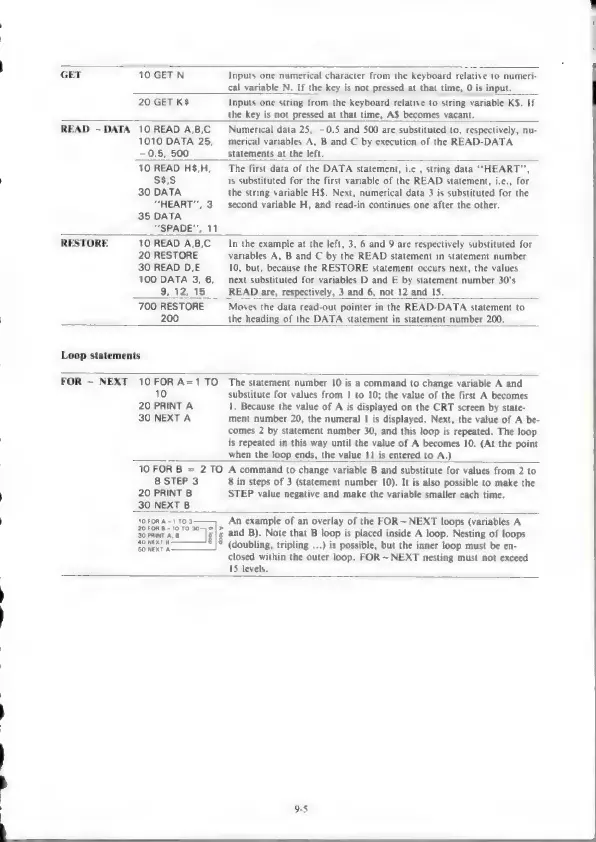
GET
10
GETN
Inputs
one
numerical
character
from
the
keyboard
relative
to
numeri-
cal
variable
N.
If
the
key
is
not
pressed
at
that
time,
0
is
input.
20
GET
K$
Inputs
one
string
from
the
keyboard
relative
to
string
variable
KS.
If
the
key
is
not
pressed
at
that
time,
AS
becomes
vacant.
READ
~DATA
10
READ
A,B,C
Numerical
data
25,
—0.5
and
500
are
substituted
to,
respectively,
nu-
1010
DATA
25,
merical
variables
A,
B
and
C
by
execution
of
the
READ-DATA
—0.5,
500
statements
at
the
left.
10
READ
H$,H,
The
first
data
of
the
DATA
statement,
i.e.,
string
data
“HEART”,
S$$,S
is
substituted
for
the
first
variable
of
the
READ
statement,
i.e.,
for
30
DATA
the
string
variable
H$.
Next,
numerical
data
3
is
substituted
for
the
“HEART,
3
second
variable
H,
and
read-in
continues
one
after
the
other.
35
DATA
“SPADE”,
11
RESTORE
10
READ
A,B,C
In
the
example
at
the
left,
3,
6
and
9
are
respectively
substituted
for
20
RESTORE
variables
A,
B
and
C
by
the
READ
statement
in
statement
number
30
READ
D,E
10,
but,
because
the
RESTORE
statement
occurs
next,
the
values
100
DATA
3,
6,
next
substituted
for
variables
D
and
E
by
statement
number
30's
9,
12,
15
READ
are,
respectively,
3
and
6,
not
12
and
15.
700
RESTORE
Moves
the
data
read-out
pointer
in
the
READ-DATA
statement
to
200
the
heading
of
the
DATA
statement
in
statement
number
200,
Loop
statements
FOR
~
NEXT
10
FOR
A=1
TO
10
20
PRINT
A
30
NEXT
A
The
statement
number
10
is
a
command
to
change
variable
A
and
substitute
for
values
from
|
to
10;
the
value
of
the
first
A
becomes
1.
Because
the
value
of
A
is
displayed
on
the
CRT
screen
by
state-
ment
number
20,
the
numeral
1
is
displayed.
Next,
the
value
of
A
be-
comes
2
by
statement
number
30,
and
this
loop
is
repeated.
The
loop
is
repeated
in
this
way
until
the
value
of
A
becomes
10.
(At
the
point
when
the
loop
ends,
the
value
11
is
entered
to
A.)
10
FOR
B
=
2TO
8
STEP
3
20
PRINT
B
30
NEXT
B
A
command
to
change
variable
B
and
substitute
for
values
from
2
to
8
in
steps
of
3
(statement
number
10).
It is
also
possible
to
make
the
STEP
value
negative
and
make
the
variable
smaller
each
time.
1OFOR
A=1
TO
3
20
FOR
B=10T0
230
0|>
30
PRINT
A,
B
g
40
NEXT
B.
50
NEXT
A
An
example
of
an
overlay
of
the
FOR~
NEXT
loops
(variables
A
and
B).
Note
that
B
loop
is
placed
inside
A
loop.
Nesting
of
loops
(doubling,
tripling
...)
is
possible,
but
the
inner
loop
must
be
en-
closed
within
the
outer
loop.
FOR
~
NEXT
nesting
must
not
exceed
15
levels.
9-5

Other manuals for Sharp MZ-800

Related product manuals