EasyManua.ls Logo

Sharp MZ-800 - Page 206

Sharp MZ-800
221 pages
Print Icon
To Next Page IconTo Next Page
To Previous Page IconTo Previous Page
Loading...
Note:
A
protective
sheet
is
inserted
in
printer
to
protect
the
printer
mechanism.
Remove
the
sheet
by
pressing
the
paper
feed
key
()
before
using
the
printer.
=
Loading
roll
paper
1.
Remove
the
printer
cover,
2.
Cut
the
end
of
roll
paper
squarely
and
insert
the
paper
into
the
paper
inlet.
(Do
not
fold
or
wrinkle
the
end
of
the
paper
when
doing
this.)
3.
Turn
on
the
MZ-800’s
power
switch
and
press
the
(paper
feed)
key
to
feed
the
paper
unitl
the
leading
edge
exposed
3
to
5
cm
above
the
outlet.
4,
Insert
the
paper
shaft
into
the
paper
roll
and
mount
it
to
the
paper
holders.
5.
Refit
the
printer
cover
so
that
the
end
of
paper
comes
out
through
the
paper
cutter.
*
To
remove
the
roll
from
the
printer
for
replacement,
cut
the
paper
squarely
at
the
paper
inlet
and
press
the
®
key.
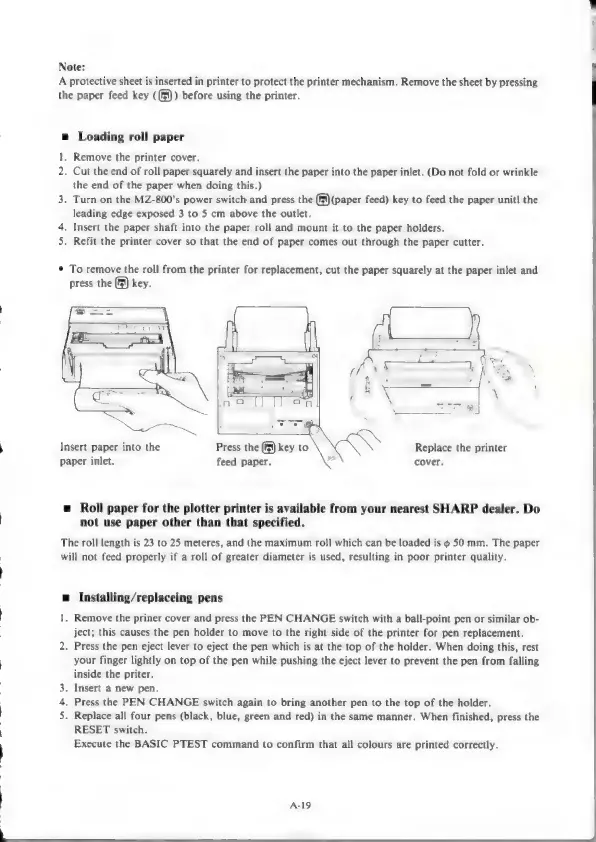
Insert
paper
into
the
Press
the
®
key
to
2
Replace
the
printer
paper
inlet.
feed
paper.
cover.
=
Roll
paper
for the
plotter
printer
is
available
from
your
nearest
SHARP
dealer.
Do
not
use
paper
other
than
that
specified.
The
roll
length
is
23
to
25
meteres,
and
the
maximum
roll
which
can
be
loaded
is
¢
50
mm.
The
paper
will
not
feed
properly
if
a
roll
of
greater
diameter
is
used,
resulting
in
poor
printer
quality.
=
Installing/replaceing
pens
1.
Remove
the
priner
cover
and
press
the
PEN
CHANGE
switch
with
a
ball-point
pen
or
similar
ob-
ject;
this
causes
the
pen
holder
to
move
to
the
right
side
of
the
printer
for
pen
replacement.
2.
Press
the
pen
eject
lever
to
eject
the
pen
which
is
at
the
top
of
the
holder.
When
doing
this,
rest
your
finger
lightly
on
top
of
the
pen
while
pushing
the
eject
lever
to
prevent
the
pen
from
falling
inside
the
priter.
.
Insert
a
new
pen.
.
Press
the
PEN
CHANGE
switch
again
to
bring
another
pen
to
the
top
of
the
holder.
.
Replace
all
four
pens
(black,
blue,
green
and
red)
in
the
same
manner.
When
finished,
press
the
RESET
switch.
Execute
the
BASIC
PTEST
command
to
confirm
that
all
colours
are
printed
correctly.
wp
w
A-19

Other manuals for Sharp MZ-800

Related product manuals