EasyManua.ls Logo

Sharp MZ-800 - Page 207

Sharp MZ-800
221 pages
Print Icon
To Next Page IconTo Next Page
To Previous Page IconTo Previous Page
Loading...
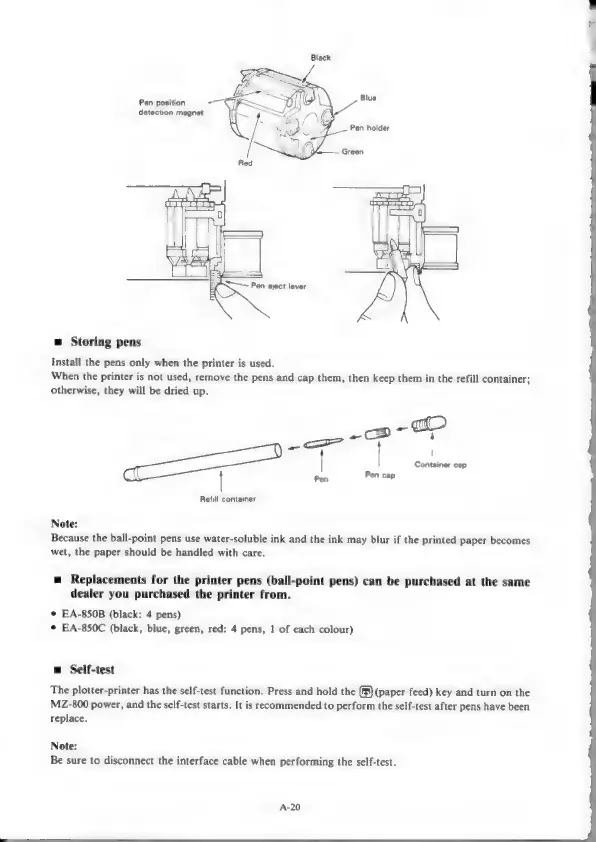
Pen
position
Pe
detection
magnet
Pa
Pen
holder
Green
Red
es
Pen
eject
lever
=
Storing
pens
Install
the
pens
only
when
the
printer
is
used.
When
the
printer
is
not
used,
remove
the
pens
and
cap
them,
then
keep
them
in
the
refill
container;
otherwise,
they
will
be
dried
up.
-co-
a>
—_S——
|
oan
cap
|
Pin
Pen
cap
Refill
container
Note:
Because
the
ball-point
pens
use
water-soluble
ink
and
the
ink
may
blur
if
the
printed
paper
becomes
wet,
the
paper
should
be
handled
with
care.
=
Replacements
for
the
printer
pens
(ball-point
pens)
can
be
purchased
at
the
same
dealer
you
purchased
the
printer
from.
©
EA-850B
(black:
4
pens)
*
EA-850C
(black,
blue,
green,
red:
4
pens,
1
of
each
colour)
m
Self-test
The
plotter-printer
has
the
self-test
function.
Press
and
hold
the
(™§)
(paper
feed)
key
and
turn
on
the
MZ-800
power,
and
the
self-test
starts.
It is
recommended
to
perform
the
self-test
after
pens
have
been
replace.
Note:
Be
sure
to
disconnect
the
interface
cable
when
performing
the
self-test.
A-20

Other manuals for Sharp MZ-800

Related product manuals