Confidential
Copyright © All rights reserved, SHARP CORPORATION
20
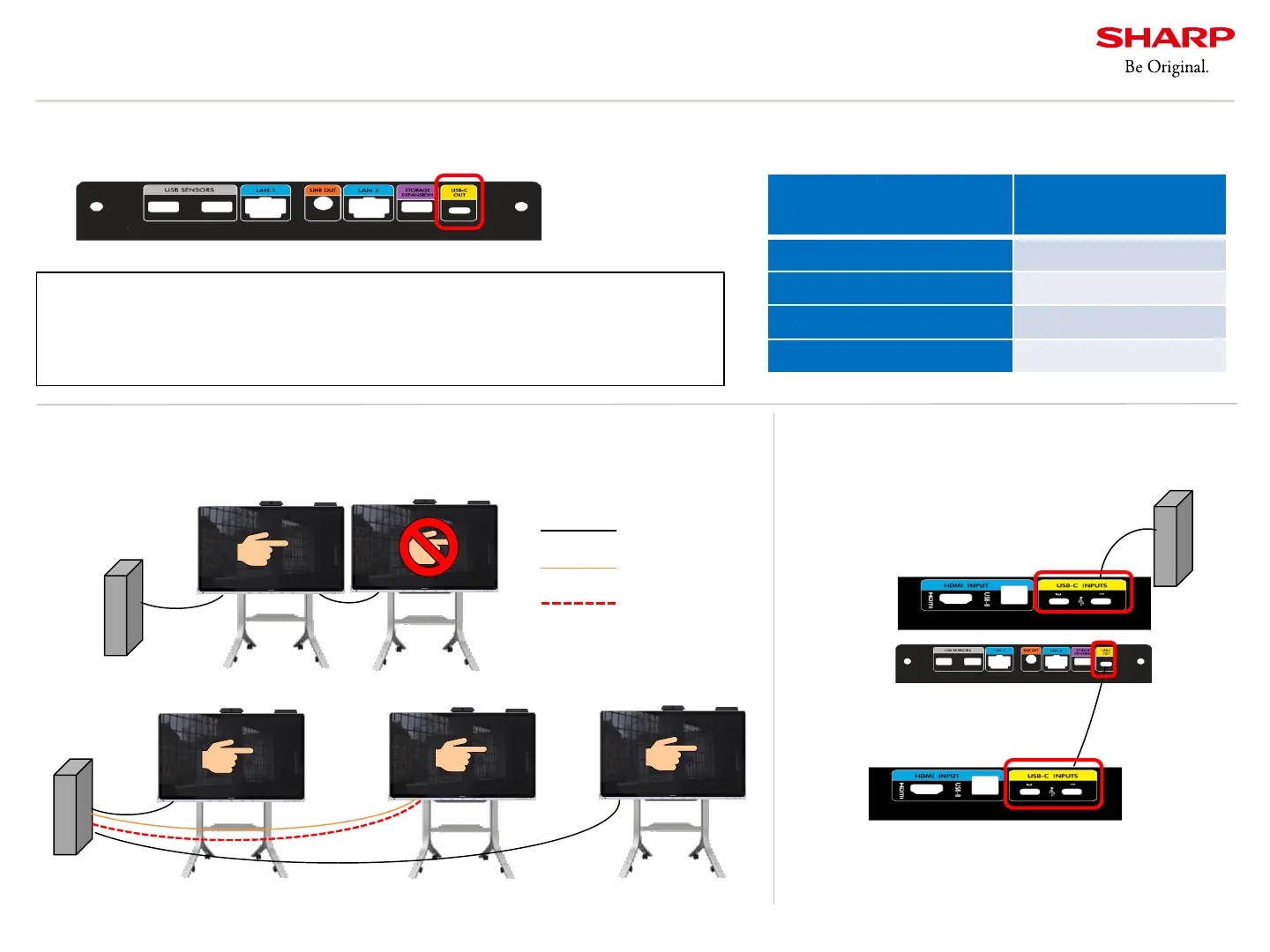
12. How to connect using USB-C Out
- Later is only used for multi board.
About “multi board”
You can display video on a second device using USB-C Out.
The USB-C cable enables touch without connecting a touch cable.
If you want to touch on the second display, please connect as follows.
USB-C cable
2
nd
unit
1
st
unit of PN-CD701
Image of daisy chain connection
Attention
Only video signals are output from USB-C Out. The signal of Wireless Cast cannot
be output. Do not convert the cable from the USB-C cable. Only the same display
or allowed display is supported for the display connected to the Out side.
Rear Left View
PC
PC
USB-C Out can be used for video output.
Figure. Functions available with USB-C Out
Touch cable
(USB-B cable)
HDMI cable
->However, touch settings on the PC must be set.
PC
OR
Function of USB-C Available/
Not Available
DP Alt mode(Video stream) Available
Network * Not Available
Touch (Data Transport) Not Available
Power Delivery Available(MAX 10W)






 To Next Page