14
E
Mounting an IoT sensor hub
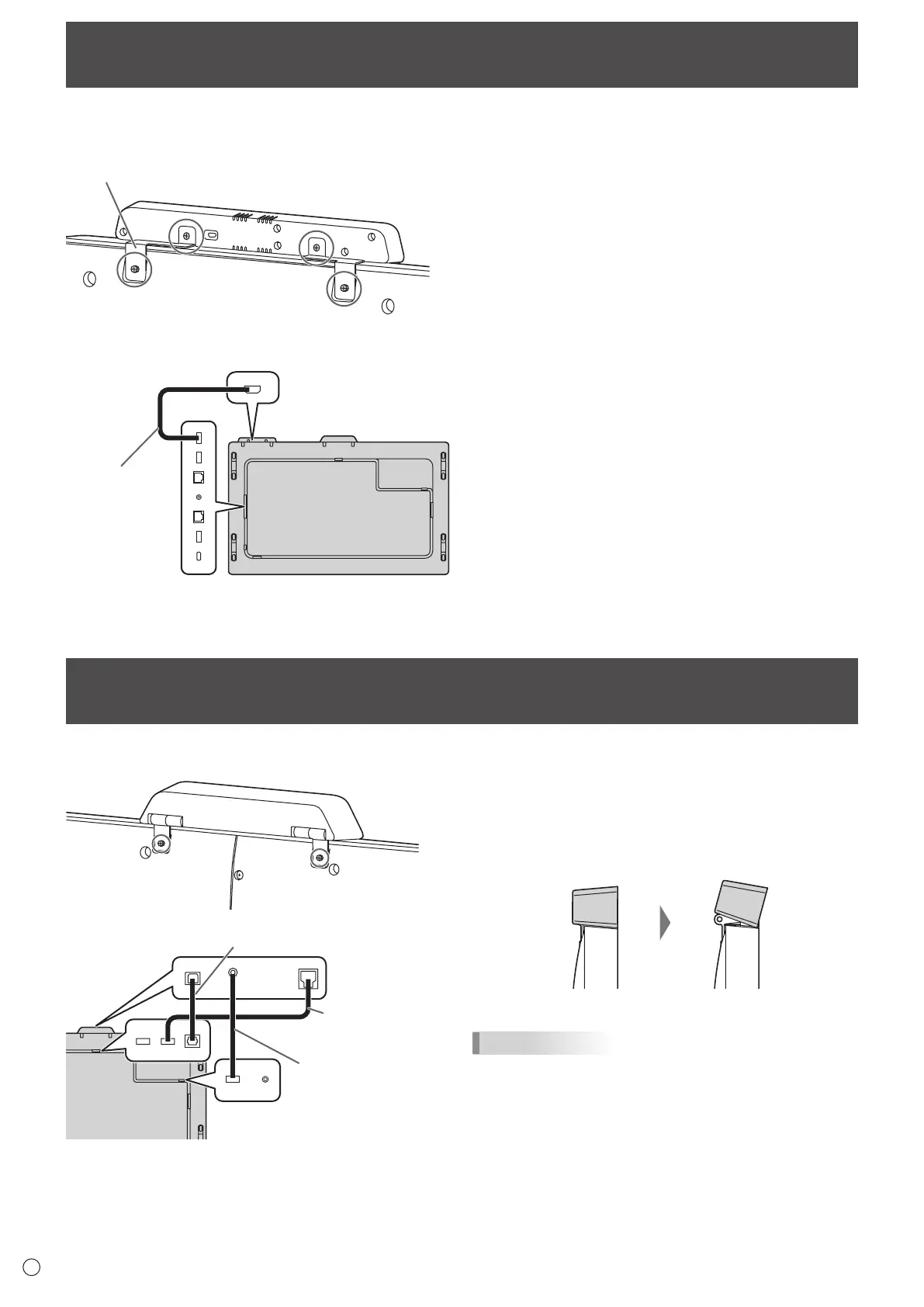
It is possible to mount an IoT sensor hub in the following position.
IoT sensor hub
mounting bracket
1
*
2
Micro USB cable
1. Attach the supplied IoT sensor hub mounting brackets
(L/R) to the IoT sensor hub with the supplied IoT
sensor hub screws (M3) (x2).
2. Fix the IoT sensor hub mounting brackets (L/R) to this
monitor with supplied knurled screws (M3) (x2).
* The IoT sensor hub mounting brackets fit into the recess
of this monitor.
Mounting a camera
It is possible to mount a camera in the following position.
3.5 mm mini jack to
USB A cable (supplied)
USB A to B cable
(supplied)
S/PDIF cable (supplied)
1. Attach the supplied camera with the supplied knurled
screws (M3) (x2).
The camera can be tilted downward.
TIPS
• Thecableclamp(supplied)canbeusedtoclampthe3.5
mm mini jack to USB A cable (supplied).
• Attachthesuppliedcableclamptoaflatsurface.Donot
attach over a vent.
• Removeanydustordirtbeforeattaching.






 To Next Page