52
Controlling the Monitor with a PC (LAN)
n
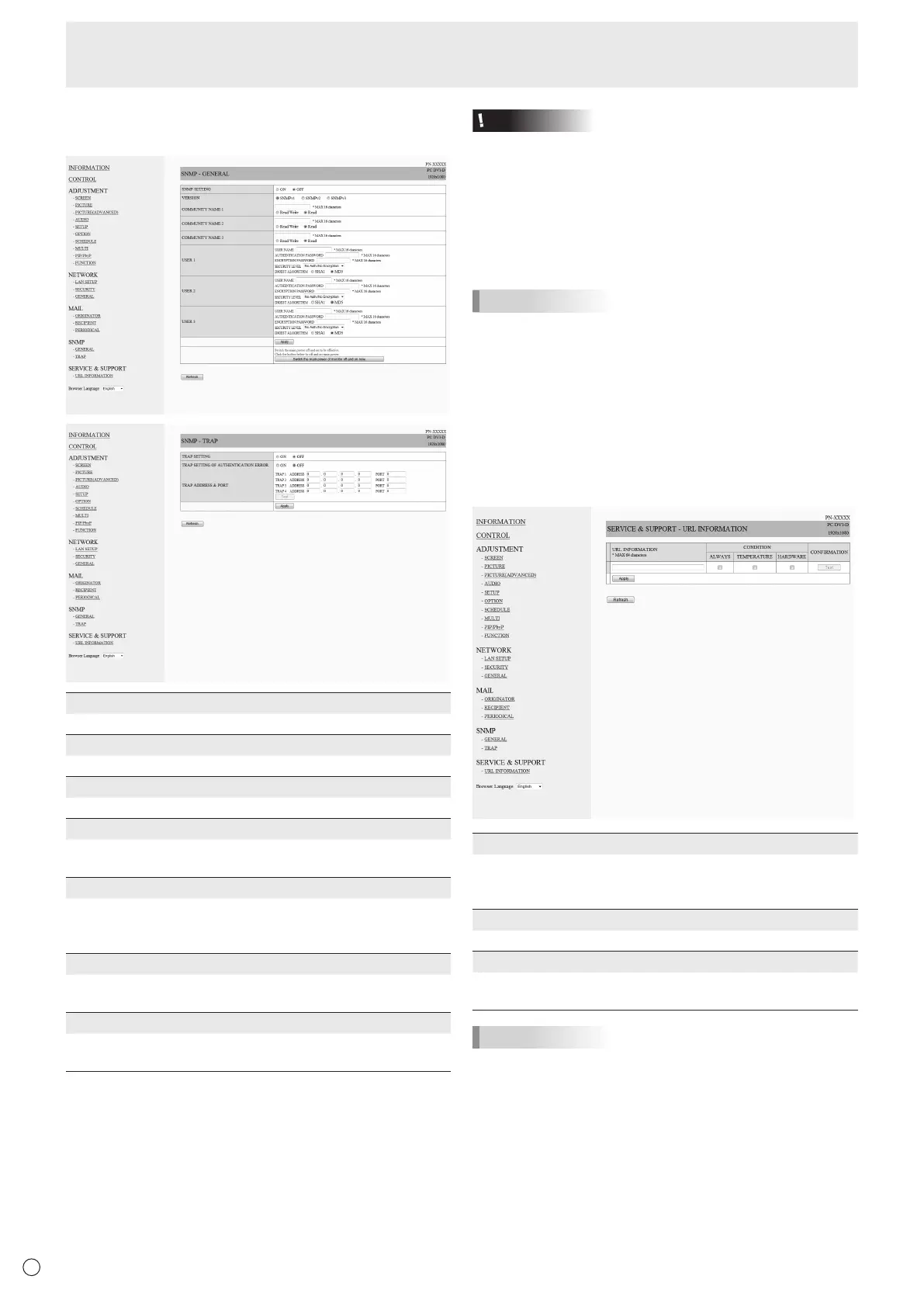
SNMP
YoucanconguresettingsrelatedtoSNMP.
SNMP SETTING
Set whether to enable or disable SNMP.
VERSION
Set the version of the SNMP to be supported.
COMMUNITY NAME 1 to 3
Setthenameofthecommunityrequiredfortheaccess.
USER 1 to 3
Set the user name, password, authentication method and
otheroptionsrequiredforaccess.
TRAP SETTING
Set whether to enable or disable the trap function.
Whenthisfunctionisenabled,atrapwillbesentwhenthe
monitor is turned on.
TRAP SETTING OF AUTHENTICATION ERROR
Setwhetherthetrapfunctionsendsanoticationwhen
authentication fails.
TRAP ADDRESS & PORT
Set the destination address and port number of the
noticationsentbythetrapfunction.
Caution
• AfteryousetSNMP,click[Switchthemainpowerof
monitoroffandonnow.]orturnoffthemonitorandthen
turnitonagainwiththemainpowerswitch.Whenthe
monitorrestarts,waitabout30secondsandthenstartthe
next operation.
• IftheIPaddressischangedwhiletheSNMPfunctionis
operational, turn off the monitor and then turn it on again
with the main power switch.
TIPS
• DependingontheSNMPsettings,ashortdelaymayoccur
before the SNMP is usable. (About 2 minutes)
• Upto16alphanumericlettersandsymbolscanbeusedfor
the community name, user name and password.
n
SERVICE & SUPPORT
(URL INFORMATION)
YoucandisplayaspecicURLintheURLINFORMATION
eldontheINFORMATIONscreenwhenanerroroccursin
the monitor. (See page 48.)
URL INFORMATION
EntertheURLtodisplayontheINFORMATIONscreenwhen
an error occurs on the monitor.
Up to 64 alphanumeric characters or symbols can be used.
CONDITION
Specify the condition to display the URL.
CONFIRMATION
ThehomepageofthespeciedURLisdisplayed.
You can check whether the URL you entered is correct.
TIPS
• Itisalsopossibletospecifythemessagetext,suchasthe
name of a contact or a telephone number, to be displayed
instead of the linked URL.



 To Next Page