EasyManua.ls Logo

Sharp RT-1157H - Page 8

Sharp RT-1157H
20 pages
Print Icon
To Next Page IconTo Next Page
To Previous Page IconTo Previous Page
Loading...
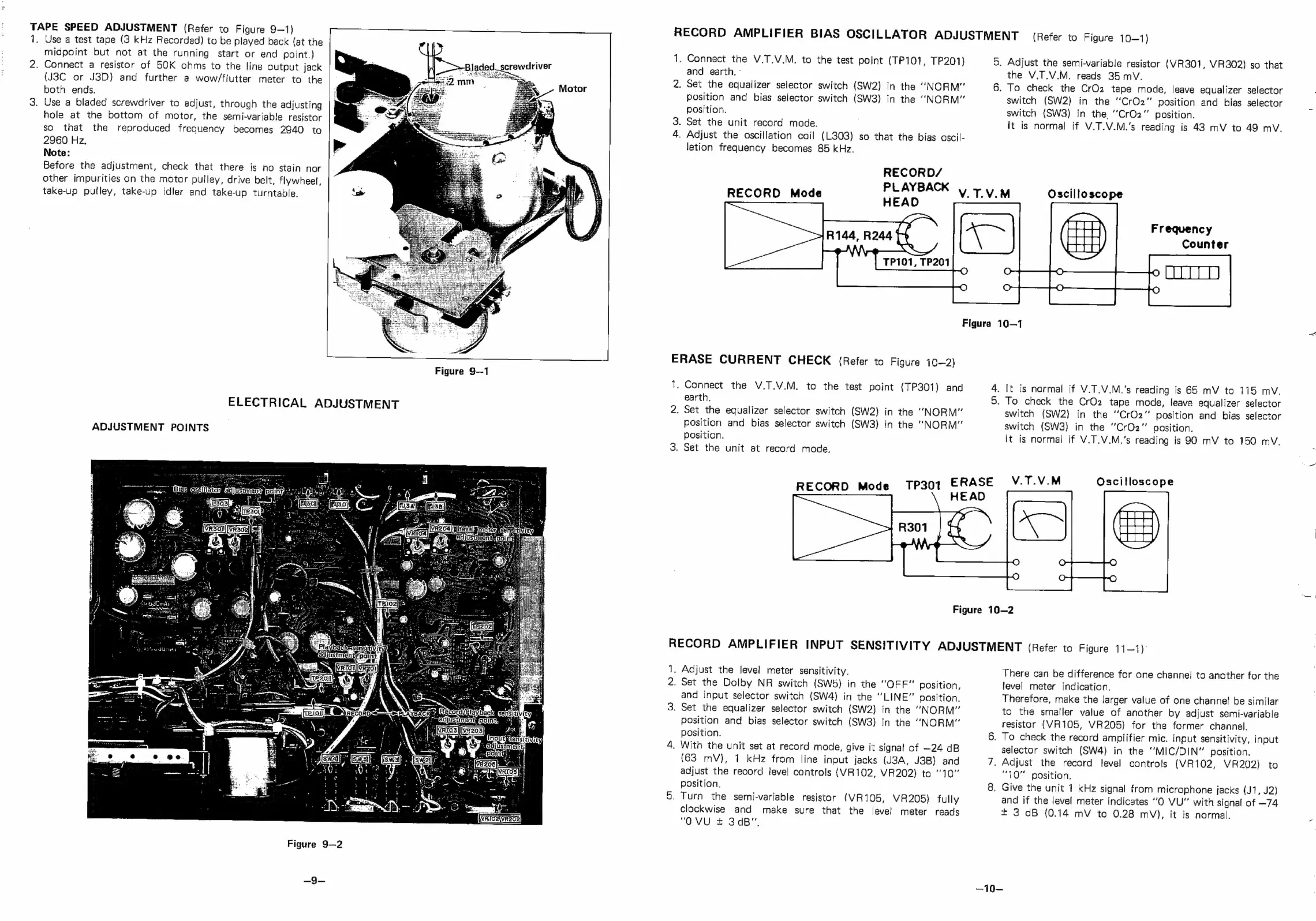
TAPE
SPEED
ADJUSTMENT
(Refer
to
Figure
9—1)
1.
Use
a
test
tape
(3
kHz
Recorded)
to
be
played
back
(at
the
midpoint
but
not
at
the
running
start
or
end
point.)
2.
Connect
a
resistor
of
50K
ohms
to
the
line
output
jack
(J3C
or
J3D)
and
further
a
wow/flutter
meter
to
the
both
ends.
3.
Use
a
bladed
screwdriver
to
adjust,
through
the
adjusting
hole
at
the
bottom
of
motor,
the
semi-variable
resistor
so
that
the
reproduced
frequency
becomes
2940
to
2960
Hz,
Note:
Before
the
adjustment,
check
that
there
is
no
stain
nor
other
impurities
on
the
motor
pulley,
drive
belt,
flywheel,
take-up
pulley,
take-up
idler
and
take-up
turntable.
ELECTRICAL
ADJUSTMENT
ADJUSTMENT
POINTS
Figure
9—2
—~9—
Figure
9—1
a
VRIOoIVRECS
RECORD
AMPLIFIER
BIAS
OSCILLATOR
ADJUSTMENT
(Refer
to
Figure
10—1)
i
2,
Connect
the
V.T.V.M.
to
the
test
point
(TP101,
TP201)
and
earth.
-
Set
the
equalizer
selector
switch
(SW2)
in
the
“NORM”
position
and
bias
selector
switch
(SW3)
in
the
“NORM”
position.
.
Set
the
unit
record
made.
.
Adjust
the
oscillation
coil
(L303)
so
that
the
bias
ascil-
lation
frequency
becomes
85
kHz.
RECORD/
RECORD
Mode
HEAD
PLAYBACK
V.TV.M
5.
Adjust
the
semi-variable
resistor
(VR301,
VR302)
so
that
the
V.T.V.M.
reads
35
mV.
6.
To
check
the
CrOz
tape
mode,
leave
equalizer
selector
switch
(SW2)
in
the
“CrO2”
position
and
bias
selector
switch
(SW3)
in
the,
’CrO2”’
position.
lt
is
normal
if
V.T.V.M.'s
reading
is
43
mV
to
49
mV.
Oscilloscope
Frequency
Counter
Figure
10—1
ERASE
CURRENT
CHECK
(Refer
to
Figure
{0—2)
i
2.
Connect
the
V.T.V.M,
to
the
test
point
(TP301)
and
earth,
Set
the
equalizer
selector
switch
(SW2)
in
the
“NORM”
position
and
bias
selector
switch
(SW3)
in
the
“NORM”
position.
.
Set
the
unit
at
record
mode.
de
TP301
ERASE
RECORD
Mo
eae
4.
It
is
normal
if
V.T.V.M.'s
reading
is
65
mV
to
115
mV.
5.
To
check
the
CrOz
tape
mode,
leave
equalizer
selector
switch
(SW2}
in
the
“CrO2”
position
and
bias
selector
switch
(SW3)
in
the
“CrO2z"
position.
it
is
normal
if
V.T.V.M.’s
reading
is
90
mV
to
150
mV.
V.T.V.M
Oscilloscope
Figure
10—2
RECORD
AMPLIFIER
INPUT
SENSITIVITY
ADJUSTMENT
(Refer
to
Figure
11-1)
Is
Adjust
the
level
meter
sensitivity.
2.
Set
the
Dolby
NR
switch
(SW5}
in
the
“OFF”
position,
and
input
selector
switch
(SW4)
in
the
“LINE”
position.
.
Set the
equalizer
selector
switch
(SW2)
in
the
“NORM”
position
and
bias
selector
switch
(SW3)
in
the
“NORM”
position.
.
With
the
unit
set
at
record
mode,
give
it
signal
of
—24
dB
(63
mV),
1
kHz
from
line
input
jacks
(J3A,
J3B)
and
adjust
the
record
level
cantrols
{VR102,
VR202)
to
10”
position.
.
Turn
the
semi-variable
resistor
(VR105,
VR205)
fully
clockwise and
make
sure
that
the
level
meter
reads
"OVU
+
3dB".
There
can
be
difference
for
one
channe!
to
another
for
the
level
meter
indication.
Therefore,
make
the
larger
value
of
one
channel!
be
similar
to
the
smaller
value
of
another
by
adjust
semi-variable
resistor
(VR105,
VR205)
for
the
former
channel.
.
TO
check
the
record
amplifier
mic.
input
sensitivity,
input
selector
switch
(SW4)
in
the
‘’MIC/DIN”
position.
.
Adjust
the
record
level
controls
(VR102,
VR202}
to
“10”
position.
,
Give
the
unit
1
kHz
signal
from
microphone
jacks
(J1,
J2}
and
if
the
level
meter
indicates
“O
VU"
with
signal
of
—74
*
3
dB
(0.14
mV
to
0.28
mV},
it
is
normal.
—10—

Related product manuals