EasyManua.ls Logo

Sharp RT-1157H - Page 9

Sharp RT-1157H
20 pages
Print Icon
To Next Page IconTo Next Page
To Previous Page IconTo Previous Page
Loading...
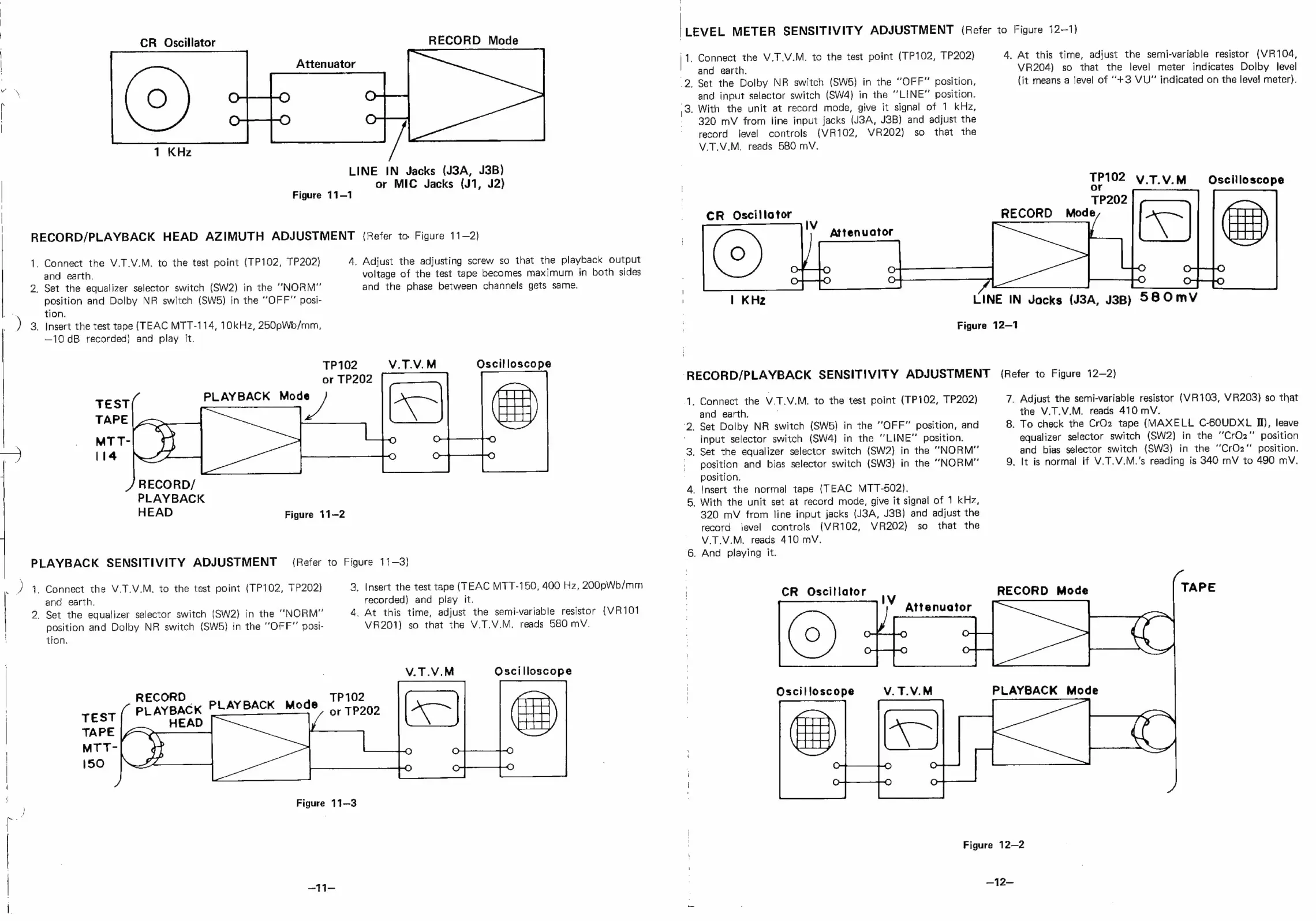
RECORD/PLAYBACK
HEAD
AZIMUTH
ADJUSTMENT
(Refer
to
Figure
11—2)
i
2;
)a
PLAYBACK
SENSITIVITY
ADJUSTMENT
a4)
¢
es"
CR
Oscillator
Attenuator
RECORD
Mode
LINE
IN
Jacks
(J3A,
J3B)
or
MIC
Jacks
(J1,
J2)
Figure
11—1
Connect
the
V.T.V.M.
to
the
test
point
(TP102,
TP202)
and
earth.
Set
the
equalizer
selector
switch
(SW2)
in
the
“NORM”
position
and
Dolby
NR
switch
(SW5)
in
the
“OFF”
posi-
tion.
Insert
the
test
tape
(TEAC
MTT-114,
10kHz,
250pWb/mm,
—10dB
recorded)
and
play
it.
PLAYBACK
Mode
RECORD/
PLAYBACK
A.
Adjust
the
adjusting
screw
so
that
the
playback
output
voltage
of
the
test
tape
becomes
maximum
in
both
sides
and
the
phase
between
channels
gets
same.
TP102
or
TP202
HEAD
Figure
11-2
Connect
the
V.T.V.M.
to
the
test
point
(TP102,
TP202)
and
earth.
Set
the
equalizer
selector
switch
(SW2)
in
the
“NORM”
position
and
Dolby
NR
switch
(SW5)
in
the
“OFF”
posi-
tion.
CORD
Figure
3,
Insert
the
test
tape
(TEAC
MTT-150,
400
Hz,
200pWb/mm
recorded)
and
play
it.
4.
At
this
time,
adjust
the
semi-variable
resistor
(VR101
VR201)
so
that
the
V.T.V.M.
reads
580
mV.
TP102
or
TP202
11-3
£q4=
V.T.V.M
{Refer
to
Figure
11-3)
V.T.V.M
Oscilloscope
Oscilloscope
LEVEL
METER
SENSITIVITY
ADJUSTMENT
(Refer
to
Figure
12-1)
\1.
2
3
Connect
the
V.7.V.M.
to
the
test
point
(TP102,
TP202)
and
earth.
Set
the
Dolby
NR
switch
(SW5}
in
the
“OFF”
position,
and
input
selector
switch
(SW4}
in
the
“LINE”
position.
With
the
unit
at
record
mode,
give
it
signal
of
1
kHz,
320
mV
from
line
input
jacks
(J3A,
J3B)
and
adjust
the
record
level
controls
{VR102,
VR202)
so
that
the
V.T.V.M.
reads
5BO
mV.
CR
Oscillator
Attenuator
4.
At
this
time,
adjust
the
semi-variable
resistor
(VR104,
VR204)
so
that
the
level
meter
indicates
Dolby
level
(it
means
a
level
of
‘+3
VU”
indicated
on
the
level
meter).
TP102
V.T.V.M_
Oscilloscope
J
|
KHz
LINE
IN
Jacks
(J3A,
J3B)
58
OmvV
Figure
12—1
-RECORD/PLAYBACK
SENSITIVITY
ADJUSTMENT
(Refer
to
Figure
12—2)
4
2
Connect
the
V.T.V.M.
to
the
test
point
(TP102,
TP202)
and
earth.
Set
Dolby
NR
switch
(SWS)
in
the
“OFF”
position,
and
input
selector
switch
(SW4)
in
the
“LINE”
position.
.
Set
the
equalizer
selector
switch
(SW2}
in
the
“NORM”
pasition
and
bias
selector
switch
(SW3)
in
the
“NORM”
position.
_
Insert
the
normal
tape
(TEAC
MTT-502).
_
With
the
unit
set
at
record
mode,
give
it
signal
of
1
kHz,
320
mV
from
line
input
jacks
(J3A,
J3B)
and
adjust
the
record
level
controls
(VR102,
VR202)
so
that
the
V.T.V.M.
reads
410
mV.
_
And
playing
it.
CR
Oscillator
Oscilloscope
V.T.V.M
7.
Adjust
the
semi-variable
resistor
(VR103,
VR203}
so
that
the
V.T.V.M.
reads
410
mV.
8.
To
check
the
CrO2
tape
(MAXELL
C-60UDXL
Il),
leave
equalizer
selector
switch
(SW2)
in
the
“CrO2”
position
and
bias
selector
switch
(SW3)
in
the
‘CrO2“
position.
9.
It is
normal
if
V.T.V.M.’s
reading
is
340
mV
to
490
mV.
RECORD
Mode
TAPE
Figure
12—2

Related product manuals