EasyManua.ls Logo

Sharp SM-207H - Page 25

Sharp SM-207H
27 pages
Print Icon
To Next Page IconTo Next Page
To Previous Page IconTo Previous Page
Loading...
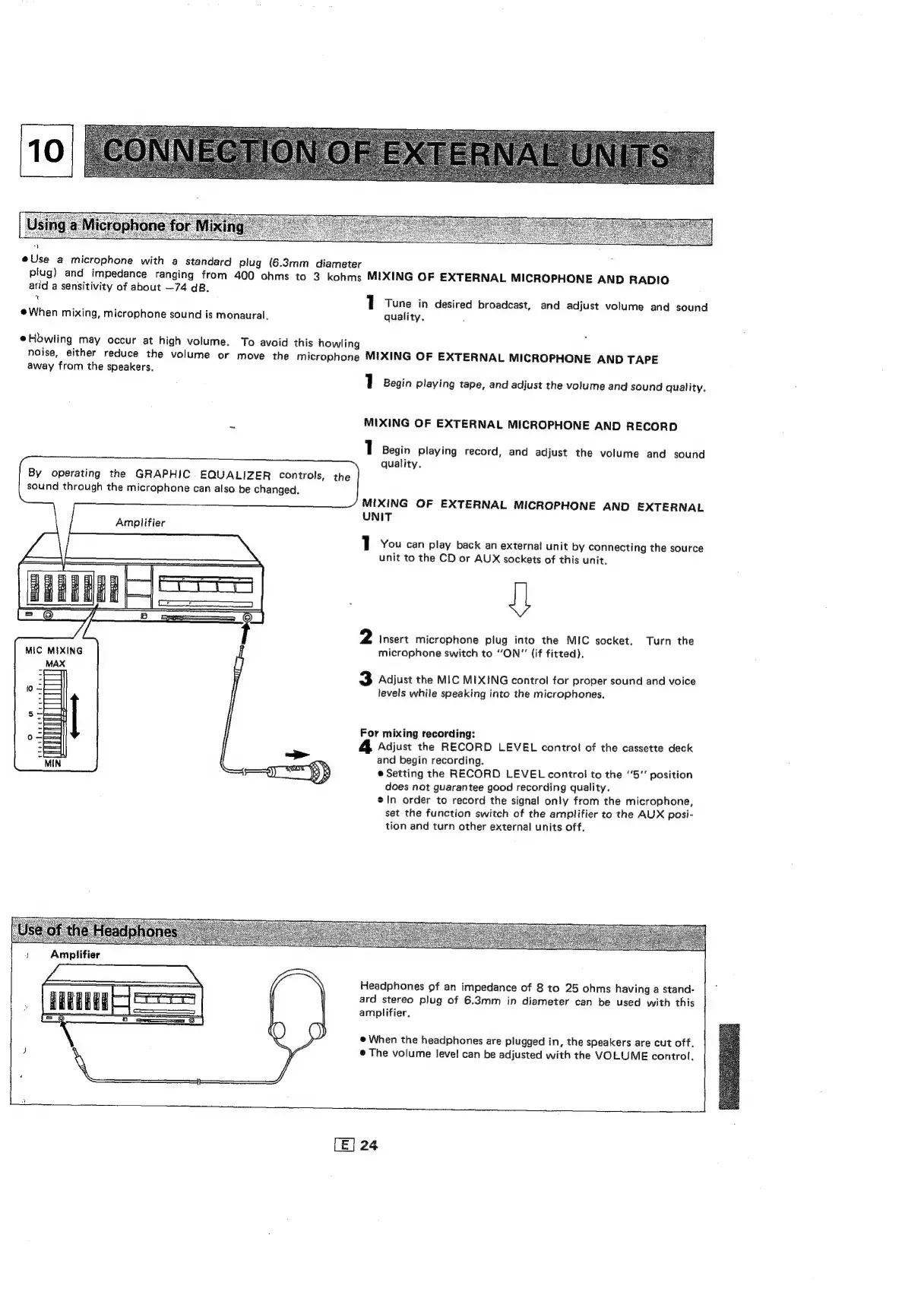
@Use
a
microphone
with
a
standard
plug
(6.3mm
diameter
plug)
and
impedance
ranging
from
400
ohms
to
3
kohms
MIXING
OF
EXTERNAL
MICROPHONE
AND
RADIO
atid
a
sensitivity
of
about
—74
dB.
1
Tune
in
desired
broadcast,
and
adjust
volume
and
sound
@When
mixing,
microphone
sound
is
monaural.
quality.
Howling
may
occur
at
high
volume.
To
avoid
this
howling
noise,
either
reduce
the
volume
or
move
the
microphone
MIXING
OF
EXTERNAL
MICROPHONE
AND
TAPE
away
from
the
speakers.
1
Begin
playing
tape,
and
adjust
the
volume
and
sound
quality.
MIXING
OF
EXTERNAL
MICROPHONE
AND
RECORD
1
Begin
playing
record,
and
adjust
the
volume
and
sound
quality.
By
operating
the
GRAPHIC
EQUALIZER
controls,
the
sound
through
the
microphone
can
also
be
changed.
MIXING
OF
EXTERNAL
MICROPHONE
AND
EXTERNAL
UNIT
Amplifier
1
You
can
play
back
an
external
unit
by
connecting
the
source
unit
to
the
CD
or
AUX
sockets
of
this
unit.
U
2
Insert
microphone
plug
into
the
MIC
socket.
Turn
the
microphone
switch
to
“ON”
(if
fitted).
3
Adjust
the
MIC
MIXING
control
for
proper
sound
and
voice
levels
while
speaking
into
the
microphones.
For
mixing
recording:
&
Adjust
the
RECORD
LEVEL
control
of
the
cassette
deck
and
begin
recording.
=p
®
Setting
the
RECORD
LEVEL
control
to
the
5"
position
does
not
guarantee
good
recording
quality.
en
order
to
record
the
signal
only
from
the
microphone,
set
the
function
switch
of
the
amplifier
to
the
AUX
posi-
tion
and
turn
other
external
units
off.
Amplifier
Headphones
of
an
impedance
of
8
to
25
ohms
having
a
stand-
qReBEue
co
a
an
i
|
ard
stereo
plug
of
6.3mm
in
diameter
can
be
used
with
this
oS
amplifier.
S
0
ee
AN
@
When
the
headphones
are
plugged
in,
the
speakers
are
cut
off,
J
\
©
The
volume
level
can
be
adjusted
with
the
VOLUME
control,
a

Related product manuals