EasyManua.ls Logo

Sharp SM-207H - Page 26

Sharp SM-207H
27 pages
Print Icon
To Next Page IconTo Next Page
To Previous Page IconTo Previous Page
Loading...
@
Check
the
POWER
switch
of
the
amplifier
is
in
the
HLOFF
position
before
carrying
out
maintenance.
@
The
unit
requires
no
lubrication.
Do
not
oi!
it.
Lubricating
the
unit
may
result
in
manufunction.
cartridge
ecava
cocoate
tl]
see
hase
:
cee
ieee
1
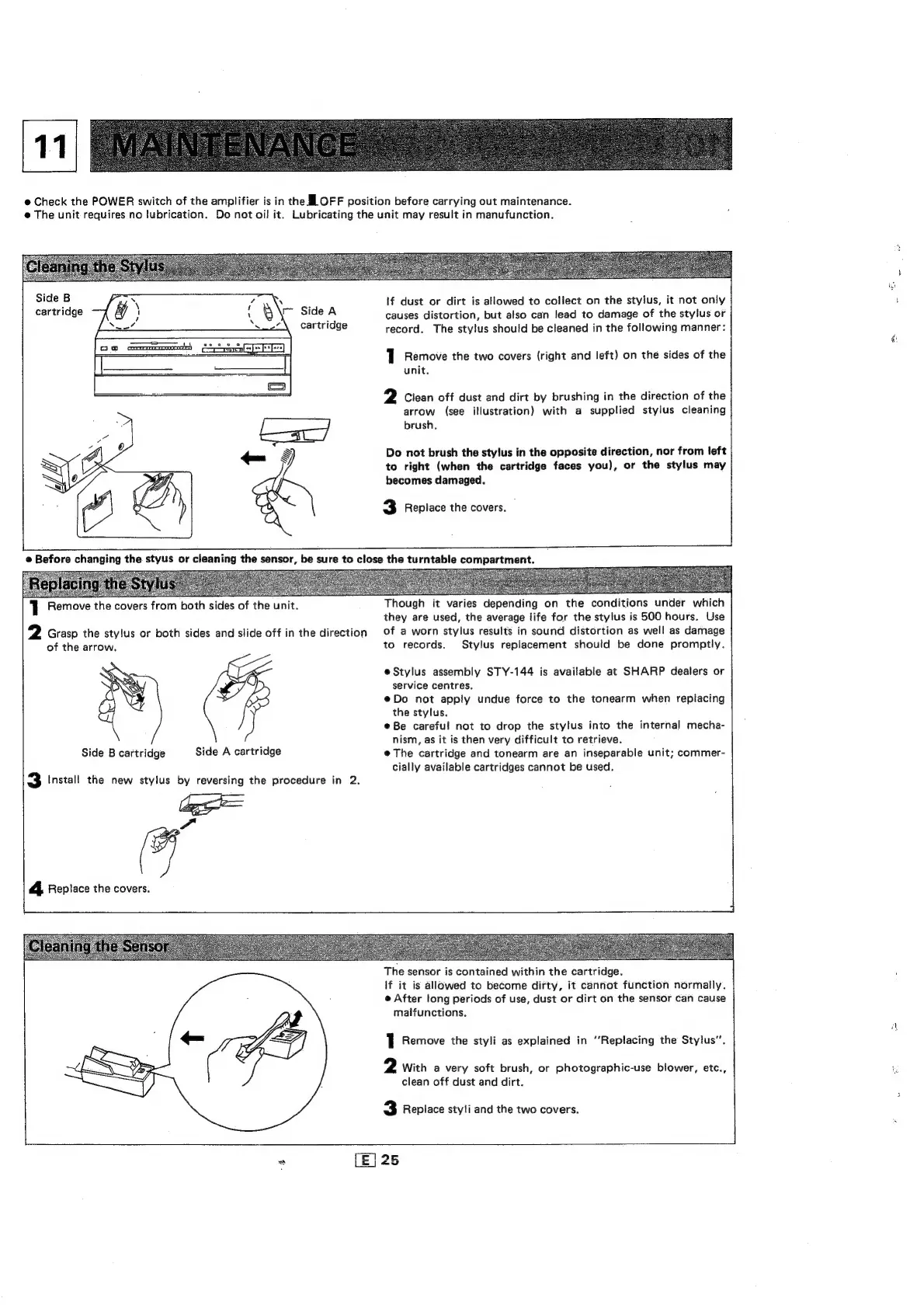
Remove
the
covers
from
both
sides
of
the
unit.
2
Grasp
the
stylus
or
both
sides
and
slide
off
in
the
direction
of
the
arrow.
»
GF
Side
B
cartridge
Side
A
cartridge
3
Install
the
new
stylus
by
reversing
the
procedure
in
2.
ee
“7
4
Replace
the
covers.
if
dust
or
dirt
is
allowed
to
collect
on
the
stylus,
it
not
only
causes
distortion,
but
also
can
lead
to
damage
of
the
stylus
or
record.
The
stylus
should
be
cleaned
in
the
following
manner:
1
Remove
the
two
covers
(right
and
left)
on
the
sides
of
the
unit.
2
Clean
off
dust
and
dirt
by
brushing
in
the
direction
of
the
arrow
(see
illustration)
with
a
supplied
stylus
cleaning
brush,
Do
not
brush
the
stylus
in
the
opposite
direction,
nor
from
left
to
right
(when
the
cartridge
faces
you),
or
the
stylus
may
becomes
damaged.
3
Replace
the
covers.
Though
it
varies
depending
on
the
conditions
under
which
they
are
used,
the
average
life
for
the
stylus
is
500
hours.
Use
of
a
worn
stylus
results
in
sound
distortion
as
well
as
damage
to
records.
Stylus
replacement
should
be
done
promptly.
eStylus
assembly
STY-144
is
available
at
SHARP
dealers
or
service
centres,
@Do
not
apply
undue
force
to
the
tonearm
when
replacing
the
stylus.
eBe
careful
not
to
drop
the
stylus
into
the
internal
mecha-
nism,
as
it is
then
very
difficult
to
retrieve.
@
The
cartridge
and
tonearm
are
an
inseparable
unit;
commer-
cially
available
cartridges
cannot
be
used.
The
sensor
is
contained
within
the
cartridge.
If
it is
allowed
to
become
dirty,
it
cannot
function
normally.
e
After
long
periods
of
use,
dust
or
dirt
on
the
sensor
can
cause
malfunctions.
1
Remove
the
styli
as
explained
in
‘‘Replacing
the
Stylus”.
2
With
a
very
soft
brush,
or
photographic-use
blower,
etc.,
clean
off
dust
and
dirt.
3
Replace
styli
and
the
two
covers.
tts:
onl
N
on

Related product manuals